

Atari ST - 1993
UnARJ-ST
- Genre
- Archiving
- Year
- 1993
- Language
- [unknown]
- Publisher
- [no publisher]
- Controls
- Keyboard
- Distributor
- —
- Resolution
- Medium / High / VGA
- Developer
- TOS-Crew
- ST Type
- ST, STe, TT, Falcon030 / 0.5MB
- Licensed from
- —
- Programmer(s)
- Hobbelt, Ger / Wessels, Hans
- Country

- MIDI
- —
- Software
- English
- Version
- 2.41
- Box/Instructions
- English
- Number of Disks
- 1 / Double Sided / HD Installable
- License
- PD / Freeware / Shareware
- Dump
- Download
- Serial
- —
- Dump format
- MSA
- Protection
- —
INSTRUCTIONS
M()ir Brandts Honk BBS (+31-70-3457929 / +31-70-3461215) is very proud to
present:

        UNARJ-ST 2.41α (rev. I_A/Ni! 1.01α: created @ Aug 31 1993 2:51:42)
               ARJ (c) Copyright 1991-1993 Robert K. Jung

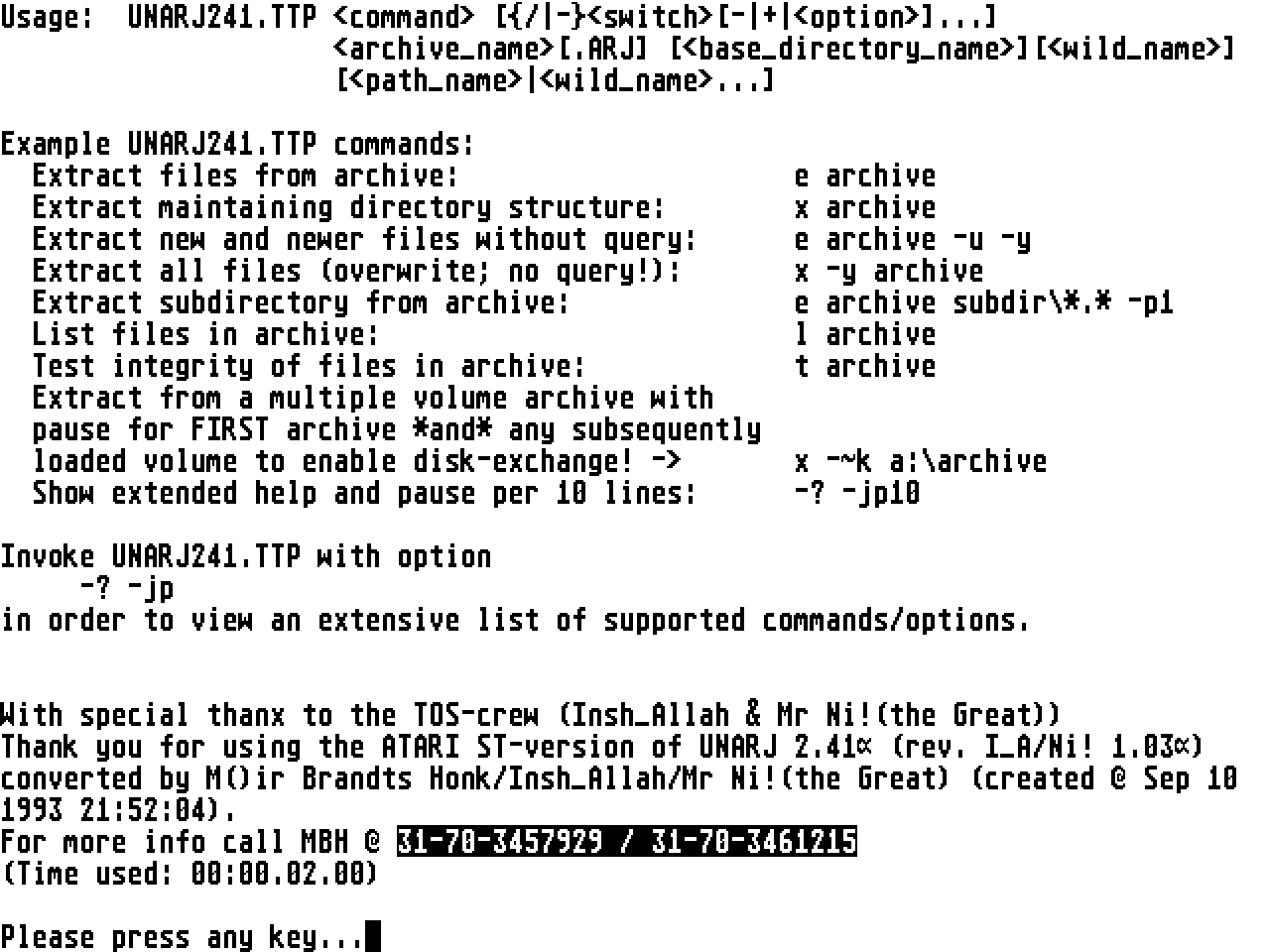
Usage:  UNARJ241.TTP  [{/|-}[-|+|]...]
                     [.ARJ] [][]
                     [|...]

Example UNARJ241.TTP commands:
  Extract files from archive:                     e archive
  Extract maintaining directory structure:        x archive
  Extract new and newer files without query:      e archive -u -y
  Extract all files (overwrite; no query!):       x -y archive
  Extract subdirectory from archive:              e archive subdir\*.* -p1
  List files in archive:                          l archive
  Test integrity of files in archive:             t archive
  Extract from a multiple volume archive with
  pause for FIRST archive *and* any subsequently
  loaded volume to enable disk-exchange! ->       x -~k a:\archive
  Show extended help and pause per 10 lines:      -? -jp10

Detailed info of all supported options:

Command list:

<+       >: May only be used in environment variable or configuration file
            loaded by environment variable. See manual for more info.
: Extract files from an archive.
: List contents of archive.
: Test integrity of an archive.
: Verbose listing of contents of an archive.
: Extract files from an archive with full pathname.

Option list:

<-?      >: Display complete help.
<-#      >: Select files by number. Instead of specifying filenames and dirs
            you specify their numbers as listed by the 'VIEW'  command.
            Remember that every archive restarts with filenumber 1: this also
            applies to multiple volumes so take care depacking file-number [1]
            with those!
            Example:
                t -# -ay .\ 22-24 5 16-98 35
                                    As you see, ranges can be spacified as
                                    [number]-[number]. Also you may specify
                                    overlapping ranges and single-file numbers:
                                    UNARJ241.TTP recognizes these overlaps!
            NOTE: INDEED, you see correctly: we have included 'selective
            file-testing' with this version! (This is ARJ-compatible
            behaviour...)
<-$      >: Add/Extract volume-label to specified drive.
            Example:
            -$A:                    extracts volume label to drive A:
            -$                      extracts vol.labels to current drive.
<-&      >: Set critical error handler to use the internal NON-INTERACTIVE
            variant. This option may be used when using this tool from an
            'unwatched' batch- or script-file (you don't like to press any key
            in case of error...) or when you experience problems with
            redirection on some (older) TOS-versions. <-&-> switches to the
            interactive variant whihc is default.
<-+      >: Inhibits ARJ_SW environment variable usage. If specified with a
            parameter, this parameter is used as the new env.var.name for this
            session's settings.
            Example:
            -+ARJCFG *.ARJ          will reload the environment from env.var.
                                    'ARJCFG' after which the commandline will
                                    be parsed again.
            Precautions against infinite loop have been taken: the user will be
            warned if an infinite loop occurs...
<-a      >: Allow any file attribute. (Default unless <-~arj> switch ON)
<-a1     >: All file-attribs. are accepted. Empty directories are handled too.
<-b3     >: Do not restore Archive-bits. Files are written with Archive-bit
            reset.
<-c      >: Skip time-stamp check when updating files.
<-e      >: Exclude paths from filenames.
            Example:
            x -e GDA c:\depacked\   extracts all files in GDA.ARJ to
                                    'c:\depacked\' without adding any
                                    subdirectories.
<-f      >: Freshen existing files. Only files that exist at the target are
            done.
<-i      >: Show no progress indicator. (No point/bar/cycler/percentage)
            Default-setting of UNARJ241.TTP is to show a progress-indicator
            (point) and increment in 64KByte steps...
<-i1     >: Show bar graph progress indicator.
<-i2     >: Show cycler progress indicator. (*)
<-n      >: Do only new files which don't exist at the target.
<-o      >: Do only those files which' time-stamp is ON or AFTER date
            specified.
            Example:
            -o                      today, 0:00 am
            -oYYMMDD                specified day, 0:00 am: specified time...
            -oYYMMDDHHMMSS          both date and time specified by user.
<-ob     >: Do only those files which' time-stamp is BEFORE date specified.
            Example:
            -ob                     today, 0:00 am
            -obYYMMDD               specified day, 0:00 am
            -obYYMMDDHHMMSS         day, time specified.
<-od     >: Do only those files which' time-stamp is NOT OLDER than N days.
            Example:
            -od                     today
            -od25                   not older than 25 days.
<-p      >: Match using full pathnames.
<-p1     >: Match path and it's subdirectories.
<-q      >: Query on each file.
<-r      >: Recursive search & match. Search: ARJ-files are searched for in
            subdirectories too.  Match: all target-files inside subdirectories
            are matched too. (You might use <-~sr> to enable/disable ARJ-file
            recursive search.
<-u      >: Update target files. The target file's time-stamp is used unless
            <-o> flags are specified.
<-v      >: Enable multiple volumes. (Default unless <-~arj> flag switched ON)
<-y      >: Assume YES on all queries except the prompt for 'next volume' when
            ARJ-files are written to/read from a removable media.
<--      >: Stop parsing of options. (This option might be necessary if
            filenames or paths are specified which start with '-'.

-h Shifted Options list:

<-ha     >: Ignore Readonly-attribute of target-file(s). When extracting these
            files are overwritten.

-j Shifted Options list:

<-ja1    >: Disable display of archive-banners & file-comments. Use <-~nb> or
            <-~nc> options if you want to disable only one of the above.
<-jc     >: Exit after a specified filecount.
            Example:
            x -jc50                 stops depacking and exits UNARJ241.TTP
                                    extracting 50 files successfully.
<-jd     >: Ensure a specified amount of free disk space when extracting.
            Example:
            x -jd2M *.ARJ           skips all files which would cause the free
                                    disk space to be less than 2 MegaByte. ('K'
                                    (KiloByte), 'M' (MegaByte) and 'B' (Byte)
                                    size-modifiers are recognized.)
<-jf     >: Store & Use full pathname including drive & root-specifiers.
<-jf1    >: Store & Use full path except drive specifier.
<-jg     >: Select 'Backup Type' files.
<-jg1    >: Select 'Backup Type' files exclusively.
            Example:
            x -jg1 *.ARJ *.H        will extract all files matching *.H in
                                    ARJ-archives only if those files have their
                                    'Backup Type' flag switched on.
<-jl     >: Display only filespec. when viewing archive contents.
<-jo     >: Extract to unique filenames if target exists. Unique filenames are
            build by appending a file-extension in the range 000-999.
<-jp     >: Pause after each screen full of data.
            Example:
            -? -jp                  will list a complete usage overview of
                                    UNARJ241.TTP with the page-length set to a
                                    default [20 lines].
            -? -jp50                will use a page-length of 50 lines.
<-jr     >: Recover broken archive files. (This option must be used if an
            archive reports bad files/CRC errors/etc. when
            extracting/testing/viewing. If this flag is not specified,
            UNARJ241.TTP will exit on such errors and delete the targetfile
            when extracting. If <-jr> or <-jr1> is specified, all targetfiles
            are NOT deleted when an error (CRC/depack err.) occurs. Severe
            errors may cause some extra warnings while this program searches
            for the next valid file.
<-jr1    >: This is an extension of the <-jr> switch and is only applicable if
            you suspect archives to be *badly* damaged. This switch will cause
            the extractor to continue if an EndOfArchive mark is found, thus
            causing 'broken archive' messages, even for correct archives. These
            warnings are only informative and don't change the behaviour of
            this program.
<-jy     >: Suppress queries assuming YES. See below for a list of <-jy> switch
            extensions when you want a more detailed control over UNARJ241.TTP'
            queries.

-jy Shifted Options list:

<-jyc    >: Skip 'Create Directory' query.
<-jyn    >: Skip 'New Filename' query when not overwriting files.
<-jyo    >: Skip 'Overwrite File' query.
<-jyr    >: Erase all type-ahead before any query.
<-jyv    >: Skip 'Proceed With Next Volume' query.
<-jyy    >: Accept single character user input on Y/N/Q/A questions. (If
            disabled all queries must be terminated by pressing
            [Return]/[Enter].)

-~ Shifted Options list:

<-~&     >: Don't use the internal critical error handlers but leave it to the
            O.S.! This option might be needed when you experience problems
            using TOS 1.0 (first try the <-&> option though!) or MinT/MultiTOS.
            However be warned that IF you disable the internal critical error
            handler you get Dialog Boxes (!!!) when running this TTP when in
            TOS 1.0-1.4 due to the well-known bug in TOS. (sigh!) So use with
            CAUTION!
<-~ac    >: Assume command. Use the specified command if the user does invoke
            UNARJ241.TTP without specifying any specifc command. (This option
            is designed to be used in your ARJ_SW environment setup!)
            Example:
            {environment}[+ -jy+ -~acx]
            *.ARJ F:\WORK\*.*       will assume 'extract' (command ), thus
                                    extracting all specified ARJ archives to
                                    the basedir 'F:\WORK\'.
            If this switch is used at the commandline, it is ignored!
            IMPORTANT NOTE: If you don't specify any command anywhere,
                            UNARJ241.TTP will assume 'x' (EXTRACT) as the
                            default, unless you switched on <-~arj>
                            compatibility mode, in which case you will get an
                            'Unspecified Command' error...
<-~arj   >: Switch to R. Jung's ARJ.EXE behaviour as much as possible. This
            causes a *lot* of queries to be enabled. This switch causes
            automatic multiple volume support to be disabled and also disables
            extracting files with  ReadOnly/Hidden/System attributes set &
            creation of empty directories.
<-~b     >: IRA support. Specify attack-count as decimal number.
            Example:
            -~b1                    will cause a single attack ;-))
<-~ia    >: Ignore any file attributes (ReadOnly/Hidden/System). These
            attributes will be masked OFF when extracting.
<-~k     >: Wait for keypress before loading first archive and before loading
            ANY multiple volumes (.A01, .A02, etc.). This option is introduced
            by (I_A) for diskette-users to enable them to have UNARJ241.TTP on
            one disk and the archives spread accross other diskettes while
            enabling the user to depack these archives without too much of a
            hassle.
<-~lw    >: Use specified line-width when printing data to screen. (Default =
            80 characters) This option can be used to allow for wider display
            in Overscan(tm) mode or when using extended screen drivers (soft &
            hardware)
<-~nb    >: Don't show banners.
<-~nc    >: Don't show file-comments.
<-~ns    >: Don't do VERY strict targetfile checking when extracting multiple
            volumes. If files packed by ARJ.EXE from Robert K. Jung are done in
            'text mode' and multiple volumes are selected, it can happen that
            ARJ.EXE re-archived part of a file when crossing a volume limit and
            switching to binary mode.
            Without this switch enabled UNARJ241.TTP will issue a warning about
            'oversized target'. Use this switch to enable ARJ.EXE compatible
            bahaviour here. (Other multiple volume related warnings are still
            issued!)
<-~pe    >: Pause before exiting UNARJ241.TTP. Switch useful when your
            shell/desktop clears the screen immidiately after running any
            TTP/TOS program like this one. (Default enabled, switched off when
            using <-~arj> ARJ compatibility mode switch.)
<-~rm    >: Specify removables. Only useful when you have removable media as
            device C: or higher and you want to switch media while using
            UNARJ241.TTP. (<-~k> switch required too then!)
            Example:
            x -~k -~rmce-hnp        lists C: E: F: G: H: N: P: as removable
                                    drives. (Multiple lists of the form
                                    - are allowed.)
            '-~rm' without any parameter assumes all existing devices in the
            range C: - Z: ...
<-~sr    >: Search for ARJ archives recursively. (Look in subdirectories too!)
            Example:
            x -r -~sr- *.ARJ *.TXT  extracts any .TXT file in any ARJ archive
                                    in the current directory. Searching for ARJ
                                    archives is however limited to the current
                                    directory by disabling <-r> on this matter
                                    by using '-~sr-'.
<-~v     >: Set verbose level. (Default = 2)
<-~v0    >: Set 'no' verbose. Any screen-output is discarded.
<-~v1    >: Set 'little' verbose. Most screen-output is discarded.
<-~v2    >: Set 'normal' verbose level. (Default)
<-~v3    >: Set 'extreme' verbose. Extra warnings/advice is added.
<-~xd    >: Search for ARJ archives accross drives. Switches on recursive
            search too! Drive-specification as with the <-~rm> option:
            x -~xdc-ehj-l *.ARJ     lists C: D: E: H: J: K: L: as drives to be
                                    scanned for *.ARJ archives. (Multiple lists
                                    of the form - are
                                    allowed.)
            '-~xd' without any parameter assumes all existing devices in the
            range C: - Z: ...

All options may be followed by '-' to DISABLE them or '+' (default action) to
ENABLE them.
Options may be preceeded by '-' or '/' as switch-token, but they may not be
mixed on the commandline.
UNARJ241.TTP fully supports the ARJ_SW environment variable, which may specify
any list of default options OR a filename, which contains those options, listed
per command or as global default. Read the UNARJ241.TTP manual for more
detailed information.

Redirection of screen output

        Redirection has allways been a bit problematic on ST/e/TT series
        (unless you're one of those folks running Mint and CLI shells) so
        UNARJ241.TTP got it's own redirection code aboard for all those
        machines that don't have redirection support build-in. (Indeed, MinT
        and others will override UNARJ241.TTP' redirection method!) There are 4
        redirection styles available:

                > file        Redirect all normal screenoutput to file .
                >file         Same as above.
                >> file       Redirect all normal output to . If
                              allready EXISTS new data is APPENDED!
                >>file        Same as above.
                >& file       Redirect all screenoutput to . All ERROR &
                              WARNING messages are redirected to this file too!
                >&file        Same as above.
                >>& file      Same as '>& file' but if  allready EXISTS
                              new data is APPENDED!
                >>&file       Same as above.

        Example:
                UNARJ241.TTP l -~rs+ k:\*.ARJ >& c:\arjlist
                              will redirect all ouput, including headers and
                              all, to file 'c:\arjlist'. The result will be a
                              file containing a complete overview of the
                              contents of every .ARJ file found on drive K: !
        Example:
                UNARJ241.TTP -? > arj_man.txt
                              will redirect this description to the file
                              'arj_man.txt' in the current directory.

Wildcards

        Wildcards are only allowed in filenames. Wildcards recognized as such
        by UNARJ241.TTP are '*' (zero or more arbritrary characters) and '?'
        (one arbitrary character). Please note that '*' does not 'cross' the
        '.' in filenames, so you will need to specify '*.*' to match anything
        with OR WITHOUT any extension.
        The enhancement compared to other programs is the capability to accept
        multiple wildcards to match 'midstring' parts like:

                *ar?*.lst           which will match:
                                    'arj.lst', 'unarj.lst', 'larc.lst', [etc.]
                                    but NOT
                                    'ar.lst' or 'tar.lst'

Arguments

        Arguments can be concatenated like this:
                x -auyv+
        You can mix normal options with <-h..> , <-j..>, <-jy..> and <-~..>
        'shifted' options like this (Remember: -h, -j, -jy, -~ are TOGGLES:
        they toggle between their own list of shifted switches and normal
        switches: this is NOT 100% ARJ compatible behaviour!!!)
                x -aujyoyjyvhajr1jod3  ...
        which is equivalent of:
                x -a -u -jyo -jyy -v -ha -jr1 -od3 ...
        You see: shift symbols ('-h', '-~', etc.) cannot be 'stacked'!

Defaults

        If no command is specified by the user and no <-~ac> switch is found in
        your ARJ_SW environment, EXTRACTING will be used as the default in
        order to behave like LHA for ST/e/etc. (Unless you switched on ARJ
        compatibility mode using <-~arj> somewhere in your environment!)


With special thanx to the TOS-crew (Insh_Allah & Mr Ni!(the Great))
Thank you for using the ATARI ST-version of UNARJ 2.41α (rev. I_A/Ni! 1.01α)
converted by M()ir Brandts Honk/Insh_Allah/Mr Ni!(the Great) (created @ Aug 31
1993 2:51:42).
For more info call MBH @ +31-70-3457929 / +31-70-3461215
(Time used: 00:00.10.00)