

Atari ST - 1992
Recipe Box
- Genre
- Hobby - Food / Drinks
- Year
- 1992
- Language
- [unknown]
- Publisher
- [no publisher]
- Controls
- Keyboard / Mouse
- Distributor
- —
- Resolution
- Medium / High
- Developer
- Mountain Software
- ST Type
- ST, STe, TT, Falcon030 / 0.5MB
- Licensed from
- —
- Programmer(s)
- Watson, Anthony
- Country

- MIDI
- —
- Software
- English
- Version
- 3.5 [preview]
- Box/Instructions
- English
- Number of Disks
- 1 / Double Sided
- License
- PD / Freeware / Shareware
- Dump
- Download
- Serial
- —
- Dump format
- MSA
- Protection
- —
INSTRUCTIONS
           Mountain Software Presents:


                 The Recipe Box


                       by
                 Anthony Watson


                  Version 3.5
           Released November 20, 1992


               SYSTEM REQUIREMENTS

The Recipe Box will run on any ST/TT machine in
ST Medium or ST High resolution.

The Recipe Box will run from a Floppy but a Hard
Drive is highly recommended.

The Recipe Box requires 200K of free RAM to
operate. If you have a 512K machine, you should
disable all accessories and auto-folder programs
to free up enough memory.


                FILE DESCRIPTIONS

  RECIPE.PRG - The Recipe Box Program File.
  RECIPE.TXT - The Documentation file.

     RECIPES - This folder contains the sample
               recipes and the configuration
               file.

MAKEFORM.PRG - A system information / Mountain
               Software Catalog / Registration
               Form Generator. When you register,
               please use this program. It
               provides me with vital system
               information for tracking down
               compatibility problems.

(CH1_RC1.BOX, CH1_RC2.BOX, and so on, are the
sample recipes. The CONFIGUR.BOX file is the
configuration file. The only files that should
be in the RECIPES folder are the recipes and the
configuration file!)


                 PROGRAM HISTORY

  The need for a better method of recipe storage
began many years ago. Like most people our
family began by handwriting recipes onto 3 x 5
cards and storing them in the traditional
'Recipe Box'. We quickly grew tired of the
endless searching for recipes, the cramped
writing area and the newspaper clippings stuffed
in with the 3 x 5 cards. So, we searched for a
better way!
  We began by typing recipes on an old manual
typewriter we had and then placing them into a
3-ring binder for storage. It worked O.K. but
the endless typo's were a pain. It always seemed
like the typographical errors increased as you
got farther down the page!
 Soon after I purchased an Atari 600XL, upgraded
it to 64K of RAM, and bought a disk drive. We
then graduated from that old typewriter, and
moved into the world of word processing! This was
no major program mind you, just the free word
processor that accompanied my disk drive. This
reduced our typographical errors, but did little
in the way of locating recipes. I decided there
must be a better way!


               THE ANTIC COOKBOOK

   In January 1991, START magazine published a
program I wrote for the Atari 130XE (I had
upgraded to a new computer). This program was
titled the ANTIC COOKBOOK. (I had originally
titled it the Atari Cookbook?) I was to receive
a royalty payment for the appearance in this
magazine, but after a year of battling with the
company, they went bankrupt. I never saw a
penney from that venture!
   In November 1991, I purchased an Atari
MEGA-STE. Using an emulator program (XFORMER II)
I was able to run my old recipe program. It
worked, but as with most emulators it ran rather
slowly.


            RETURN TO WORD PROCESSING

  After a month or so of the 'snail pace' recipe
program, I decided to return to my old method of
using a word processor. I used Wordflair II and
was able to set up a database for recipes. It
worked O.K. but things seemed clumsy, I had
occasional problems with the program bombing and
scrambling the data, and I just missed the
specific recipe commands. So, I decided to write
a new recipe program for the ST.


                 THE RECIPE BOX
                  Version  1.0

  As with most programs, this version was rather
simple. Graphics were practically nonexistent,
and it used a menu bar. It worked O.K, and the
484 recipe limit seemed tremendous compared to
the 60 recipe limit of the ANTIC COOKBOOK. But
not being able to see the chapters and recipes
simultaneously made looking for recipes a pain.


                  Version  2.0

  Essentially, this version was identical to
version 1.0, only it sported a new graphical
user interface. This did little for program
operation, but it made using the program much
more enjoyable.


                Version 2.1 - 2.3

A. Fixed a large number of bugs. I never got
   around to releasing versions 2.2 and 2.3,
   as it seemed that just as I was about to
   release it a new bug would turn up.

B. A few minor features were also added.


                  Version  3.0

Completly recoded The Recipe Box. New features
include:

A. Simplified controls - Operations were
   beginning to get overly complex in version
   2.3. Every button had two functions depending
   on which mouse key was used to select it. It
   was confusing and difficult to remember.
   Version 3.0 went to single function buttons,
   except for scanning or scrolling operations
   which use the mouse keys to move up or down.

B. Added a HELP menu, for assistance. Was faster
   and more convenient than having to leave the
   program and go read a documentation file.
   Also, it did not take up the disk space a
   documentation file would have.

C. Added the ability to load Assistant Chef and
   Meal-Master recipes.

D. Added the ability to save a chapter as a text
   file, for exchanging recipes with friends or
   for storing lesser used recipes.

E. Added selectable formats, to allow
   configuring The Recipe Box to personal
   preferences.

F. Cleaned up the code, adding improved error
   detection, and many features that most folks
   will probably never see.

G. Added the ability to resize a recipes
   ingredients. Also recipes are all converted
   to a consistant display format. You may enter
   ingredient quantities in decimal or
   fractional form, but they will be converted to
   a fractional form in the final file.

H. The editor for entering recipes, has been
   greatly improved. Word wrap, and cursor
   controls are now included.


                  Version  3.1

A. Developed a smoother and faster scrolling
   routine for the recipe display. Also, added
   scrolling to the custom file selector.

B. Search Function. You can now search for the
   occurrence of any string in the recipe
   titles. This allows you to more easily track
   down a recipe. For example, search for the
   word 'chicken' and all recipes with 'chicken'
   in the titles will be located.

C. Added the ability to invert colors when using
   a monochrome monitor.

D. Batch Printing. You can now print up to 10
   recipes at once. You can choose to print one
   recipe per page, or select a 65 line page,
   which will only allow batch printing as many
   recipes as will fit on one page. This feature
   is useful if you are printing up a 'cookbook'
   of recipes.

E. More Editor Controls. You can now go
   immediatly to the left, right, beginning or
   end of a recipe, or to the top/bottom of the
   screen.

F. Deleted Meal-Master/Assistant Chef Imports.
   The program was growing too large to
   accomodate the plans I had for these
   features. The import/export formats were
   modified to accept files from an external
   recipe converter program.


                  Version  3.2
             Released August 1, 1992

A. Fixed the problem of not being able to enter
   'even' numbers into a recipe!

B. Fixed the problem that caused some printers
   to only print the first line of a recipe.

C. Rewrote all of the button routines, and added
   some special routines in an effort to speed
   things up a little.

D. Added a feature in the Batch print menu for
   printing a 'Shopping List'. Essentially it's
   just a list of the ingredients. This print
   mode always prints as standard ASCII text,
   regardless of your printer format settings.

E. Added detection for floppy disk write
   protection.

F. Rewrote the resizing/formatting section of
   the program. If you tried to enter an amount
   such as "2 6-ounce cans" you would have lost
   the "6-" and the recipe would have shown
   "2 ounce cans".

G. Reworked the help menus to answer questions
   as they occur. It was becoming apparent that
   many of you were not taking the time to read
   the help menu! This feature is user
   selectable.

H. Converted all operations back to total mouse
   control again! This should ease operation of
   some of the newer functions.

I. Made the mouse pointer effects selectable.

J. When selecting GDOS fonts, the previously
   chosen fonts are now displayed instead of
   starting out with the first fonts everytime.

K. Added a custom printer format. This will
   allow you to set up the control codes you
   need for your specific printer.

L. Modified the recipe export formats, again!
   The Recipe Box now automatically
   distinquishes between exported recipes and
   exported chapters.


                  Version  3.3
           Released September 1, 1992

A. Fixed the bug that would lock you out of the
   editor if you accidently pressed the 'Caps
   Lock' while editing a recipe.

B. Changed the Import/Export formats, AGAIN!
   While working on The Recipe Converter, I
   found a number of bugs in these routines.


                  Version  3.4
             Released October 1, 1992

A. Fixed a minor bug of The Recipe Box not being
   able to find the KEY file for registered
   owners. This would only show up when run from
   a floppy disk.

B. Fixed the bug, of not being able to move a
   recipe out of a chapter that full.


                  Version  3.5
            Released November 20, 1992

A. All Mountain Software programs have been
   modified to use a new registration method.
   Registered owners will no longer need the
   KEY.BOX file! In addition the recipe program
   is now about 3000 bytes shorter than the
   previous version.

B. The documentation file has been updated for a
   new manual.

   (If you have registered an earlier version,
    you will need to send $5 for a new disk and
    manual. I'm sorry for the inconvenience and
    added expense, but I just do not have the
    finances to send all registered users the
    new version. My apologies! The new version
    comes personalized in your name, and
    includes a utility program for upgrading
    yourself when new versions become available!)


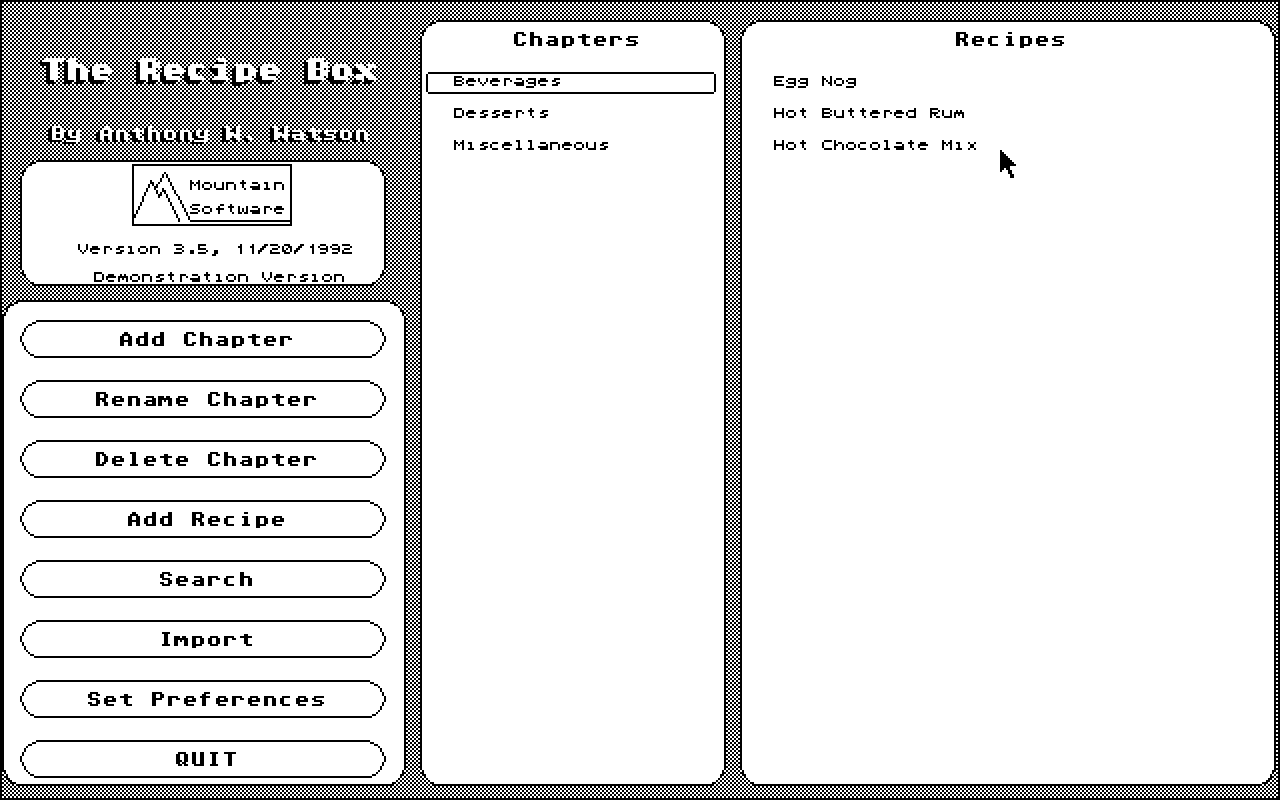
                  HELPFUL HINTS

All buttons can be clicked on using EITHER of
the Mouse Keys. The same effect will be achieved
regardless of which mouse key you use. (The
exception to this is the chapter and recipe
scrolls)

To 'select' a chapter or a recipe, move the
mouse pointer to the name of the chapter or
recipe and click on one of the mouse keys! If
you select a chapter the list of recipes within
that chapter will appear. If you select a recipe
the screen will switch to the recipe display.

The BUTTONS display error messages within the
button if something is wrong. If you click on a
button too fast, you might miss them. So until
you get the hang of the program, click and HOLD
a button to see if an error message is
displayed. Then release the button.

When you are requested to enter a title (Chapter
Title, Recipe Title, Filename, Search String.
'renaming OR entering'), you type in the title
on the keyboard. If you accessed the title entry
in error, you can press the RETURN key (Assuming
you haven't entered anything yet!), or you can
move the mouse pointer outside of the title
entry box and click either of the mouse keys.
The maximum title length depends on what you are
entering. (20 letters for chapter titles, 40
letters for recipe titles or search strings, 8
letters for filenames, etc.)

Anytime a 'control menu' pops up, and you wish
to abort or exit out of the menu simply move the
mouse pointer OUTSIDE of the box and click
either mousekey. (Modify Menu, Move Menu, Print
Menu, etc.)

Also, while viewing a recipe, you can scan
through the available chapters by clicking on
the Current chapter title at the top of the
screen. The LEFT mouse key scans backwards, the
RIGHT mouse key scans forwards. You can also
scan through the recipe titles (within the
displayed chapter) by clicking on the recipe
title at the top of the screen.

If you 'Move' or 'Copy' a recipe you will not be
allowed to move it to the chapter it is already
in, or into a chapter that has already reached
it's maximum capacity. ('move' transfers a
recipe from one chapter to another. 'copy'
duplicates a recipe to another chapter. Select
which you type you want in the set preferences
menu!)

After you import a recipe file into The Recipe
Box, the exported text file is no longer
necessary and may be deleted if you wish.

Many features are user selectable! Click on the
'Set Preferences' button to configure the
program to your liking.


              NOTE FROM THE AUTHOR

  I sincerly hope you find this program useful.
If you have any questions regarding this
program, or any Mountain Software program,
please don't hesitate to contact me. I'll
provide any assistance I am able to.
  If you find any bugs in this program, or have
a suggestion for future features, please write
and tell me about it. I can't fix bugs that I
don't know about!

Registration for The Recipe Box may be obtained
by sending TWENTY DOLLARS to:

                Anthony Watson
                6911 NE Livingston Road
                Camas, WA, 98607

Thank You! Enjoy!

Anthony Watson


-------------------------------------------------
If you need assistance or have furthur questions
you may leave E-Mail to Anthony Watson at any of
the following locations:

The Mosh Bit -    Forem Net   #648
(206) 574-1531    Atari Net   51:3/9
                  Fido-Net    1:105/139

The Bear Cavern - (206) 574-1146

GEnie Address:  A.WATSON6
(Or see the Mountain Software Message Topic!)

Anthony Watson
6911 NE Livingston Road
Camas, Washington  98607

-------------------------------------------------
 My sincere gratitude goes out to all of you who
have registered the earlier versions! Receiving
that little incentive in the mail box helps me to
continue updating this program, and create new
ones...


Thank you.


This Manual was created with 'Manualizer'.
Another Mountain Software product...