

Atari ST - 1989
Directory Fiddler
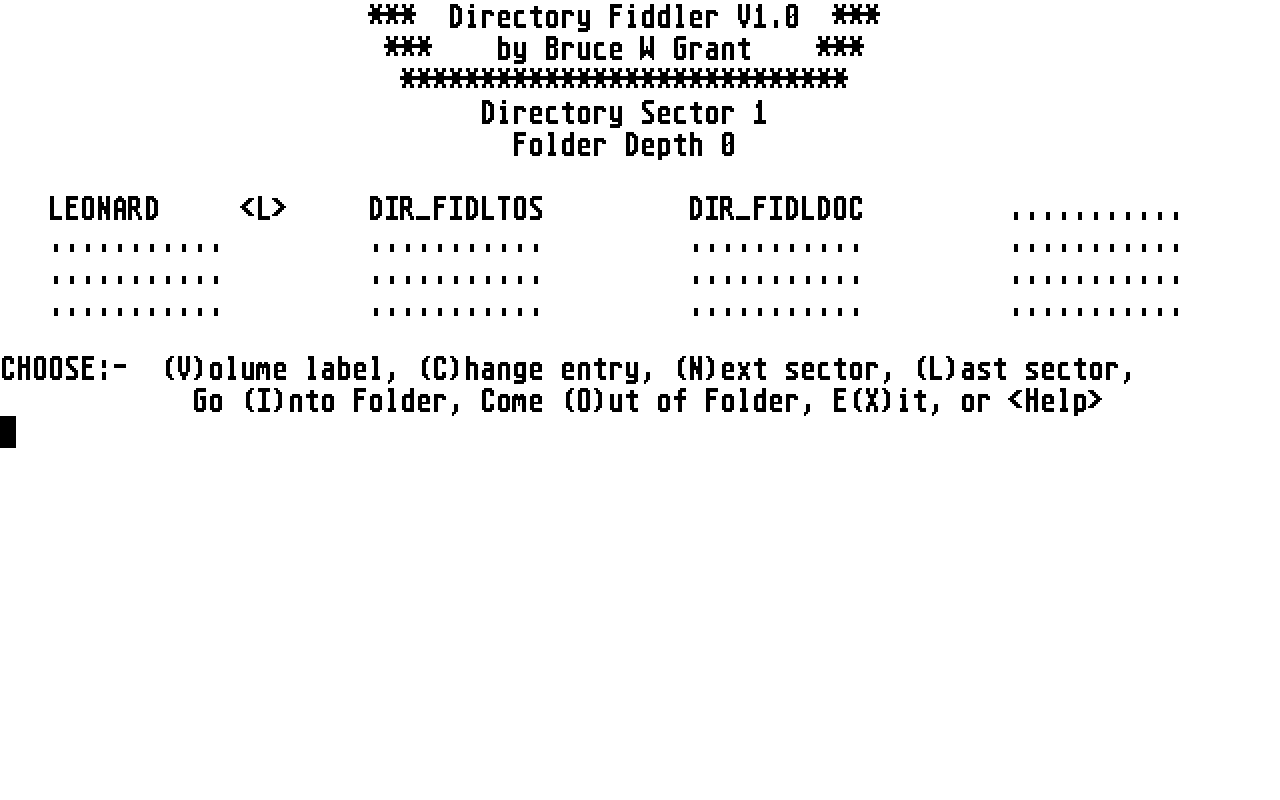
- Genre
- Tape / Disk / Cartridge Utility
- Year
- 1989
- Language
- [unknown]
- Publisher
- [no publisher]
- Controls
- Keyboard
- Distributor
- —
- Resolution
- Medium / High
- Developer
- [n/a]
- ST Type
- ST, STe, TT, Falcon030 / 0.5MB
- Licensed from
- —
- Programmer(s)
- Grant, Bruce W.
- Country

- MIDI
- —
- Software
- English
- Version
- 1.0
- Box/Instructions
- English
- Number of Disks
- 1 / Double Sided / HD Installable
- License
- PD / Freeware / Shareware
- Dump
- Download
- Serial
- —
- Dump format
- MSA
- Protection
- —
INSTRUCTIONS
                    ****************************            30/5/89
                    *  Directory Fiddler V1.0  *
                    ****************************
         **************************************************
         *  A Disk Volume Labeller And Directory Renamer  *
         **************************************************
                   ******************************
                   *  Medium or High-res only!  *
                   ******************************
                         ------------------
                          by Bruce W Grant
                         ------------------

* WARNING * * WARNING * * WARNING * * WARNING * * WARNING * * WARNING *

          THIS PROGRAM ALTERS A DISK'S DIRECTORY SECTORS!

 TO PREVENT ANY POSSIBILITY OF LOSING DATA, ONLY USE BACKUP DISKS!

            NEVER USE ORIGINAL DISKS WITH THIS PROGRAM!

                 DRINK COCA-COLA! (only kidding!)


Directory Fiddler is designed to add a volume label to any disk,
single or double sided, of any format: 9, 10, or 11 sectors per
track. It can also alter the directory entries on a disk, renaming
folders, files, or already existing labels. It can search into
eight levels of folders (the limit imposed by TOS), and alter file
or folder names at any level. It can't make a decent cup of coffee
yet, but I'm working on it.

The major limitation (at present) is that only the first 30 items
in a folder are accessible. This is due to my incomplete knowledge
of the File Allocation Tables, which are stored on the disk and
give cross-references to the next part of any file that requires
more than one cluster (2 sectors) on the disk, i.e. more than 1024
bytes in length. This system also applies to folder subdirectories;
one cluster is allocated to a subdirectory when a folder is created.
This allows 30 items to be stored in the folder (plus two hidden
system-reserved entries). When a 31st. item is added, a further
cluster is allocated as the next part of the subdirectory, giving
room for another 32 items in the folder (the two system-reserved
entries are only present in the first sector of a folder's sub-
directory). The FAT entry corresponding to a subdirectory cluster
points to the entry relating to the next subdirectory cluster, if
there is one. This continues, daisy-chain fashion, to the end of
the subdirectory. Are you following me so far? I hope so; I'm not
too sure about some of this stuff myself.

NOTE:- Directory Fiddler disables the key repeat. It is re-enabled
(if it was enabled to begin with) before exiting to the Desktop.

WARNING:- One sure way of destroying a directory and corrupting
data is to change disks after opening a directory but before
writing any changes back to the disk. This is error-trapped, but
if you use an exotic formatter which always gives a disk the same
serial number, it is possible to bypass the trap.

   NEVER CHANGE THE DISK UNLESS YOU ARE TOLD TO BY THE PROGRAM!

            IF YOU SUCCEED, YOU WILL CORRUPT THE DISK!


 HOW IT WORKS
--------------
Double-click on the "DIR_FIDL.TOS" icon, and you will be prompted
to put the disk you wish to alter into drive A. If you have two
floppy drives, you should only use drive A, although the program
may be loaded from drive B. The first physical sector on the disk
(the BOOT SECTOR) will then be read, containing the BIOS Parameter
Block, which specifies the disk format arrangement and whether the
disk can auto-boot. This is also where viruses lurk, but I'm not
jumping into that particular can of worms here. Various words in
the BPB are used to fix the LOGICAL SECTOR NUMBER of the DIRECTORY
SECTORS. This is arrived at by counting sectors from the boot
sector (counts as 1), through the first track, and on to the next
track. This is track 1 on single-sided disks, and side 1, track 0
on double-sided disks. A standard 9-sector formatted disk has a
boot sector, 5 sectors each for two copies of the File Allocation
Table, and 7 Directory sectors. Therefore, the directory begins at
sector #11, followed by the DATA SECTORS at #18, where the actual
files on the disk begin. The first sector of the directory is then
read. If a disk operation fails at any stage, an error message is
printed giving the option to try again, or exit from the program.
If all goes well, though, the first sector of the root directory
should then be displayed. To make any alterations, move through
the directory until the required entry is displayed. Press the key
for the command you want, and select the entry. When opening a
folder, the bytes in its entry acting as an offset into the FAT
are decoded, giving the Logical Sector Number of the beginning of
the subdirectory. Any changes made are written back to the disk.

 DIRECTORY ENTRY FLAGS
-----------------------
16 directory entries are stored in each sector. Some may be files,
or folders, or an already existing volume label. Each entry is
displayed as 11 characters of name, and may be followed by a flag
as follows:-

     DESKTOP INF      - An ordinary file entry.
     AUTO          - A folder entry.
     MYDISK        - An already existing volume label.
     åNYTHING      - The entry for a previously deleted item.
     ...........      - An empty entry.
     .             - These are system-reserved entries found in
     ..            -  folder subdirectories. You must not alter
                         these entries.

 COMMANDS
----------
The following commands are used to select the program functions.

    < V > - CREATE VOLUME LABEL: This will create a volume label on
          a disk. Use the <- and -> cursor keys to highlight the
          entry you want to put the label into, and press
          to select an entry. This should only be an empty entry,
          or one which has been deleted. Labels should only be put
          into the root directory. Enter a label name of no more
          than 11 characters, remembering that anything after the
          8th. will appear as an extension. Invalid characters are
          not accepted. When finished, type "Y" to confirm the
          label entry. It will then be written onto the disk. To
          change a Volume Label, use < C >.

    < C > - CHANGE ENTRY NAME: This can change the name of any file,
          folder, or label. Do not use  to change a label: you
          will be error-trapped out. Use the same procedure as
          above to select an entry and enter the new name.

    < I > - GO INTO FOLDER: Decodes the File Allocation Table bytes
          in a folder entry. This allows you to select and examine
          a folder and alter the names of any items found there.
          Folders deeper into the directory tree can also be
          entered, to a limit of 8 levels.

    < O > - OUT OF FOLDER: This will exit from a folder to the
          previous level of the directory tree.

    < N > - NEXT SECTOR: Reads and displays the next sector of the
          current directory.

    < L > - LAST SECTOR: Reads and displays the previous sector of
          the current directory.

    < X > - EXIT: Gives the option of examining another disk before
          returning to the Desktop.

    < Help > - Displays a screen summarising the above information.

 VALID CHARACTERS
------------------
Any alphnumeric character may be used in a label, folder, or file
name, i.e. 0-9, a-z, A-Z, also the colon : and underline _.

 ERROR TRAPS
-------------
Considering the potential dangers of this program, I have put in
as many error traps as I can think of. The major traps are as
follows:-

 -> Putting a Volume Label into any active entry (this includes an
     existing label).
 -> Putting a Volume Label into a folder.
 -> Changing the name of a deleted or empty entry.
 -> Changing the name of a system-reserved folder entry.
 -> Attempting to enter a non-folder entry.
 -> Changing the disk before writing a directory back to it.

This last trap, as mentioned above, is not infallible. The only
way of making sure this never happens is to use a formatter which
gives unique disk serial numbers. If anyone manages to induce a new
error, please contact me and tell me how you did it. If I can work
out what went wrong, I'll try to fix it in future versions.

 ABORT OPTIONS
----------------
When selecting a directory entry, you can press  to abort the
command you are using. There is also a last chance do-you-really-
want-to-do-this after entering a new entry name. Press  to
write the name to the disk, or any other key to abort.

 LIMITATIONS
-------------
As mentioned above, the program is unable to find more than the
first cluster of a folder subdirectory. This is partly because I
don't yet fully understand the File Allocation Table, and partly
because I can't find the copy of the FAT saved in memory when a
disk is read! Two system variable longwords at &h000004B2 point to
buffer lists, according to my copy of COMPUTE!'s Machine Language
Programming Guide (free plug), but after that I'm stuck. If
there's anyone out there (Knock once for yes, twice for no) who
knows anything more than this, please get in touch. Lowercase
letters in a name are permitted, but be warned! If you then copy
the renamed item, any lowercase characters are converted back to
uppercase in the copy name. Spoilsports! Finally, I'm not quite
sure what happens if you create a label on a disk whach already
has one: TOS seems to read the first label it comes across, then
it ignores any others. This isn't error trapped at the moment: I
couldn't figure out an easy way of doing it without making the
program grow in leaps and bounds. Just try not to do it, ok?

 BUGS
------
So far as I know, there aren't any left. All conceivable (and some
inconceivable) misbehaviour has been found and Dealt With. As
before, though, if anyone out there finds a bug, tell me about it
and I'll get out the Domestos again.

 FUTURE VERSIONS
-----------------
I have been putting together some ideas which may be incorporated
into future upgrades. These include:

     Reading a full folder subdirectory.
     Deleting as well as creating volume labels.
     Friendlier user interface.
     (Perhaps) GEM compatibilty.

Anyone with ideas, please get in touch.

 ACKNOWLEDGEMENTS  Or, Who else can I blame for messing up my disks?
------------------
     Thanks are due to Steve, for asking me to write this thing,
then sitting down three weeks later to try it out.
     Also to Peet, for helpful advice/criticism and intelligent
conversation.

 CONGRATULATIONS
-----------------
To any Trekker (don't call us Trekkies!) who recognised the quote.

 NO APOLOGIES WHATSOEVER
-------------------------
For the crummy jokes.

 UPGRADE SERVICE
-----------------
If you want an upgrade from version 1.0, please send a cheque or
Postal Order for Five Pounds Sterling to:-

                    Bruce W. Grant,
                    85 Hayton Road,
                    Aberdeen,
                    Scotland,
                    AB2 2RN

The latest version of Directory Fiddler will be sent as soon as
possible thereafter. For foreign orders (I can hope, can't I?)
please add One Pound Sterling and enough International Reply
Coupons (or whatever they're called) to cover a 3.5" disk and
secure packing material. Don't forget to include your name and
address, otherwise the money will be donated to the Retirement
Home for Deranged ST Programmers.

     Have fun!