

Atari ST - 1989
Cold Hard Cache
- Genre
- Tape / Disk / Cartridge Utility
- Year
- 1989
- Language
- [unknown]
- Publisher
- [no publisher]
- Controls
- Mouse
- Distributor
- —
- Resolution
- Low / Medium / High / VGA
- Developer
- [n/a]
- ST Type
- ST, STe, TT, Falcon030 / 0.5MB
- Licensed from
- —
- Programmer(s)
- Owens III, Robert E.
- Country

- MIDI
- —
- Software
- English
- Version
- 3.5
- Box/Instructions
- English
- Number of Disks
- 1 / Double Sided / HD Installable
- License
- PD / Freeware / Shareware
- Dump
- Download
- Serial
- —
- Dump format
- MSA
- Protection
- —
OTHER VERSIONS WITH THE SAME TITLE (1)
INSTRUCTIONS
                               Cold Hard Cache 3.5


                               Cold Hard Cache 3.5

                      for the Atari ST and MEGA ST Computers
                           with or without a Hard Disk

                       Copyright 1989, Robert E. Owens III


             Cold Hard Cache is an easy to use disk caching  program  that
        works  with both hard drives and floppies.  Disk caching  improves
        disk  I/O  speed  by  keeping  the  sectors  that  are  used  most
        frequently in RAM. The I/O speed of a cached drive will be between
        that of a RAM disk (very fast) and the uncached drive (much slower
        than a RAM disk).

             Benefits:
             o  Faster disk operation.
             o  Longer life for your disk drives.
             o  Longer life for your media.
             o  Less waiting on programs that grind your disks.

           Drawbacks:
             o    The  cache program and the sector buffers take  up  some
                  RAM memory (about 20K minimum).

             Cold Hard Cache was designed to be as small, reliable, and as
        fast as possible.  The program buffers reads only.  All writes  go
        directly to disk unless the sector is already in the cache and the
        data  has not changed.  This ensures that the disk's contents  are
        current  in  case  of a  crash,  power  failure,  or  accidentally
        powering off the computer.

             The size of the code may surprise you.  Good things  come  in
        small packages. Version 1.0 was about 8K long while Version 3.5 is
        just over 2K long.  The code has been carefully refined and tested
        for  about  two years on several models of hard  drives  including
        Atari,  Supra,  and  ICD models and should be compatible with  any
        other models.

        Included Files:

             cachev3.prg    The caching program.

             chcstat.prg    The   GEM   application   status/configuration
                            program.

             chcstat.acc    The    GEM   accessory    status/configuration
                            program.

             chcstat.rsc    The GEM resource file for both chcstat.prg and
                            chcstat.acc.

             chcache.doc    This file.


                                      - 1 -


                               Cold Hard Cache 3.5


        Installation:

        1.   Place the following files in the root directory of your  boot
             disk:
                  chcstat.prg
                  chcstat.acc
                  chcstat.rsc

        2.   Place cachev3.prg in the AUTO folder of your boot disk.  Make
             sure it is placed after your hard disk driver (like  AHDI.PRG
             on  Atari drives).  Also,  if you are  networked,  make  sure
             cachev3.prg is placed BEFORE your network driver or there  is
             a very good chance of scrambled files.


        Configuration/Status Reporting:

        General:

             There are two versions of the  configuration/status  program.
        Chcstat.prg and Chcstat.acc. They both operate the same except one
        is a stand-alone program and the other is a desk accessory. I will
        refer to these as the Chcstat from here on.

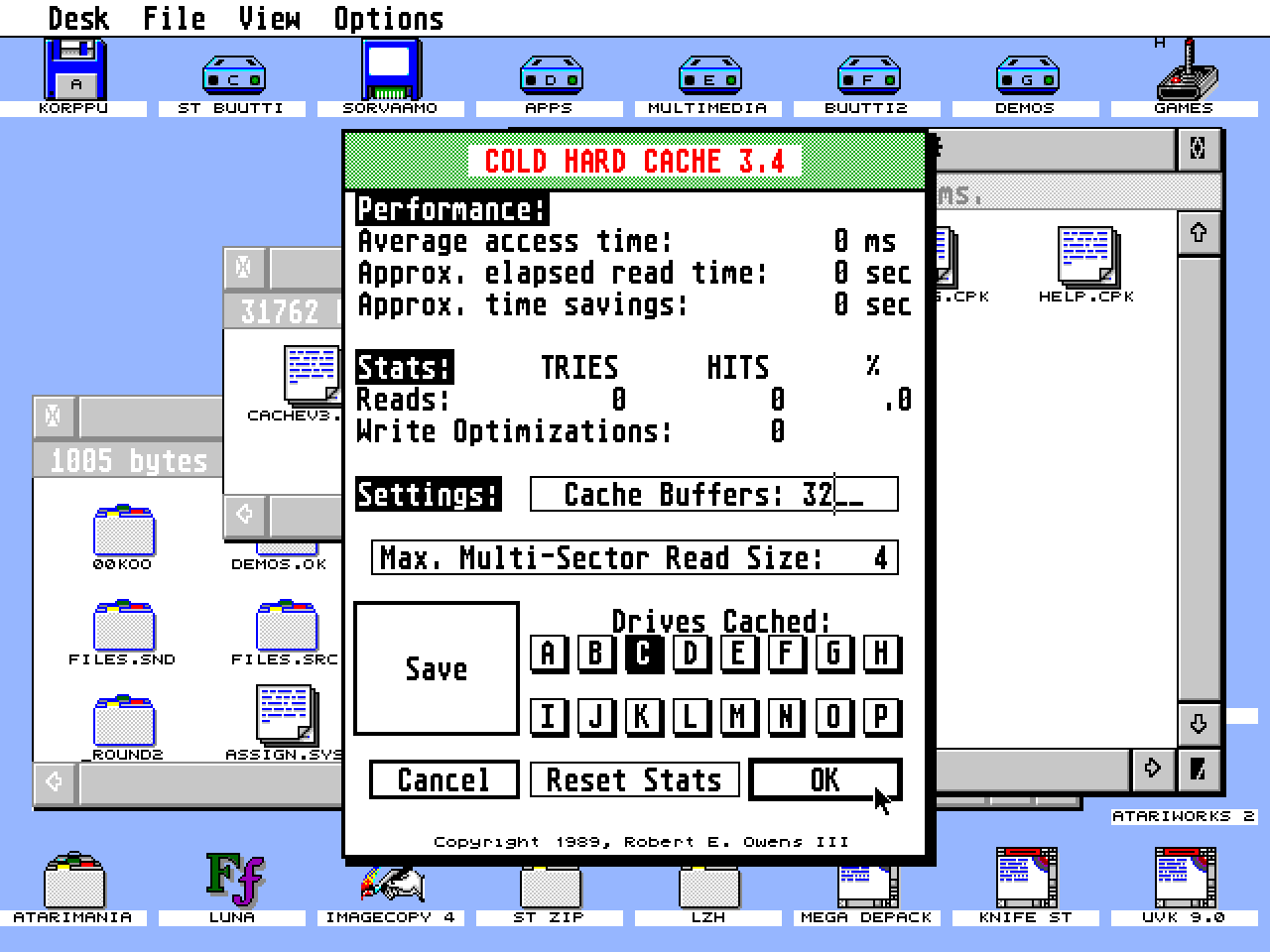
             Chcstat first tests whether cachev3.prg is installed.  If  it
        is not Chcstat will complain. Then a dialog is displayed.

             The  top half of the dialog contains performance  and  status
        info. The bottom half contains configuration settings.


        Configuration:

             You may choose the size of the cache and the drives you  wish
        to be cached.  The size of the cache is measured in buffers.  Each
        buffer requires 524 bytes (512 for the sector,  12 overhead).  The
        cache should be at least 32 buffers but not too big. I usually use
        256  buffers (about 128K).  You can try various sized  caches  and
        watch the statistics to find a good size.

             You may choose the maximum sized multi-sector transfer to  be
        considered  cachable.  The  default  setting is  4  (512  bytes  *
        4 sectors = 2K). You may specify any value from 1 to 9999 sectors.
        Large  values  will  cause  a  loss  of  performance  since  large
        transfers  (like  program  loads) will fill the  cache  and  flush
        potentially useful sectors (like directory and FAT  sectors).  You
        may  tune  the  cache for your particular  needs.  If  you  use  a
        database  with large records you may wish to specify a larger  max
        size to accomodate the size of your records.

             You may also choose the drives you wish to be cached.  Select
        the  drives  with the mouse.  Caching is enabled on  the  Selected
        drive letters. There is no harm if you enable a drive that doesn't
        exist.  If  you enable caching on a ramdisk you will make it  work
        SLOWER than if it was not cached.


                                      - 2 -


                               Cold Hard Cache 3.5


        Status/Performance:

             The status and performance info is useful for tuning the size
        of  the cache for optimum performance for  your  hardware/software
        environment.  The performance is based on cachable sectors.

             An  average  access time is  given  (in  milliseconds)  which
        represents the average time it takes to locate and read a cachable
        sector  from disk.  The average is for all of the enabled  drives,
        not just one drive.

             The approximate read time is displayed which  represents  the
        total amount of time it took to read all of the cachable sectors.

             The approximate time savings is calculated from  the  average
        access  time and the number of sector requests satisfied from  the
        cache (Hits).

             The read status shows the number for cachable sector requests
        (tries),  the  number of those requests satisfied from  the  cache
        (hits), and the percentage of hits.

             The  number  of write optimizations  is  displayed.  A  write
        optimization  occurs  when  a sector write is  requested  and  the
        sector  is  in the cache AND the contents of the sector  does  not
        change so no write takes place.

        Exiting:

             There are three ways of exiting the dialog.

             Cancel    The Cancel button will exit without changing any of
                       the settings.

             OK        The  OK button will enable the selected drives  and
                       then exit. Any changes to the size will be ignored.
                       If   the  Reset  Stats  button  is   selected   the
                       statistics will be reset.

             Save      The  Save button will save the current settings  in
                       the cache.inf file (so they will take effect  after
                       the next boot), enable the selected drives and then
                       exit.  If  the Reset Stats button is  selected  the
                       statistics will be reset.


        NOTE:     The cache program cachev3.prg must be positioned in  the
                  AUTO  folder after your hard disk driver  (ahdi.prg  for
                  Atari drives) and before any network drivers.

        NOTE:     If  the alternate key is held down when  cachev3.prg  is
                  run (from the \auto folder during the boot process)  the
                  cache will NOT be installed.

        NOTE:     Users  of  TURBODOS  may  see  lower  performance  since
                  TURBODOS  does some caching  internally.  TURBODOS  will
                  disable  caching on floppies since it  bypasses  RWABS()
                  and the ROM routines that handle floppies.  Cachev3 when


                                      - 3 -


                               Cold Hard Cache 3.5


                  used with TURBODOS can still give good results if  there
                  is lots of disk activity. Try it and see what you get.

        NOTE:     Cachev3   should  work  with  TOS  1.4   with   Extended
                  partitions (> 16 Meg) however only the first 16 Meg will
                  be cachable.  THIS HAS NOT BEEN TESTED!  TRY IT AT  YOUR
                  OWN  RISK!  MAKE  SURE YOU HAVE A BACKUP OF  YOUR  DRIVE
                  BEFORE YOU TRY!

        NOTE:     Cachev3  prevents  writes to the boot sector (#  0)  for
                  enabled  drives.  This will prevent utilities that  make
                  partitions  bootable (or viruses) from working.

        NOTE:     Some  Hard  Disk  utilities  (like  markbad)  will   not
                  function correctly when the caching is  enabled.  Simply
                  disable   the  drives  with   the  chcstat  program   or
                  accessory.

        BUG ALERT:
             Cold   Hard  Cache  3.2  did  NOT  recognize  Media   Changes
             correctly.  This  may have affected Removable Hard Drives  as
             well as Floppies.  This has been corrected in version 3.3.

             Cold Hard Cache 3.3 would crash (Address error) if a read  or
             write request specified a transfer to or from an odd  address
             (very rare). This has been corrected in version 3.4.

             Cold Hard Cache versions before 3.5 would not allow  floppies
             to  format  correctly.  Writes to the Boot  Sector  were  not
             permitted.  They are now allowed for floppies but NOT allowed
             for drives C through P.


             Cold  Hard  Cache  was  written using  the  Mark  Williams  C
        Compiler. I highly recommend this product.


             Cold Hard Cache is released as Shareware.

             If  you use this program please make a donation ($15  or  so)
        to:

             Robert E. Owens III
             34 Pinecrest Dr.
             Covington, LA 70433
             USA

             This  program was designed to save time and has proved to  be
        valuable. I usually save 20 to 40 minutes a day!


             If you have any suggestions or comments about this program  I
        would like to here from you. I can be reached by Stamp Net (at the
        above address) or on Genie (at R.OWENS3).


                                      - 4 -