

Atari ST - 1992
Check Open Files
- Genre
- Tape / Disk / Cartridge Utility
- Year
- 1992
- Language
- [unknown]
- Publisher
- [no publisher]
- Controls
- Mouse
- Distributor
- —
- Resolution
- Medium / High / VGA
- Developer
- Kaktus
- ST Type
- ST, STe, TT, Falcon030 / 0.5MB
- Licensed from
- —
- Programmer(s)
- Richstein, Hans Jürgen
- Country

- MIDI
- —
- Software
- German
- Version
- 1.03
- Box/Instructions
- English / German
- Number of Disks
- 1 / Double Sided / HD Installable
- License
- PD / Freeware / Shareware
- Dump
- Download
- Serial
- —
- Dump format
- MSA
- Protection
- —
INSTRUCTIONS
CHK_OFLS: A data protector for GEMDOS bypassing programs
========================================================
Version 1.03
von Hans-Jrgen Richstein
(c) 1991/92 KAKTUS GbR
For programs that whilst avoiding the Atari filesystem - GEMDOS - still make
access to mass storage systems (disk monitors, fast copiers etc.) there is
one basic problem: when files on the drive being accessed have previously
been opened by GEMDOS or during the course of operations both systems are
active, the result will almost certainly be data loss. In both cases this is
dependant on using the file system alone to have access at the same time.
Unfortunately, previously there was no legal way to make both coexist in
harmony.
The program 'CHK_OFLS.PRG' CHeck Open FiLeS) should now and in the future
provide a cure. It originated within the framework of the development of
the high speed file copier, KOBOLD and should simply be copied into the
AUTO folder. From then on, KOBOLD (from version 1.07) will only be able to
access those drives which contain files which are not currently opened and
data loss will be gone. (Afterwards, you will still be able to use this
drive in GEMDOS mode as before!), and vice-versa since GEMDOS retains its
pointer to such partitions yet KOBOLD will have direct access bypassing
GEMDOS for copying as swift as an arrow.
Additionally, from this version (1.02) onwards, the new so-called XHDI
protocol will be used, to lock into removable drives, so long as files on
at least one partition of the media inserted has been opened. This prevents
the loss of data after the unintentional ejection of the cartridge and makes
the employment of CHK_OFLS especially meaningful even when it is not being
used expressly for the benefit of other programs working simultaneously
with it.
To make this function effective, you must be using an XHDI-compatible hard
disk driver - new versions of Hushi, Diskus, CBHD etc. do conform to this.
WHen you are using MultiTOS or MiNT from version 0.94, the usage of
CHK_OFLS will have no effect, since here the allocation of file pointers
work differently. It should no be used in this case, since it is unable to
provide the superfluous blocking of drive access. It is also not required
since under these operating systems, functions to protect drive access are
already provided.
Version 1.03 now contains a 'Workaround' to a peculiarity of Flexdisk,
which caused it not to work in conjunction with this program.
This program that can be found in the CHK_OFLS folder, together with the
following unchanged files...
CHK_OFLS.PRG
CHK_OFLS.ANL
OFLSSHOW.ACC
OPN_FILE.ACC
...can be given away and also in particular, can be included free in this
form with any commercial products. Additionally, you will find below an
exact description of the code required to make any programs that avoid
GEMDOS work in conjunction with CHK_OFLS. When you are writing a utility
yourself, that makes access to a mass storage media via the BIOS (or at an
even lower level), then simply insert the support described below and
include this folder with it.
************************************************************************
CHK_OFLS: Hints for programmers
===============================
During installation, CHK_OFLS attaches itself to a GEMDOS and BIOS trap.
It counts the opened files and makes note of when via Fclose() voluntarily,
or by Pterm(), Pterm0(), Ptermres() or after a true or forced media change
it is compulsorily closed again. Using a 'cookie' called 'OFLS', your
program can recognize the existence of CHK_OFLS which contains in the cookie
value a pointer to the following structure (here in C):-
struct ofls_cookie
{
long product; /* 'OFLS' (0x4F464C53) */
unsigned short version; /* e.g. 0x0103 for V 1.03 */
signed short drives[32]; /* Info for 32 drives */
signed short reserved[32]; /* For possible expansion */
};
After the four characters 'OFLS' there also follows a version number and
then the corresponding 32 byte pairs, in which for each drive (drives[0] =A:
etc...) the number of files that have currently been opened on it that
can be read from. So long as this contains the value 0, you can have no
reservations about accessing this drive via the BIOS.
In order to now prevent access to it, that is when GEMDOS tries to access
a drive, you should simply write the value -1 into the corresponding word
(0xFFFF, word length) - other values will be ignored and will be reset to
0 at the next available opportunity. From this time on, the following
GEMDOS commands will be exited with a EACCDN error (ACCESS DENIED, -36):-
Dcreate(), Ddelete(), Fcreate(), Fopen(), Fdelete(), Fattrib(),
Fsfirst(), Frename()
This will continue to happen until a 0 is written again into the
corresponding location, which naturally you ought not be allowed to forget!
When you yourself find that a negative value is already stored, similarly
you will not be able to operate on the corresponding drive (except possibly
for reading), since obviously another program has similarly modified the
data directly and has previously obtained the access rights.
You should take note that a query of the access possibilities via the BIOS
must be preceded by carrying out a Getbpb() command. After that you may
possibly run into trouble with a media change message taken out from under
the nose of GEMDOS and a 'Force media change' will not put a stop to this.
Utilities
=========
During program development, you may find the tools OFLSSHOW.ACC and
OPN_FILE.ACC to be helpful - or they can be renamed to *.PRG when they may
then prove to be less useful!
OFLSSHOW.ACC:
-------------
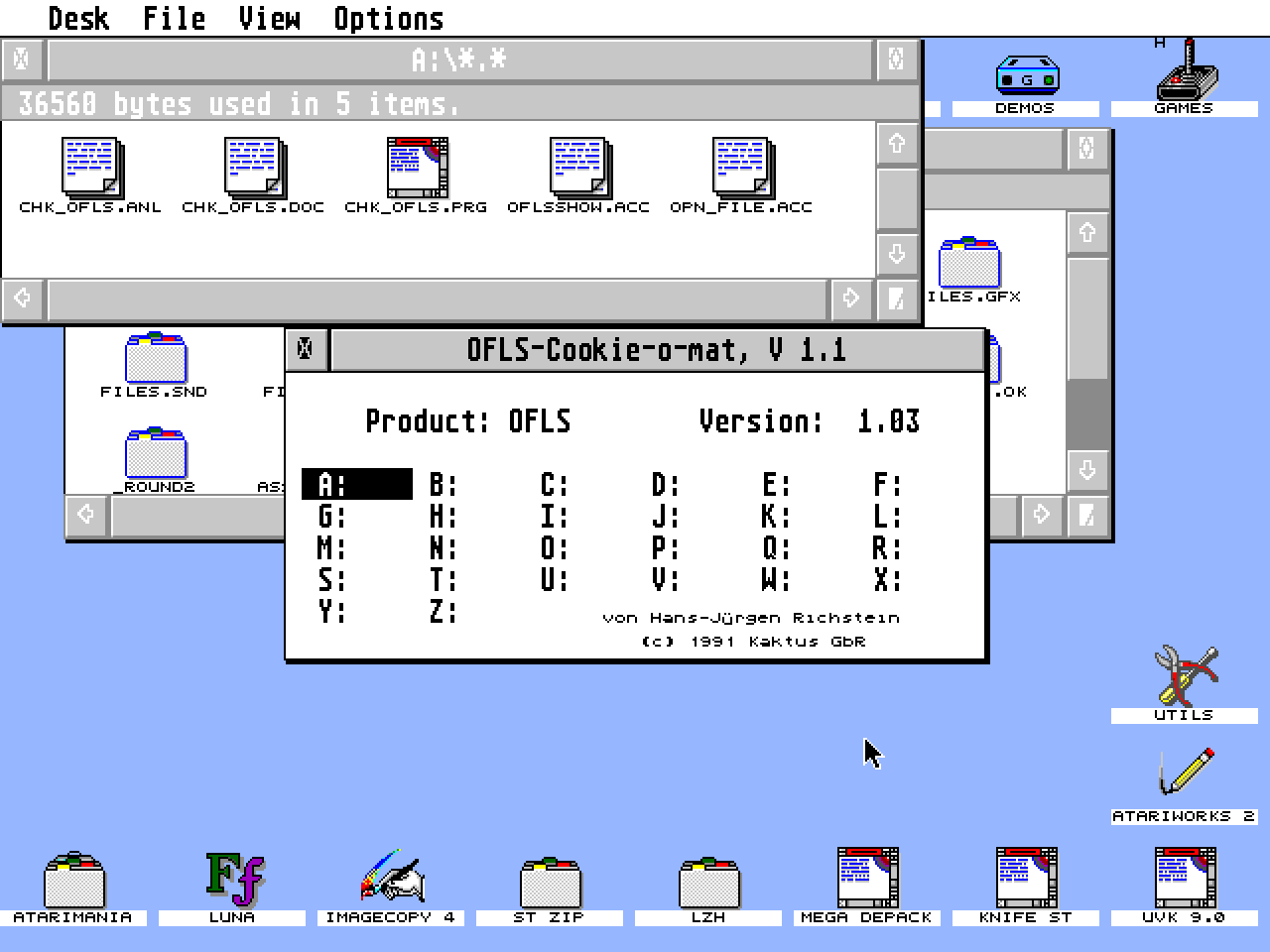
...reads the cookie and for the drives from A: to Z:, shows how many files
are currently open (it shows nothing - thus there is no '0' value - when
none have been opened, which appears to be an oversight on my part!).
Additionally, the current drive (the default drive for the current process)
is always shown inverted plus the product identifier and version number
shown in the OFLS structure. Changes will be updated in the display field
up to two times per second, so that you can observe such changes, when
OFLSSHOW itself is not the topmost window.
When your program (or another CHK_OFLS modifying tool) excludes GEMDOS from
a partition, this will identified with a broken line ('-X-'). On this drive
no access via GEMDOS is now possible. Should a negative value of less than
-1 be found in an entry, this will be shown as "???".
OPN_FILE.ACC
------------
...is solely used to create open files. This is useful for testing programs
that are to cooperate with CHK_OFLS, since as a rule it is otherwise
difficult to locate a program with open files on the right drive at the
right time.
You should then select your chosen drive and by then clicking on "Open
files" you may open one file, or with additional clicks several. This mode
lets you preselect where the files are to be opened. Next it will always be
created using a 'Fcreate' command, for 'Read' or 'Write' however, it will
similarly be closed again and then re-opened in the appropriate mode.
The number of files opened will be recorder beneath the drive letter icon.
The files which are created are named 'TEST.XXX' where XXX corresponds to
the number of the file that was opened. 'Close and delete' will then undo
the operation in the reverse sequence that they were created on the selected
drive.
When files are opened by an external program, these will not be closed but
instead the program will be terminated, so that these files will be closed
compulsorily by the operating system. Whilst CHK_OFL it resident, this will
be monitored with complete correctness, and for OPN_FILE the work will be
ended. Therefore, any 'TEST.XXX' files that were created will still remain
on the appropriate drive, which must then be removed manually.
When the files become compulsorily closed because of a forced media change
(for example, by pressing 'ESC' from the desktop when displaying the
contents of a drive), OPN_FILE will not notice this (should the situation
arise for CHK_OFLS). Using 'Close and delete' this will result in the
display of the number of opened files being removed, this is merely the
failure of the release of the file handles, which will not be noticed by it.
'Technical' Data:
=================
Trap#1 (GEMDOS) XBRA: 'OFLS'
TRAP#13 (BIOS) XBRA: 'OFLS'
Cookie identifier: 'OFLS'
XBRA for Cookie-Reset-Routine from TOS <= 1.04: 'OFLS'
CHK_OFLS creates - in case it is necessary (TOS <= 1.04 without already
installed cookies) - a new cookie jar including a reset routine or otherwise
enlarges it if necessary to accept 20 new cookies.
From version 1.02, CHK_OFLS is completely re-entrant, so that in its use
under MiNT it does not stand in its way. For MultiTOS its installation is
not meaningful, since the file handles are no longer global, but are
provided according to the process. With MultiTOS and MiNT from version 0.94,
you have the possibility anyway to use the operating system routine 'Dlock()'
to lock onto a drive.