

Atari ST - 1992
TCache
- Genre
- Tape / Disk / Cartridge Utility
- Year
- 1992
- Language
- Compiled C
- Publisher
- [no publisher]
- Controls
- Mouse
- Distributor
- —
- Resolution
- Low / Medium / High / VGA
- Developer
- RBsoft
- ST Type
- ST, STe, TT, Falcon030 / 0.5MB
- Licensed from
- —
- Programmer(s)
- Biedermann, Ralf
- Country

- MIDI
- —
- Software
- German
- Version
- 6.0
- Box/Instructions
- English / German
- Number of Disks
- 1 / Double Sided / HD Installable
- License
- PD / Freeware / Shareware
- Dump
- Download
- Serial
- —
- Dump format
- MSA
- Protection
- —
INSTRUCTIONS
Ralf Biedermann
Ortfeld 3
W-2815 Langwedel
Germany
(49) 4235-8407
Maus:Ralf Biedermann @ HB
Fido:Ralf Biedermann on 2:241/2021.1
Short documentation of TCache:
0. General information !
TCache is charityware which means that if you like TCache and use it
regulary you have to make a donation for an animalcharity. If you send me
a proof of your donation you'll receive the latest version of TCache
including commented sourcecode (comments in german sorry). If you write
from inside germany include a stamped self addressed envelope. If you
write from outside germany include 2 IRC and an self addressed envelope.
The latest version of TCache can be frequested on
Spice-Box (49)-7154-180017 under the MAGIC TCACHE
the Spice-Box is member of the following nets
FidoNet: 2:2407/ 43
GerNet :21: 100/1201
NeST :90: 400/ 206
1. What is TCache ?
TCache is a very fast Harddisk-Cache for the Atari range of computers
(ST/STE/TT/Falcon). A cacheprogram stores sectors from disk/harddisk in
ram and increases the speed of repeated access.
2. How to install TCache ?
You must copy TCache60.PRG into the autofolder of your bootdrive. Because
TCache is deactivated after the first installation you have to make some
configurations using the accessory TC_ACC60.ACC. You can rename
TC_ACC60.ACC to TC60_ACC.PRG and start a from the desktop or you put
TC_ACC60.ACC into the rootdirectory of your bootdrive and perform a reset.
Now you have to make the apropriate changes to the configuration of TCache
und save it directly in the programcode of TCache60.PRG. The meaning of
every option will be explained in the next chapter.
3. Options of TCache
With the programm TC_ACC60.ACC (.PRG!) you can change every option of
TCache. In this chapter I will try to explain every possibility in simple
words, because I can't explain it in detail in english.
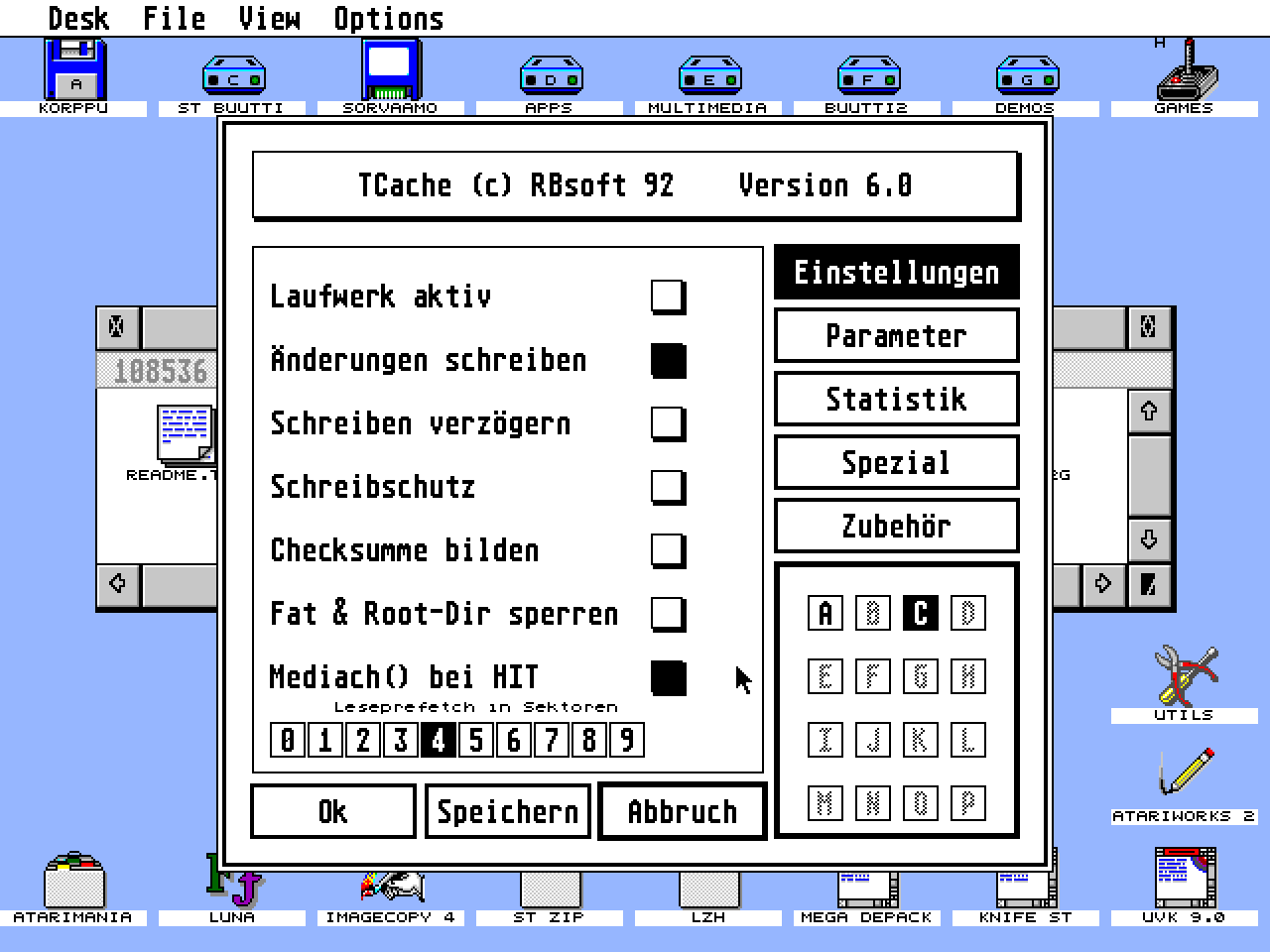
- If you click on the top-button you will receive the following
informations:
- Name of the author (me).
- Bootdev, the single letter in the top row.
- over all memory requirement, in the button.
- on the right are five radiobuttons. If you press one of the buttons the
information in the big area on the left side might get a new contents.
- 'Einstellungen' will let you change the options for every drive. These
options must be set for every drive.
- 'Parameter' shows some global values of TCache, this means that these
option are valid for all drives.
- 'Statistik' gives statistical informations about the success of
cacheing for every drive.
- 'Spezial' hides two interesting features of TCache. One denies access
for choosen drives without a password and the second redirects access
to one drive to another one.
- 'Zubeh”r' hides some global options and more special features.
- under the radiobuttons are 16 more radiobuttons labeled with 'A'..'P',
with these buttons you can select a drive for wich you want to see the
local options ('Einstellungen') or the statistics ('Statistik'). If you
have selected neither 'Parameter' nor 'Spezial' or 'Zubeh”r' these buttons
will have no effekt.
- 'Ok' will configure TCache60.PRG according to your changes and leave the
ACC. The changes are not permanent, after a reset your old values are
valid.
- 'Speichern' will save your changes directly in the file TCache60.PRG. You
have to select the correct file with the fileselectorbox. After the
changes were saved the ACC will be leaved. When you try to save something
it will be validated if it is a program which contains TCache60 so you
could even rename the program.
- 'Abbruch' means abbort and none of your changes will be taken and the ACC
will be leaved.
Now some explanations of 'Einstellungen'
'Einstellungen' must be made for every drive (click on 'A'..'P').
- 'Laufwerk aktiv' means that the drive selected (bottom right) will be
cached according to your further configuration. If this button is not
selected none of the other option for this drive will be active.
- 'Änderungen schreiben' means that only sectors with a changed contents
will be written to disk.
- 'Schreiben verzägern' means that a writeoperation will be delayed for a
while. This is a bit dangerous because not every information will be
immediatly on disk, if the computer crashes before the information is
written it can result in a los of data. But this option is very usefull
because a lot of datahandling will be speeded up quite a bit. The best
example is deleting a lot of files with 'Schreiben verz”gern' it will
have the speed of most ramdiscs.
- 'Schreibschutz' is a software writeprotect for the selected drive.
- 'Checksumme bilden' informs TCache to calculate a checksum for every sector.
This option is only usefull while testing new programs or during
programdevelopment because the speed will go down dramaticly.
- 'Fat & Root-Dir sperren' means that sectors belonging to either FAT (file
allocation table) or the rootdirectory will be locked in cache, they
can't be overwritten. If you use only 32..256K for cache this option can
speed up things a bit.
- 'Mediach() bei HIT' means that for every cachehit (sector is found in
cache) the program checks if the media was changed in the meantime. This
option must be activ for every medium which could be changed, f.i.
floppydiscs. On harddiscs it's faster to leave this option unset.
- On the bottom is a row of radiobuttons labeled '0'..'9'. Theses buttons
are used to configure the so called readprefetch. Readprefetch means
reading more sectors in one call than GEMDOS wants to. If GEMDOS wants
only one sector TCache reads more sectors and stores them in cache, if
GEMDOS wants the next sector it is already in ram and the speed will be
very high. With these buttons you can select the number of sectors TCache
reads instead of only one sector.
Now some explanations of 'Parameter'
- 'Cachegräze' is the amount of ram you wants to use for TCache. TCache is
very fast even if you try >1MB so don't be afraid to test large amounts.
- 'Hashtabelle' is a value which has something to do with finding a sector
in cache. A value of '16' is the fastest possibility but it will use a
further 256K of ram. Normally values between 10..12 should be fast enough
and they will cost only 4..16K of ram.
- 'max. Prefetch' is the size of a buffer used for prefetch and writing
blocks back to disc. Values between 16..32 are all right.
- 'Leseblock' is the largest block which will be completly stored in cache
if possible. If a block is bigger than these amount of sectors it will be
directly read from disc. Making this value to big will cost some speed
for some operations.
- 'Schreibblock' the same as 'Leseblock' with the difference that
writeoperations are meant.
- 'Flushzeit' is the amount of time a writeoperation will be delayed if the
'Einstellungen' 'Schreiben verz”gern' is activ. The lower the saver and
the higher the faster is TCache.
- 'Belegungsgrad' shows how full cache is. If the number is inverted
than the cache is full of locked data. The second number shows the
percentage of Cache used by locked data, f.i. FAT-sectors if you have
selected 'FAT & RootDir' for at least one drive.
- 'LED' lets your floppy-led flash for every harddiscaccess.
- 'CLR' will flush and clear cachememory.
- 'LOCK' all sectors will be locked in cache (see 'Fat & Root-Dir sperren')
- 'AKTIV' enables or disables TCache completly.
Now some explanations of 'Statistik'
'Statistik' can be seen for every drive (click on 'A'..'P').
- 'Lesezugriffe' number of readaccesses since start of TCache.
- 'Treffer' readhits since start of TCache. Number of saved readaccesses.
- 'Schreibzugriffe' number of writeaccesses since start of TCache.
- 'Treffer' writehits since start of TCache. Number of saved writeaccesses.
- 'Prfsummenfehler' number af checksumerrors since start of TCache. This
value is only of interest if 'Checksumme bilden' is activ for one or
more drives.
- 'ungerade Adressen' shows the number of reads/writes to/from odd
addresses. This can be of interest for program testing/developing because
a normal ST/STE is a lot slower in accessing odd adresses.
- 'freier Speicher' shows the amount of free memory on the selected drive.
- 'Sektorgröže' shows the size of one sector for the selected drive.
Now some explanations of 'Spezial'
- The top half of this area is used for a security option. 'Zugriffsschutz
fr Laufwerke' can protect one or more drives against unwanted accesses
from your boss/brother. You must make your configuration AND enter the
password ('Passwort'). You won't see the password because it's hidden. On
delivery the password is set to 'TCRB'. If you want to change this
password take a fileeditor and search for the string 'PASSTCRB' in the
file TCache60.PRG and change 'TCRB' in this string against your new
password.
- The bottom half allows you to redirect the access from one drive to another
drive. With the arrows you can select the drive you would like to be
redirected. With the radiobuttons beneath you can select the drive to
which the accesses will be redirected.
Now some explanations of 'Zubehör'
- 'Ramdisk' shows another menue which allows you to install a ramdisk. Just
select the drive and the amount of ram and press 'installieren'. If there
is already a ramdisk installed press 'entfernen' to remove this one. The
ramdisc is very fast but not resetresident.
- 'ACC-Ordner' shows another menue from which you can select a folder from
which the ACC's will be loaded after the next reset. Of course you must
save the configuration for the desired result. To select the path simply
click on the pathname and a fileselectorbox will apear. The button 'laden
aus Ordner' must be selected as well.
- 'Steprate' allows you to switch the steprate for drive 'A' or 'B'. Simply
select the desired steprate for drive 'A' (top row) and 'B' (second row)
and select 'setze Stepraten'. If you save the TCache-configuration the
steprates will be set on boot.
- 'virtuell' shows a menue which lets you install logical drives, these are
drives which aren't physicly attached to your computer. Together with
'Spezial' 'Zugriffsumlenkung von ? auf' you can create alsmost every
harddisc configuration. This option is especially usefull if you want to
install a programm which is conigured for drives which are absent on your
computer.
- Information shows another menu with further global informations. These
informations are:
'absolut Lesen' Rwabs()-readmode >= 8
'absolut Schreiben' Rwbas()-writemode >= 8
'Schreibfehler' number of problems during delayed write
'einzelne Zugriffe' number of singlesectoraccesses
'mehrere Zugriffe' number of multisectoraccesses
'gesamt Zugriffe' total number of accesses
'gesamt gespart' number of saved accesses
- 'Absolut' allows or denies accesses to a drive in an absolut manor which
means access to a drive without using partitioninformation. If you wants
to partition your HD absolut must be allowed.
- 'Testing' hows if the ACC should test TCache every five seconds or not.
- 'PUN-INFO' is a flag which tells TCache to use the so called PUN-INFO
strucure to get informations about the largest sectorsize. If is not
selected TCache makes a Getbpb() for every drive on starup.
- 'NOX !' is a very special thing. If you have a cookie called 'NOX!' and
the value of this cookie is a pointer to a subroutine then on start and
end of a Rwabs()-call this routine will be called.
- 'Drvbit-Check' checks the systemvariable '_drvbits' and denies every
access to a drive which isn't in '_drvbis' (anymore). It's main interest
is in program testing/developing.
- 'XBra-Check' is an option for TCache. TCache checks its programcode
everytime you leave a program. TCache uses the XBRA-standard and if
anyone changes something in the programmcode TCache deinstalls itself.
With this switch you can select whether TCache should allow manipulations
in his XBRA-structure or not.
- 'etv_term' means that every time you leave a program the cache will be
flushed. Only of interest if 'Schreiben verz”gern' is activ for one or
more drives.
- 'WriteReset' if selected TCache tries to flush the cache even if someone
has pressed 'CTRL+ALT+DEL' (warmreset). Only of interest if 'Schreiben
verz”gern' is activ for one or more drives.
- 'Gemdos' if selected even the directories of folders are locked in cache.
Attention this option needs a lot of ram, even on small harddiscs are
>512K recommended.
- 'Uhr' reads a special version of a hardwareclock on normal ST's during
booting.
Sorry for this short document but I hope it's of help most of you.
Regards Ralf