

Atari ST - 1993
Load Aladdin
- Genre
- Hardware - Emulation / OS Fixing
- Year
- 1993
- Language
- [unknown]
- Publisher
- [no publisher]
- Controls
- Mouse
- Distributor
- —
- Resolution
- Medium / High / VGA
- Developer
- Trace Technologies
- ST Type
- ST, STe Enhanced, TT, Falcon030 / 0.5MB
- Licensed from
- —
- Programmer(s)
- Gerdes, Keith
- Country

- MIDI
- —
- Software
- English
- Version
- 1.0 release 6
- Box/Instructions
- English
- Number of Disks
- 1 / Double Sided
- License
- PD / Freeware / Shareware
- Dump
- Download
- Serial
- —
- Dump format
- MSA
- Protection
- —
INSTRUCTIONS
Load Aladdin v1.0
-----------------

[release 6, 12/08/93]

Copyright c 1993 Trace Technologies

Program by Keith Gerdes


ARCHIVE CONTENTS
================

LOADALAD.TXT - this file
LOADALAD.PRG - Load Aladdin v1.0

 FPATCH2.PRG - Atari's Falcon patch program required on a Falcon030, place
               in the AUTO folder  NOTE: already pre-installed on most F030s


General info
============

  ** Load Aladdin- an ST Aladdin enhancement utility **

  Load Aladdin (LoadAlad) changes the serial/modem/RS232 routines in
ST Aladdin from direct hardware access to device independent TOS BIOS
calls.

Why bother?

  Aladdin is not usable on the Falcon030 because of direct access to
a serial port which no longer exists.  With LoadAlad, not only can you
use Aladdin on a F030, but you can also take advantage of the extra
serial ports on the MegaSTe and TT030.  Plus, Aladdin no longer hooks
into the serial receive vector- allowing the port to be used by other
programs or accessories when not in use.

Grace period:

  You may evaluate this program for a 14 day trial period.

  If you find this program a useful addition to your system, you are
expected to register before the 14 day limit.  See the 'Shareware'
section for details.


Operation
=========

  LoadAlad loads Aladdin into memory, searches for specific serial
related routines, patches that code and then runs this enhanced
memory-resident Aladdin version.

 NOTEs:
  * At _NO_ time does LoadAlad patch the Aladdin file on disk.
  * _NO_ permanent changes are made.
  * Only the version in memory is modified.


Installation
============

  Copy LOADALAD.PRG to the directory where the main Aladdin program
is located.  This file is generally named ALAD.PRG.


Usage
=====

  You will run LOADALAD.PRG instead of ALAD.PRG.


Wait a sec...
=============

  Before running LoadAlad, configuring.....

  During the initial evaluation phase, verify the operation of LoadAlad
_BEFORE_ doing your normal GEnie routine.  Once you have the serial
port configured right, then give LoadAlad the real test.

  Otherwise you'll come "complaining" to me, seeking help for this
"stupid" program.

  How do you verify Load Aladdin's operation?

  Do a simple 'Log-on'.  Check the text transmission for any errors.
Then use Aladdin to 'send' an email message to yourself and 'retrieve'
it.  Again, check the text uploaded and downloaded for any errors.


Configuration
=============

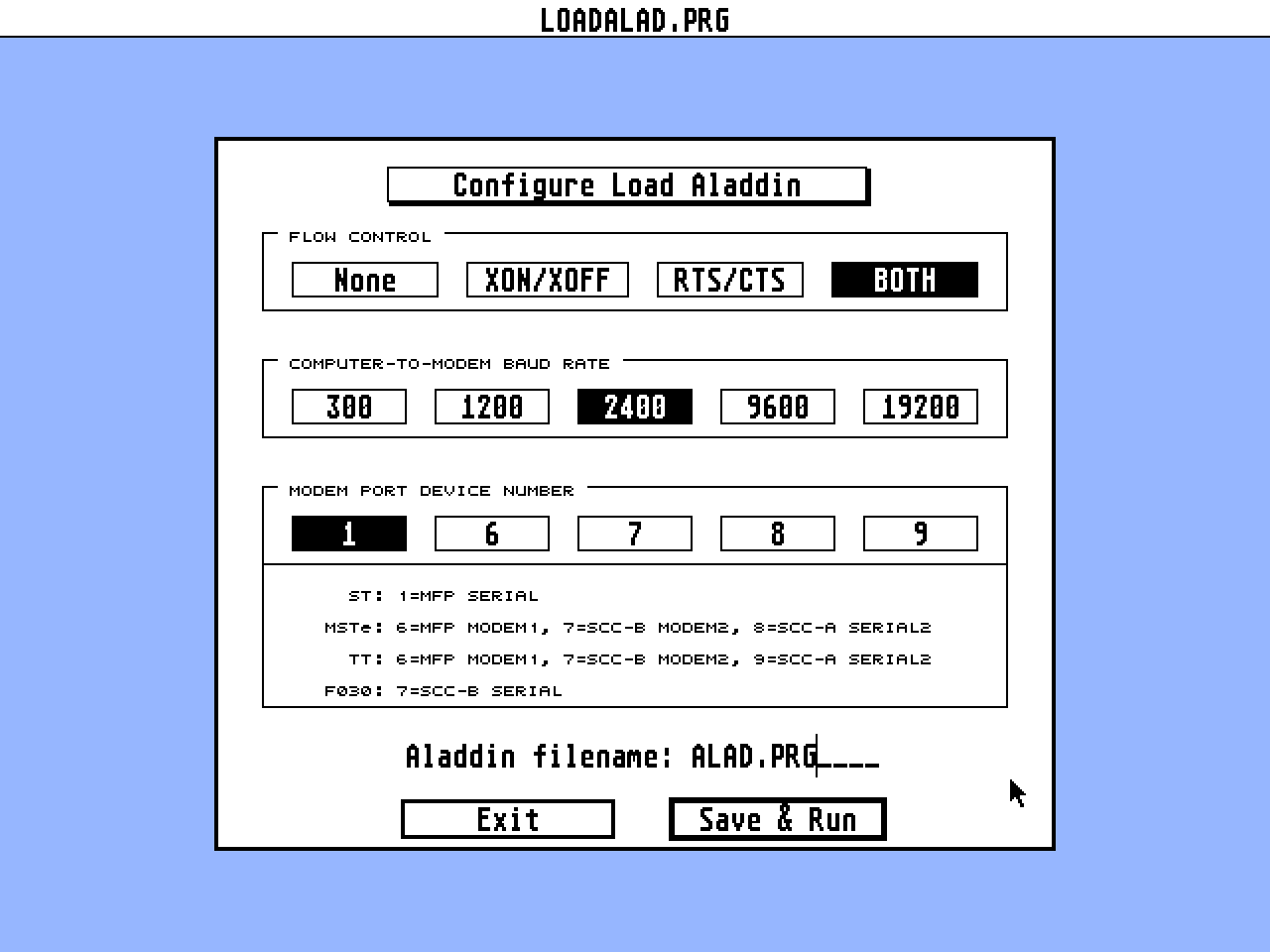
  The first time you run LOADALAD.PRG, you will need to configure the
serial port used by Aladdin.

1) Choose the type of flow control.

   Default: 'Both' Software (XON/XOFF) & Hardware (RTS/CTS)

   If you run into problems during message reading or message uploading,
   then this needs to be changed.  Generally, whatever you use in your
   terminal program will be the setting to use here.
   [See below for more info.]

2) Choose the computer-to-modem baud rate.

   Default: 2400

   This is the rate which your computer will talk to your modem.  On
   some modems, this rate can be faster than the modem-to-modem baud
   rate.
   Note, modem-to-modem is determined by the access phone # you dial,
   and limited by the speed of your modem.  ie. 2400 or 9600

3) Choose the serial port which your modem is connected to.

   Default: 1

   See the table for ports and machines- located in the Config dialog
   and detailed further in this text.

   On a MSTe, TT or F030 you should change to a device # other than
   device 1.  Device 1 on those machines is used to indirectly map
   the current device (a number from 6 to 9), therefore device 1 is
   not very useful for our purposes.

   On bootup, the system's default serial device:
    Device 1 - ST
    Device 6 - MSTe or TT
    Device 7 - Falcon

4) Enter the filename of Aladdin.

   Default: ALAD.PRG

   This is the file which LoadAlad loads into memory, patches and runs.
   _NO_ wildcards can be used.

5) Select 'Save & Run' to save the configuration info to LOADALAD.CFG
   and run Aladdin.
   LOADALAD.CFG is automatically created during this step.

NOTE: To configure LoadAlad later on, hold down the 'Control' key when
      you run LOADALAD.PRG.  Or you can simply delete LOADALAD.CFG.


Startup dialog
==============

  After LoadAlad has been configured, each time you run LOADALAD.PRG an
Info dialog will appear.

  In this dialog, you will find LoadAlad's version # (ie. 1.0) &
release # (ie. 06), the device # (ie. 7) and general info.


Errors
======

  If one of the following errors is encountered, LoadAlad will give an
alert and then exit.

1) Bad device #.

  The configured serial port device does not exist on your machine or
a hardware problem was found during the port check.

2) Cannot find configured Aladdin filename.

  Check the filename of Aladdin.  No wildcards can be specified.

3) Sorry, Aladdin cannot be squished.

  You cannot squish (w/Squish v1 or Squish II) the Aladdin executable
file.

4) Patch error.  Is Aladdin compressed?  Contact Keith...

  For some reason the patch routine could not find all of the serial
related code in Aladdin.  Either you need to get the current version
of Aladdin or the Aladdin executable file is compressed or packed.
During testing, LoadAlad was used with ST Aladdin v1.50, 1.60 and 1.62.


Serial patch/fix AUTO programs
==============================

  On an ST, MSTe or TT you may need to run an AUTO serial port fix
program such as SerialFix2, TurboCTS, etc.

  On a Falcon, you _MUST_ use FPATCH2 when using LoadAlad.  Without FPatch2,
device 7 is unavailable.
  At a high speed, SCC-based connection rate, you may need to use a
serial fix program such as FastSerial or HSMODEM.

NOTE: SerialFix2 does not work on a F030.


Troubleshooting
===============

* Flow control

  The main configuration in LoadAlad that you have to worry about is
the Flow Control setting.

If you experience
 a) garbled or lost text during receive,
 b) garbled or lost echoed text during send,
 c) disconnection or
 d) serial port freeze up
then you need to change the flow control type.

  First, change from Both to RTS/CTS.

  If that doesn't help, try XON/XOFF.

* High speed connection

  If you use GEnie at a baud rate >2400, then you may need a serial port
fix program- see above.


Misc
====

*
  MSTe device #8 & TT device #9 have a dual serial port assignment- LAN and
Serial2.  If you use one of these devices, LoadAlad will automatically
switch to Serial2 for that device #.

*
  RS232 configuration (Rsconf) and hangup (drop DTR) work on any device.

*
  Checking the Data Carrier Detect (DCD/CD) line remains a direct
hardware access.

*
  If you find yourself accidentally running ALAD.PRG instead of
LOADALAD.PRG, rename ALAD.PRG to ALAD.PRX and re-configure LoadAlad's
filename reference.

*
  With LoadAlad, you can use a serial buffer expander such as AUXINIT
or RSxxMDXX to possibly correct or enhance I/O transfers.

*
  Installing LOADALAD.PRG as an icon on the desktop requires the default
directory be set to the location of LoadAlad- ie. 'application', NOT
'top window'.

*
Aladdin under MTOS
  If you run into crashing problems at a point when an audible alert
would be given, then you may need to install Scott Sander's DSFIX
(currently v1.01).
  LoadAladdin will appear as LOADALAD.PRG and LOADALAD.xxx in the
dropdown process name menu.

*
When running LoadAlad with STalker installed as an accessory
  You will need to select 'Disable STalker' and save the configuration
if you run STALKER.ACC.  See p.57 of Gribnif's STalker 3 manual.


Falcon users
============

  During development, beta testers ran into intermittent lockups, mainly
when exiting a 'reply' window.  The reply is safely saved, but you have
to reboot the system because of the lockup.

  When you re-enter Aladdin after a lockup, you will notice the lack of
pending operations.  The ALADDIN.CFG file, which keeps track of status
info, was not updated due to the reboot.  Don't worry, everything is
still pending for transmission to GEnie.


Methods used to try to avoid this:
1) clear the FASTLOAD bit on ALAD.PRG (LOADALAD.PRG can still FASTLOAD)
2) use Geneva or MTOS
3) run Aladdin after a coldboot

NOTE: The cause of the lockup has not been pinpointed.  Aladdin will
      lockup _even_ without being executed from LoadAlad.


Device table
============

Dev#  Hardware  (Name)
----------------------

[ST/STe/STacy/STBook]
1  ST MFP  (Serial/Modem)

[MSTe]
1  Currently mapped serial device
6  ST MFP  (Modem 1)  [initially mapped in device #1]
7  SCC Channel B  (Modem 2)
8  SCC Channel A  (Serial 2/LAN)

[TT]
1  Currently mapped serial device
6  ST MFP  (Modem 1)  [initially mapped in device #1]
7  SCC Channel B  (Modem 2)
8  TT MFP  (Serial 1)
9  SCC Channel A  (Serial 2/LAN)

[Falcon030]
1  Currently mapped serial device
7  SCC Channel B  (Modem)  [initially mapped in device #1]
8  SCC Channel A  (LAN)


Support
=======

  Great strides are taken to make sure LoadAlad will not cause problems
as a new addition when running Aladdin.

  If you do run into any difficulties, report them to me ASAP.
Please, do _NOT_ bug GEnie representatives or Tim Purves.

  You can reach me by phone, GEmail (includes Internet) and GEnie's
ST Aladdin RT (m1000), CAT 2 TOP 6.


- Keith Gerdes


Shareware
=========

Registering is easy:

1) Contact me before the 14 day evaluation period expires.

2) And then send in the shareware fee of US$15.


What else do you get for your investment?
  Tech support and bug fix updates!


Please make payment by check (issued by a U.S. bank), U.S. funds
money order (drawn on a U.S. bank), or postal money order.
[NOTEs: GEnie gifts of time are not accepted.  And no credit card orders.]

Payable to:
 Trace Technologies or Keith Gerdes

Send to:
 Trace Technologies [LoadAlad]
 PO Box 711403
 Houston, TX  77271-1403


Contact info
============

GEnie: K.GERDES
Internet: k.gerdes@genie.geis.com

Phone: (713)771-8332  [weekdays 1PM-5PM Central Time]


TraceTech products
==================

Commercial:

* Data Diet v2  (++)
 a realtime data compression system

* Data Rescue
 the complete realtime data recovery solution

* Squish II  (++)
 an executable file compression system


++ An upgrade from v1 is available.  Contact TraceTech.


Next major project release- Missouri.

Also look for Falcon specific utilities, available early '94.


Legalease
=========

* ST Aladdin is copyright The General Electric Company.
* Load Aladdin is released by permission of GEnie, Tim Purves and
  Griffin Hi Tech Software.

++++++++++++++++++++++++++++++++++++++++++++++++++++++++++++++++++++++++++++++
This program is supplied in the belief that it operates as specified, neither
the company (Trace Technologies) nor the authors shall be liable in any
circumstance whatsoever for any direct or indirect loss or damage to property
incurred or suffered by the customer or any other person as a result of any
fault or defect in the goods or services supplied by the company and in no
circumstances shall the company be liable against consequential damage or
loss of profits -whether or not the possibility thereof was separately advised
to it or reasonably forseeable- arising from the use or performance of such
goods or services.
++++++++++++++++++++++++++++++++++++++++++++++++++++++++++++++++++++++++++++++
This archive contains a SHAREWARE version of the program Load Aladdin.
You CANNOT re-distribute or alter the programs or contents of the
documentation in any manner.  Trace Technologies retains all copyright
exclusive rights AND exclusive distribution of this SHAREWARE version.
++++++++++++++++++++++++++++++++++++++++++++++++++++++++++++++++++++++++++++++
TRIVIA (1)
Hardware
Supports additional Mega STe and TT serial ports.