

Atari ST - MW Electronic - 1994
E-Backup
- Genre
- Copying / Protecting / Dumping
- Year
- 1994
- Language
- [unknown]
- Publisher
- MW Electronic
- Controls
- Keyboard / Mouse
- Distributor
- —
- Resolution
- Medium / High / VGA
- Developer
- MW Electronic
- ST Type
- ST, STe, TT, Falcon030 / 0.5MB
- Licensed from
- —
- Programmer(s)
- Weiss, Robert
- Country

- MIDI
- —
- Software
- English
- Version
- 1.01
- Box/Instructions
- English
- Number of Disks
- 1 / Double Sided / HD Installable
- License
- Commercial
- Dump
- Download
- Serial
- —
- Dump format
- MSA
- Protection
- —
INSTRUCTIONS
INSTALL.TXT
---------------------------------------------------------------------------
Installation:

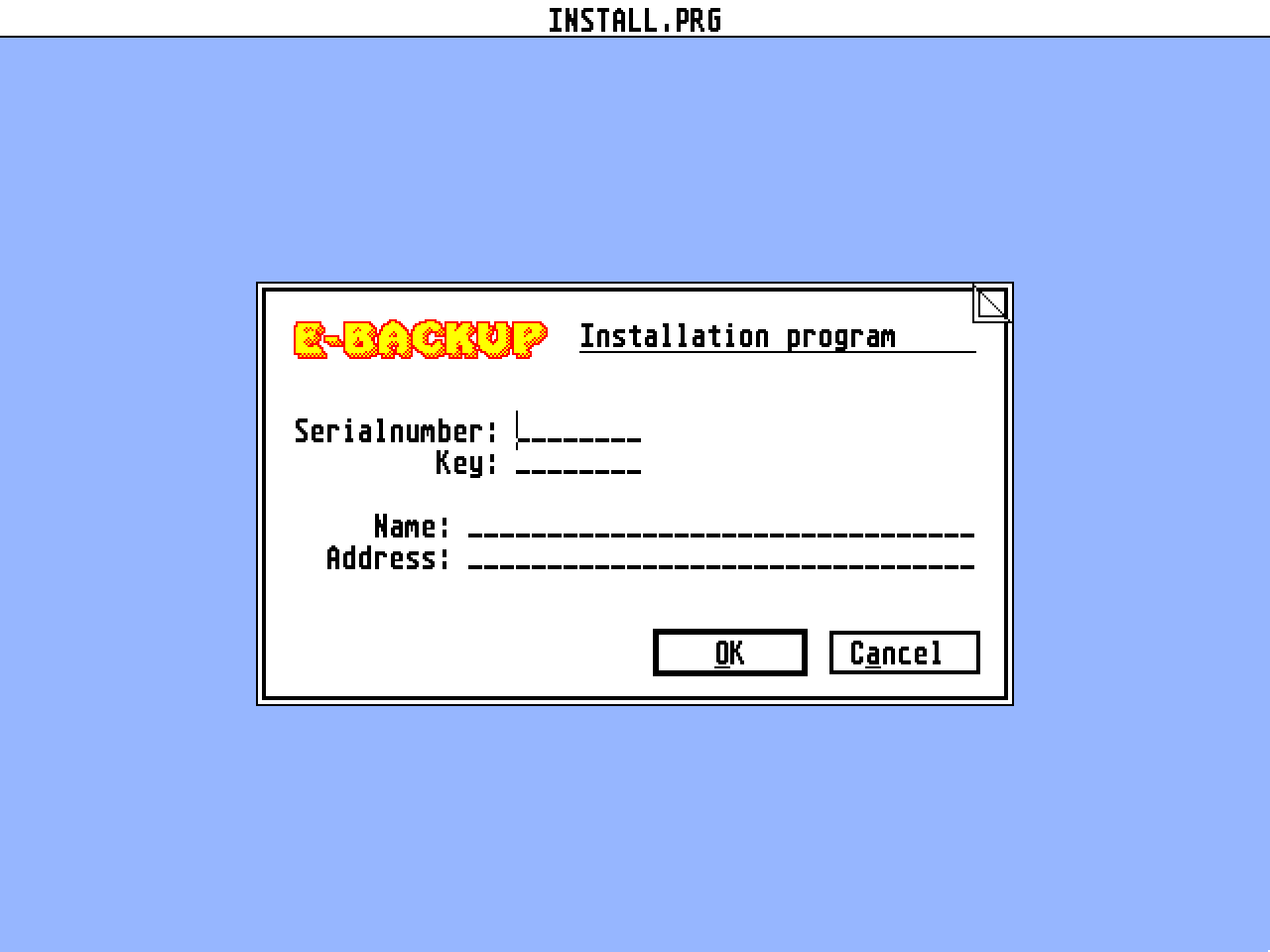
As the program as it is supplied on the original diskette is not yet
executable, it must first become personalised by entering your own data.
The installation program is provided to do this.

Insert your original diskette and then run the program named "INSTALL.PRG"
that is included on it. The installation dialog box should now appear. If
is does not, then neither the data files "ECOPY.DAT" nor "EBACKUP.DAT"
could be found.  This file must be in the same directory as "INSTALL.PRG".

In the field "Serial number:", you should enter the eight-digit number
found on the original diskette. Afterwards you should enter the "Key:" that
can be found on the diskette label. You should then complete the entries
for your name and place of residence. These can contain a maximum of 32
charactyers each. When the correct information has been entered, click on
"OK". You will now be provided with a further dialog allowing you to check
the data before the installation program verifies the serial number and
key.

If all is well, either "ECOPY.PRG" or "EBACKUP.PRG" containing your
personal information will be created.

Once you have installed the program, you should always make a backup copy
of the original diskette.  From now on you should use the backup and keep
the original in a safe place.  If you have a hard drive, you should copy
the program file (*.PRG) to the directory of your choice. If you wish to
use the program as an accessory, simply copy it to the root directory of
your boot drive and then rename it to "ECOPY.ACC" (in the case of
"ECOPY.PRG") or "EBACKUP.ACC" (in the case of "EBACKUP.PRG").  After the
next reset, the program will be available as an accessory.


README.TXT
--------------------------------------------------------------------------
Installation:

Since the original diskette is almost full, you must always first install
EBACKUP.  If during installation you receive the message "ERROR WHISLT
WRITING THE USER DATA", in all probability there is insufficient space on
the diskette. In this case you should copy EBACKUP.DAT and INSTALL.PRG to
your hard drive and start again.

The demo version of ECOPY can be found in packed form in the EC_DEMO
folder. Copy the file ECOPYD.TOS to your hard drive or a blank diskette and
run it from there, so that there is sufficient free space available.

Backup by file:

You should always take care that the largest file to be processed should
fit on a single destination medium, since at the present time, the file
copier is unable to split up large files.
In case you do want to process files larger than the useful capacity of the
diskettes being used for the backup, these files must be split up first.
You should read through the README file contained in the SPLIT folder.

If you are making a file backup, the diskettes to be used must be
pre-formatted in a way that is recognizable to GEMDOS. Whether these disks
are blank or already contain files is immaterial.

In all cases, the program FLOP_FIX should be placed in your AUTO folder,
since otherwise when making a file backup to diskette, a crash may result.


UPDATE.TXT
--------------------------------------------------------------------------
Update Info:

You can always discover the most up-to-date version of E-BACKUP that is
available by referring to the "Immer up to date" column in ST-Computer
magazine.

If you would like an updated version, please send a letter containing your
details and the serial number from your original diskette together with
10,- Dm to:

                          MW electronic
                      Heisterbacher Str. 96
                      D-53639  K”nigswinter

Since we have introduced a new installation program with a serial number
and key, we no longer require the original diskette itself.

Upgrade info:

If you have returned your registarion card to MW Electronic, when there are
large changes to the program you will be automatically informed by mail,
which will contain any relevent information about obtaining an upgrade.


VERSION.TXT
--------------------------------------------------------------------------
Current changes to E-Backup 1.01 dated 25.02.94

- HBS6 cookie removed
- The recognition of defective clusters in 16-bit FATs was incorrect
- When a change in the destination media is required, you will now hear a
  PLING
- In the System info dialog, clicking on the blank area of a bar
  displayed info for the wrong drive
- The file mask has been expanded to include [] just like UNIX