

Atari ST - Softcell - 1988
Disector Parameters
- Genre
- Copying / Protecting / Dumping
- Year
- 1988
- Language
- [unknown]
- Publisher
- Softcell
- Controls
- Mouse
- Distributor
- —
- Resolution
- Low / Medium / High / VGA
- Developer
- [n/a]
- ST Type
- ST, STe, TT, Falcon030 / 0.5MB
- Licensed from
- —
- Programmer(s)
- [unknown]
- Country

- MIDI
- —
- Software
- English
- Version
- —
- Box/Instructions
- English
- Number of Disks
- 1 / Double Sided / HD Installable
- License
- Commercial
- Dump
- Download
- Serial
- —
- Dump format
- MSA
- Protection
- —
INSTRUCTIONS
                     DISECTOR ST PARAMETER INSTRUCTIONS
                     ----------------------------------


   The DISECTOR PARAMETERS enable extra programs to be backed up
   successfully. After conversion most of the programs can be file
   copied. This allows more than one game to be stored on a double
   sided disk, and twin disk games to be run from a single double
   sided disk.


   INSTRUCTIONS :

    1. Make a copy of the games disk using  DISECTOR ST BACKUP or
       FASTCOPY. Programs followed by a (B) must be copied by BACKUP.

    2. Programs marked (para) must not be copied, as they are
       transfered entirely by the parameter. A number of specially
       formatted single sided disks will be required, prepared using
       the disector SPECIAL FORMAT program.
       The number and type of format is displayed at the start of the
       parameter operation and is also indicated in the parameter
       list below. (S stands for SUPER and L for LARGE format)

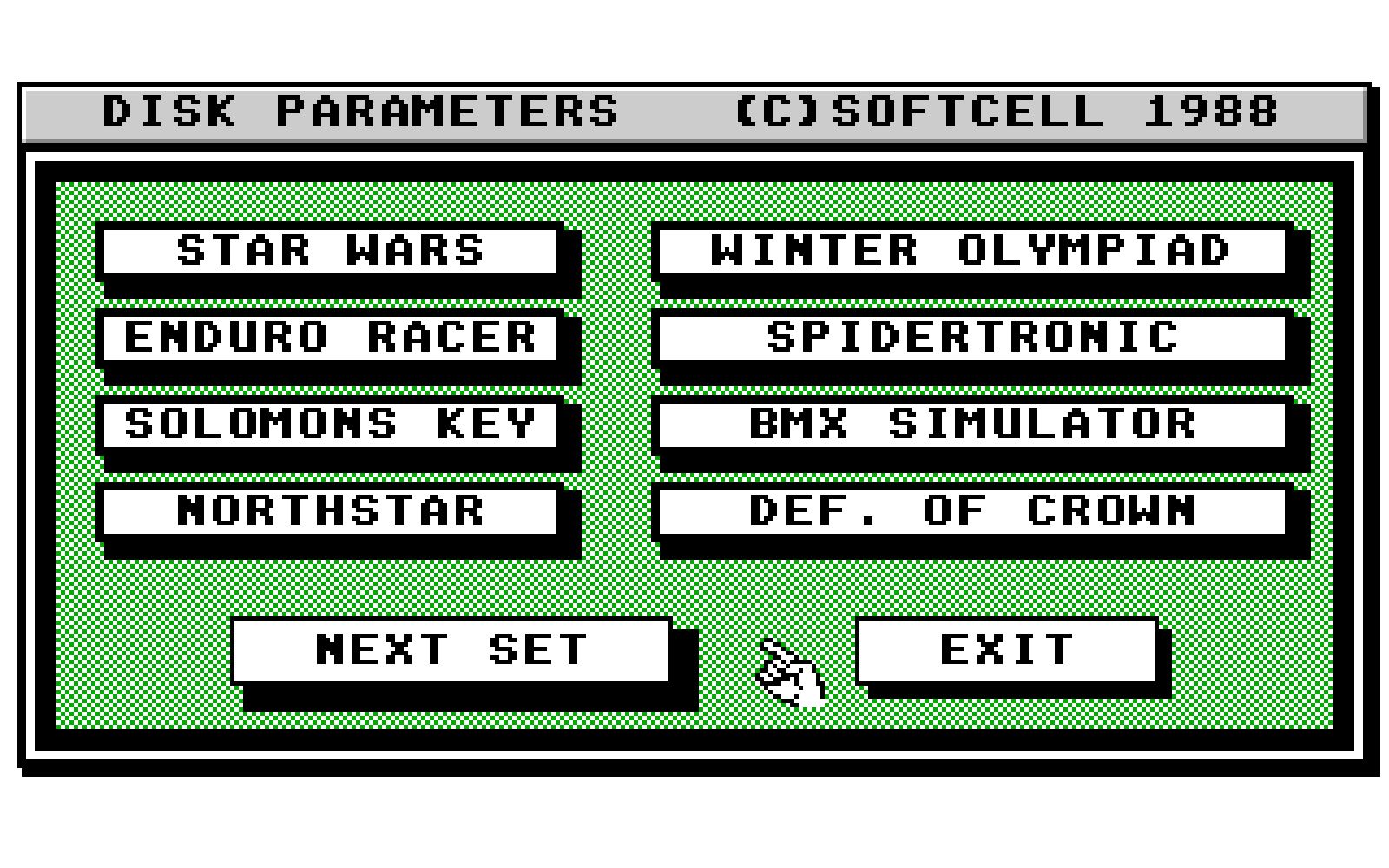
    2. Load PARAMETR.PRG and select the program name required.
       A parameter is available for the following programs.

      SET 1  - STAR WARS    (*)        WINTER OLYMPIAD    (D)
               ENDURO RACER            SPIDERTRONIC
               SOLOMON'S KEY           BMX SIMULATOR
               NORTHSTAR               DEFENDER OF THE CROWN

      SET 2  - ECO                     WARLOCKS QUEST     (B)
               DEFLEKTOR               WIZBALL
               STAFF     (B,D)         KNIGHTMARE
               PREDATOR  (D)           I,BALL

      SET 3  - THRUST                  FOOTBALL MANAGER
               SECONDS OUT (D)         MARBLE MADNESS     (D)
               GUNSHIP     (D)         CAPTAIN AMERICA
               WARHAWK                 MISSION GENOCIDE

      SET 4  - OUTRUN                  TANGLEWOOD         (D)
               IMPACT                  SUPERBASE PRO      (2D)
               TEST DRIVE  (D)         THUNDERCATS        (*)
               VIXEN                   FOOTBALL MANAGER 2

      SET 5  - ELF                     FIRE AND FORGET
               REVENGE II              WORLD DARTS
               SIDEWINDER  (D)         STIR CRAZY         (D)
               OVERLANDER              BIONIC COMMANDO    (D)

      SET 6  - GARFIELD                CAPTAIN BLOOD         (D*)
               ELITE                   SPACE HARRIER         (D)
               WHIRLIGIC               BEYOND THE ICE PALACE
               SINBAD      (D+1)       BOMBJACK

      SET 7  - GAUNTLET II (B,NF)(*)   SUMMER OLYMPIAD     (*)
               OBLITERATOR (B,NF)      CARRIER COMMAND     (B,NF)
               MICKY MOUSE (B,NF)      INTERNATIONAL SOCER (B,NF)
               ARMY MOVES              RETURN TO GENESIS   (B,NF)

      SET 8  - VIRUS       (para1S,NF) SUPER HANG-ON     (para2S,NF)
               AFTERBURNER (para2L,NF) STARGLIDER 2      (para1L,NF)
               TECHNO COP  (para2L,D)  MARIA'S XMAS BOX
               SPEED BALL              CIRCUS GAMES

      SET 9  - SUPERMAN (man of steel) DOUBLE DRAGON         (B,NF)
               MENACE      (B,NF)      SPITTING IMAGE        (B,NF)
               MUNSTERS                FALCON PATROL         (NF)
               SDI                     HELLFIRE ATTACK

      SET 10 - RAMBO III               HELTER SKELTER      (B,NF)
               TURBO CUP   (D)         RUGBY SIMULATOR     (B,NF)
               ZANY GOLF   (B,NF)      LOMBARD RALLY       (D)
               CAPTAIN FIZZ            NIGHT HUNTER        (B,NF)

    3. Follow the screen prompts. More than one conversion can be
       made at a time.

    4. Always test a backup after conversion to ensure that it is
       working.

    5. After parameter conversion most programs can be file copied
       using the desk top.(see chapter 3 of owners manuel).
       Multiple files are best selected using the rubber band box
       method (see P37 of owners manual)
       Complete folders can be copied by moving the folder name.
       If however the folder already exits on the destination disk
       then the file names must be moved to the destination disk
       folder name.
       For systems with only one drive there are less disk changes
       if the files are first copied to a RAM disk. RAMDISK D is
       installed using the disk ORGANISER accessory or program.

    6. Programs names above followed by (NF) cannot be file copied
       usually because they have no directory.

    7. Program names above followed by (D) are multi-disk programs
       which can be successfully transfered to a double sided disk
       after parameter conversion.

    (*) NOTES
        Two versions of STAR WARS exist. Both versions will copy
        with V3 BACKUP ,but the parameter can only be used with the
        earlier version.

        THUNDERCATS will file copy, but must be loaded from the AUTO
        folder.

        When transfering CAPTAIN BLOOD to a double sided disk,
        tracks 79-82 must be recopied after file transfer.

        SUMMER OLYMPIAD will not run correctly with a second drive
        connected.

        GAUNTLET 2 has been modified to work with the new protection
        as well as the original.


   TRANSFERRING TO DOUBLE SIDED DISKS :

    1. To transfer a twin disk game to a double sided disk, the
       following procedure should be followed.

          a) Backup both disks with DISECTOR ST BACKUP
          b) Use the parameter conversion program.
          c) Copy all files from the backup disks to a double sided
             formatted disk.  NOTE use the EXTRA format on the disk
             ORGANISER accessory to ensure enough room.
          d) Set the desk top default to display the loading program.


    2. When transferring more than one game to a double sided disk.

         a) For automatically loading games. Copy all files to their
            original folders except for the first .PRG or .TOS file
            in the AUTO folder, This file  must be copied to the main
            directory and is the file which is loaded to start the
            game.
         b) Set the desk top to display all loading names.
         c) Make sure that file names are not duplicated. If they
            are then the games cannot be combined. This does not
            apply to twin disk games where the same file may be on
            both disks.


   LOADING FROM SECOND DRIVES

    1. Some games can be converted to load from a second drive
       by using the CONVERT A: TO B: utility on the WELCOME program.
       This will not work for all games, but will be improved in
       future disector updates.

    2. The program can be used to load some games which have been
       doubled up using the disector parameters.

    3. The conversion is not required for all games and should not
       be run on original software as any changes are irreversable.

    4. Programs are run from the second drive using the
       ALTER BOOT DRIVE utility on the WELCOME program.