

Atari ST - 1990
Cheetah
- Genre
- Copying / Protecting / Dumping
- Year
- 1990
- Language
- [unknown]
- Publisher
- [no publisher]
- Controls
- Mouse
- Distributor
- —
- Resolution
- Medium / High
- Developer
- [n/a]
- ST Type
- ST, STe / 0.5MB
- Licensed from
- —
- Programmer(s)
- Jones, Jay
- Country

- MIDI
- —
- Software
- English
- Version
- 3.0
- Box/Instructions
- English
- Number of Disks
- 1 / Double Sided / HD Installable
- License
- PD / Freeware / Shareware
- Dump
- Download
- Serial
- —
- Dump format
- MSA
- Protection
- —
OTHER VERSIONS WITH THE SAME TITLE (1)
INSTRUCTIONS
                         Documentation for Cheetah

                         (C) 1989,90  by Jay Jones


Every effort has been made to ensure that this program is safe to use and
error free.... HOWEVER, I accept no responsibility for any damage or data
loss that may occur from the use of this program.


  This program is being distributed as Shareware. This means that you may

give this program out to your friends or post it on Bulletin Boards freely

as long as the program and this text file are kept together and remain
unchanged. These files may not be distributed commercially without my
written consent. All I ask is that if you like this program and use it,
please send a donation ($20 Suggested?) to the address listed at the end
of this file. The only way that I can continue to develop and support this
program is if I receive some compensation for the MONTHS I have devoted to
its development. Your registration also insures that you will be informed
of any upgrades made available. Enough said.


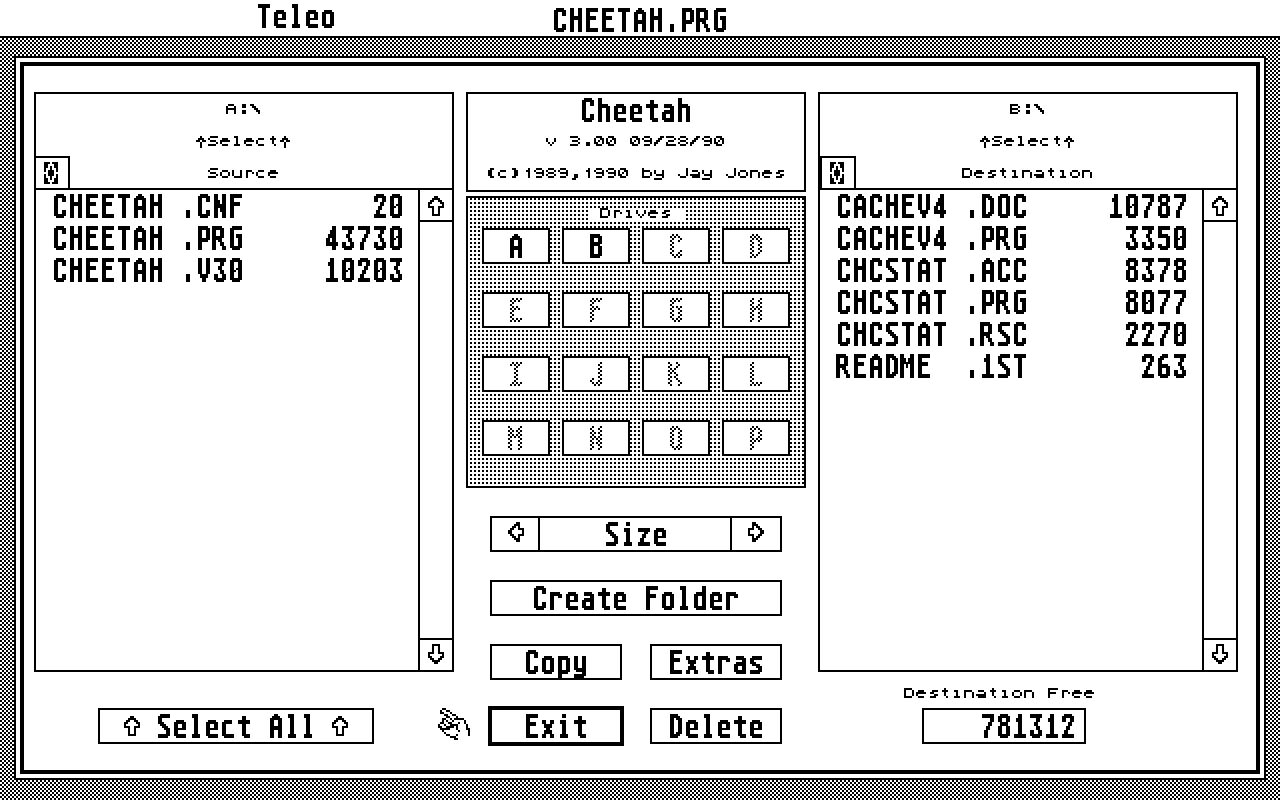
  Cheetah is designed as a high speed file copying utility. Hard Drive

users will find it the most useful, however it does fully support floppy

drives also. Effective transfer rates vary depending on the hardware and

the data being copied. Hard drive users can expect to see transfer rates

ranging from 6 to 14+ Mb/Min.


Selecting Paths:  There are two ways to select your source/destination

paths. One is to highlight the drive letter and click in the "Select Path"

boxes, the other is to double click the drive letter. When double
clicking, first the source then the destination will be selected. After
that, you can use normal double clicks to select source or hold down the
right button when double clicking to change destination. To go into a
folder, either double click it or highlight it and click in the "Select
Path" box.


Selecting Files:  Once both source and destination paths are selected,
files can be selected by clicking on them, or by holding down and
dragging. "Select all" will toggle all files on/off. Also see "Auto
Select" in the "Extras" menu below.


Extras Menu:  From this menu you can see buffer and mem free sizes, change

the file sort order, choose whether or not to display the performance
window after the copy, or go to either of the 3 submenus (Auto Select,
Free Space or Zero Drive).


Auto Select Menu:  This routine will go through the source path top to

bottom (as displayed) and select as many files as can fit into the

destination free space. All previously selected files are ignored. The

other items are for setting filtering of which files to select. The "File

Mask" and the two date fields are ignored if left blank.


Archive bit Sensitivity (In the Auto Select Menu):  To enable archive bit

sensitivity, highlight the "Archive bit sensitive" box. If this box is

selected, the select routine will take into account archive bit status

relative to the "Select when" option. If archive bit sensitivity is

enabled, the directories in the main menu will display archive bit status

by showing a ":" if the bit is on, and a "." if it is off. Any time the

archive bit sensitivity is enabled and a copy is performed, the bit status

of the copied files is changed in memory (ie: "Select when" set ON, all

copied files are set to OFF). If "Write Src Dir" is ON, the modified
source directory archive bit status will be saved to disk, otherwise it is
changed IN MEMORY ONLY and is lost when source paths are changed or you
exit the program.


Quick Keys:  From the main menu, there are several "Hot Keys" to get the

sub-functions quickly.

        ^A      Auto Select Menu

        ^F      Free Space

        ^Z      Zero Drive

        ^B      Toggle Folder Buffering On/Off


Aborting:  Copies can be aborted by pressing the UNDO key, the program
will then prompt you to verify the abort. This can be done during all but
the final stage of the copy.


Folder Buffering: If folder buffering is enabled the program will try to

load all copied folders into the main buffer. If you are having problems

with buffer size or errors try turning the buffering off to save memory.

DO NOT exceed 200 folders in a single copy with buffering on!


Note: If you are using a version of TOS less than 1.4 you may notice that
the double click is a bit slow. This is due to slow return times from the
AES. It may be easier with old TOS to make selections by using the path
select boxes at the tops of the file windows.


***********************        Warning        ***********************
  Cheetah does not use standard calls to its copying/deleting! This can
cause problems when you exit the program with GEM not being updated
properly as to the changes that have been made. Normally this is only a
problem if you are running some sort of caching program, and  can usually
be resolved by hitting ESC on the affected drives at the desktop. If you
are unsure as to whether GEM has been updated properly, play it safe,
REBOOT!


**********************************************************************

*                   Changes for ver 1.1 11/15/89                     *
**********************************************************************


Caching:

  Routines have been added when exiting Cheetah to force GEM to re-read
the disks even when caching programs are resident! These routines have
been tested with CACHExxx.PRG, HDACCEL.PRG, and ICD's v4.x.x booter, and
all seem to work fine. The ONLY thing that we have found that can still
cause a problem is if you have a window open into a folder, then delete
that folder from within Cheetah. If you have any problems, please let me
know.


File Size,Date,Time Display

  A new item has been added to the main menu. By clicking on the arrows
you can shift the display left or right through File Name, Size, Date
and Time. This can also be acomplished through pressing the left/right
cursor keys.


**********************************************************************

*                   Changes for ver 2.0 12/16/89                     *
**********************************************************************


Media Change:

  New routines have been added to force a media change on any drive that
is altered. This should help to eliminate the problem of having to reboot
to access a newly created folder etc.. Many thanks to Don for his hours of
work in developing and testing these routines. They have been heavily
tested and seem to work fine, however if for any reason you are having
problems getting the OS to recognize any changes that have been made,
reboot IMMEDIATELY!


Warm Boot:

  A new item has been added in the Extras Menu that allows you to
automatically trigger a warm boot whenever you exit Cheetah.


Sort Options:

  Sort Options have been moved into the Extras Menu. Since there is no
longer a seperate menu for these, ^S now brings up the entire Extras Menu.


Load/Save Config:

  Two new buttons in the Extras Menu now allow you to save all of your
settings out to a file, or load them back in at any time. All of your
on/off settings, Auto Select parameters and Source and Destination paths
are saved. At startup the program will automatically try to load the file
CHEETAH.CNF from the same path that the program was run, if it is not
found, defaults will be used.


Refresh:

  Hitting ESC from the main menu will force a complete refresh of both
source and destination paths.


Delete Originals:

  You are now asked for confirmation whenever you select to delete the
originals after a copy.


Byte Count:

  Displays the number of bytes selected in source directory. Note, this
amount does not take into account any folders that may be selected.


RAM Disks:

  RAM Disk compatibility has been increased. Cheetah should work fine now
with most popular RAM Disks.


**********************************************************************

*                   Changes for ver 3.0 09/28/90                     *
**********************************************************************


  BGM Compatibility: Cheetah now supports ICD's new BGM format for both
    source and destination drives. A different aglorithm had to be
    developed to support the non standard cluster sizes. This new routine
    optimizes the files as the are being copied. The new copy method can
    also be selected to be used when copying between standard partitions.
    Progress is also displayed during the copy.


  Main Display expanded: Main Menu now simultaneously shows filename
    and either size, date or time (saved in config). Previously you
    could scroll through filename, size, date or time, but only one
    was displayed at a time.


  Filename Conflict (Switchable): When the copy is initiated all
    conflicts are prompted with options to copy, skip this file or
    abort the copy. In earlier versions conflicting file names were
    just replaced without warning.


  "Not" mask in auto select: Two of the autoselect criteria (file and
    date masks) have been upgraded so that clicking on their titles
    toggles between selecting the files if the mask is true or false.


  Free space: This display has been expanded to show bytes used and free
space percentages as well as free and total. Also expanded the displays
for those really big hard drives and BGM partitions.


  Time Displays: All time displays have been converted to AM/PM format
instead of military format.


  Bug Fixes:    Found and fixed date display bug.

                Subdirectory links now being updated properly (For
                    what thats worth...).
                Free space calculations corrected (off by 2K in places).


Donations, Comments, Questions or Suggestions: Please write.


Jay Jones

PO Box 6563

Kent, WA 98031


or via modem at:


Super 68 BBS

F-Net Node 596

(206)859-9644

HST - PCP WASEA