

Atari ST - 1990
Bootblock
- Genre
- Tape / Disk / Cartridge Utility
- Year
- 1990
- Language
- Machine Language
- Publisher
- [no publisher]
- Controls
- Keyboard
- Distributor
- —
- Resolution
- Low
- Developer
- Fingerbobs
- ST Type
- ST, STe / 0.5MB
- Licensed from
- —
- Programmer(s)
- Buchanan, Andrew J.
- Country

- MIDI
- —
- Software
- English
- Version
- —
- Box/Instructions
- English
- Number of Disks
- 1 / Double Sided / HD Installable
- License
- PD / Freeware / Shareware
- Dump
- Download
- Serial
- —
- Dump format
- MSA
- Protection
- —
INSTRUCTIONS
BOOTBLOCK - Pre-Release Edition
-------------------------------

(c)1990 Fingerbobs


1. INTRODUCTION
---------------

This edition of the program allows
you to install any one of 8
bootsectors onto your own disks.

This is a Pre-release version, the
final version will include...

o Many more bootsectors ( approx 50 )
      Anti-virus Bootsectors
      Intro Bootsectors
      Utility Bootsectors
      Silly Bootsectors
o Full error checking
o Improved user interface

This version does no error checks
in the DMA code and so will think
it has written a bootsector even if
the write protect is on. Also selecting
drive B on a single drive system will
cause the program to hang.

Feel free to copy this program to
all your friends/contacts.
Please ensure that this document
is included whenever you make
a copy.


2. USE
------

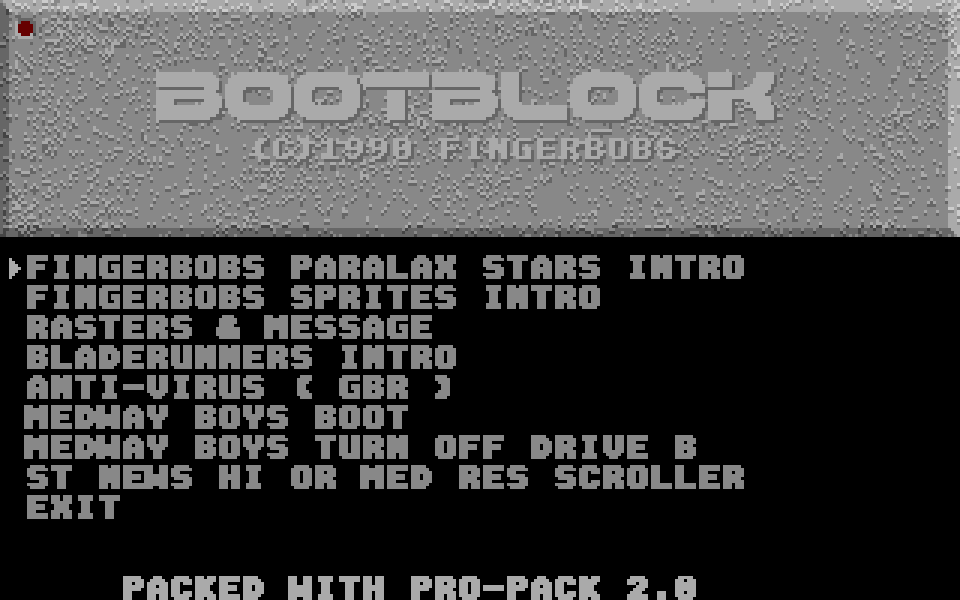
To start the program simply double
click on the program file BOOT.TOS.

You will be presented with the main
menu.

Use the cursor up and down keys to
move the selection arrow and press
return when the arrow rests at the
option you wish to select.

When a bootsector has been selected
a short page of information about
the bootsector will be displayed.
To carry on just press the space
bar.

Now the installation menu appears.
Selecting CANCEL will move back to
the main menu.

a)ENTER TEXT. (Some Bootsectors only)
  This allows you to enter the message
  text for the bootsector.
  Each bootsector has its own length
  of message, and the program will
  take care of this automatically by
  telling you how many characters you
  may input. Return terminates a
  string.
b)WRITE TO DRIVE A.
  This copies the bootsector to
  drive A
c)WRITE TO DRIVE B.
  This copies the bootsector to
  drive B

When writing the bootsector, please wait
until the drive light and the light
on the screen ( top lefthand corner ) are
extinguished before removing the disk
or pressing a key.

N.B After a bootsector writing session
the desktop may be confused. To ensure
the windows are correct, close all
windows and then re-open them.

THE BOOTSECTORS:

1)FINGERBOBS PARALLAX STARS
  This bootsector displays 3 layers of stars
  ( 120 stars total ) for 8 seconds.
  A 36 character message is displayed in
  the centre of the screen.

2)FINGERBOBS SPRITES
  This bootsector displays 16 16x16 single
  plane sprites on the screen until a
  key is pressed.

3)RASTERS & MESSAGE
  This displays a ( 28 character ) message
  down the screen several times.
  It rolls up several raster bars onto the
  screen, waits for a keypress and then
  rolls them off again.

4)BLADERUNNERS INTRO
  This shows a 17 character message in the
  centre of the screen. And does a really
  cool raster-trick! Watch & see!

5)ANTI-VIRUS ( GBR )
  This is the anti-virus which beeps and
  flashes when it detects that there may
  be a virus on a disk. It does however
  think that EVERYTHING with an exec
  bootsector is a virus, so it can be a
  pain in the butt!

6)MEDWAY BOYS BOOT
  This just prints "VIRUS FREE" and is
  a reassuring message to have on a disk!

7)MEDWAY BOYS DRIVE B OFF
  This bootsector turns off drive B if
  you have one. (Limited practical use!)

8)ST NEWS BOOTSCROLLER
  This bootsector will work on all ST's
  i.e Mono and Colour. It reads in the
  file a:\boots.txt and scrolls it
  across the top of the screen until
  a key is pressed


3. END
------


23/5/90