

Atari ST - 1989
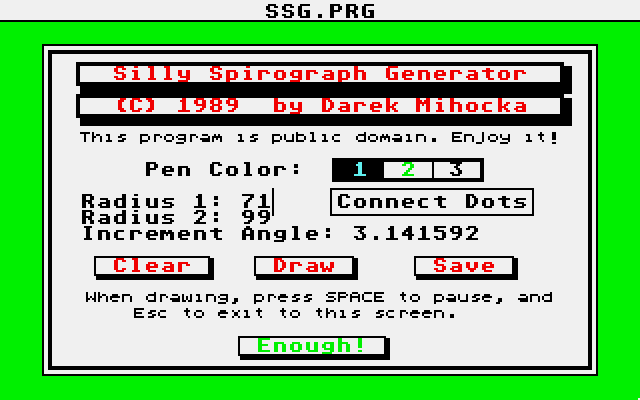
Silly Spirograph Generator
- Genre
- Graphics - Miscellaneous
- Year
- 1989
- Language
- [unknown]
- Publisher
- [no publisher]
- Controls
- Mouse
- Distributor
- —
- Resolution
- Low / Medium / High
- Developer
- [n/a]
- ST Type
- ST, STe / 0.5MB
- Licensed from
- —
- Programmer(s)
- Mihocka, Darek
- Country

- MIDI
- —
- Software
- English
- Version
- —
- Box/Instructions
- English
- Number of Disks
- 1 / Double Sided / HD Installable
- License
- PD / Freeware / Shareware
- Dump
- Download
- Serial
- —
- Dump format
- MSA
- Protection
- —
INSTRUCTIONS
Silly Spirograph Generator
==========================

(C) 1989 by Darek Mihocka


Hi folks! Ready to kill some time? Double click on SSG.PRG in any
resolution. Select the pen color, the gear ratios, and the step
angle, and click on the "Draw" button. When you get bored, press
the ESC key. If you like the pattern that is generated, click on
the "Save" button and type in a file name. The file format used is
DEGAS compatible.

This program in no way attempts to perfectly emulate a Spirograph
set. The gear ratios, labeled "Radius 1" and "Radius 2" can range
in any value from 1 to 99. The step angle determines how fast the
two "gears" are moving. A small step angle (less than 5 degrees)
will produce smooth curves, whereas a larger angle will produce
choppier images. Very large angles (1000000 or so) will produce
_very_ bizzare results. Try it!

By default, the patterns are generated as a series of dots. The
"Connect Dots" option will draw straight lines between the points.

You can repeatedly change pen colors, angle, and the radiuses so that
the different patterns get overlayed. To wipe the image clean, click
on the "Clear" button.

Any pattern can be determined uniquely by the 2 radiuses and angle,
so if you come across any interesting patterns, let me know!

Darek Mihocka
Compuserve: 73657,2714
BIX, Delphi, GEnie: DAREKM