

Atari ST - 1990
GIFcolor & GIFscale
- Genre
- Graphics - Miscellaneous
- Year
- 1990
- Language
- [unknown]
- Publisher
- [no publisher]
- Controls
- Keyboard
- Distributor
- —
- Resolution
- Low
- Developer
- Brain~Waves Freeware Group
- ST Type
- ST, STe / 0.5MB
- Licensed from
- —
- Programmer(s)
- Steger, Robert / Barnhardt, Robert
- Country

- MIDI
- —
- Software
- English
- Version
- —
- Box/Instructions
- English
- Number of Disks
- 1 / Single Sided
- License
- PD / Freeware / Shareware
- Dump
- Download
- Serial
- —
- Dump format
- MSA
- Protection
- —
INSTRUCTIONS
 ==============================================================================
 ==   GIFcolor & GIFscale :  Two Very Fast GIF Viewers For Colour Systems.   ==
 ==             Robert Barnhardt & Robert Steger, November 1990.             ==
 ==============================================================================
 ==                          Files In This Archive                           ==
 ==                         """""""""""""""""""""""                          ==
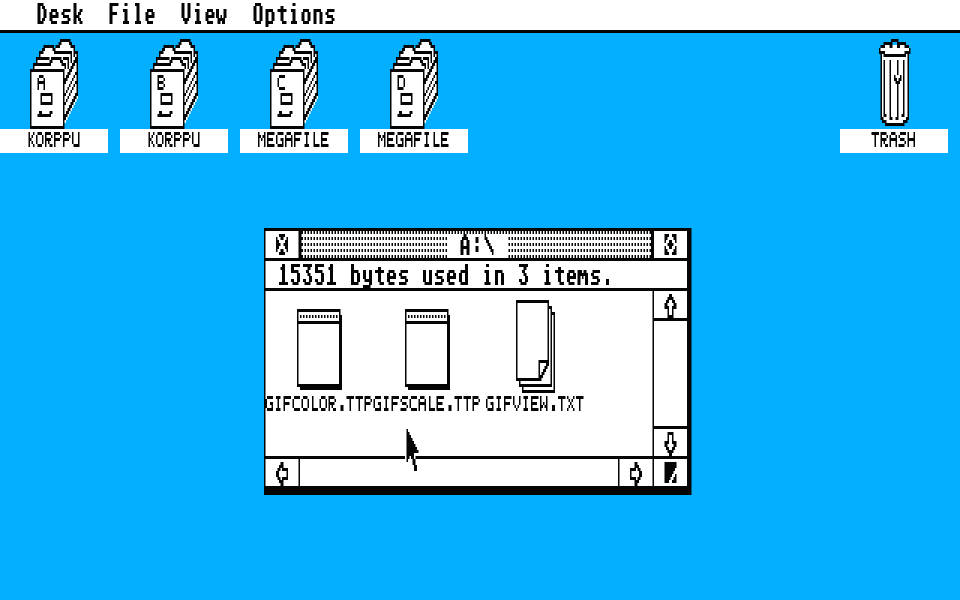
 == GIFcolor.TTP - Viewer #1, uses the 16 most popular colors in the image.  ==
 == GIFscale.TTP - Viewer #2, maps the image to gray and tinted scales.      ==
 == GIFview.TXT  - This text file.                                           ==
 ==============================================================================
 ==             GIFcolor and GIFscale are, of course, freeware.              ==
 ==   The programs in this archive are (C) 1990 Brain~Waves Freeware Group.  ==
 ==  GIF (Graphics Interchange Format) is (C) 1987 CompuServe, Incorporated. ==
 ==============================================================================

Why Another GIF Viewer? (2, even!)
"""""""""""""""""""""""""""""""""""
     In the manner of most of the programs we write, these GIF viewers were
  not conceived, planned, or developed in any sense of the word; rather, they
  came into being virtually overnight, much like a pimple.  It was quite a
  surprise, then, when a use became apparent for them.

     Most everyone keeps their GIFs on floppies, and these disks are often
  quite full, correct?  If we could develop these viewers into TTP programs
  that could be "Installed Applications", they would be ideal in this
  situation.  Strangely, we actually did this, and so you hold in your hands
  two of the smallest, fastest GIF viewers for the ST.  (Ooooh.)


So, What Do I Do With Them?
""""""""""""""""""""""""""""

  Method One
  """""""""""
     From the desktop, double-click on either of the viewers, and a parameter
  line should appear.  Here's where you tell the viewer what GIF(s) you wish
  to view by means of a path-and-file-specification string.  I'll spell it out
  for you with a few examples.

     Multiple
     """"""""
          *.GIF               Views all GIFs in the current directory
          A:\*.GIF            Views all GIFs in the root dir. of drive A.
          A:\GIF\*.GIF        Views all GIFs in the \GIF folder on drive A.
          C:\A*.GIF           Views all GIFs in the root dir. of drive C
                               that begin with the letter "A".

     Single
     """"""
          YAWN.GIF            Views "YAWN.GIF" in the current directory.
          C:\SNOOZE.GIF       Views "SNOOZE.GIF" in the root dir. of drive C.
          D:\GIF\BORING.GIF   Views "BORING.GIF" in the \GIF folder on drive D.

     Um, at least I hope all of those would work...

  Method Two
  """""""""""
     Make either viewer (not both!) an "Installed Application" for file type
  GIF.  For those who don't know, here's a little explanation of how to perform
  this.

     Click once on one of the viewers from the desktop, thereby highlighting
  it.  Go up to the Options menu, and select "Install Application...".  Set
  the "Document Type" in the dialog box that appears to "GIF", click on the
  OK button, and you're all set.  You may now double click on a GIF picture
  from the desktop, and the GIF utility that you have installed will load
  and view that GIF with no further work on your part.

     If you decide that you like the utility installed, arrange the desktop
  in a manner that's visually appealing to you.  This will probably be futile,
  so when you decide that the desktop can't look good, select "Save Desktop"
  from the Options menu.  From now on, if you boot your computer with that
  disk in the drive, the utility of your choice will be "Installed".


So, The Picture's Loaded...
""""""""""""""""""""""""""""
     If you loaded a GIF picture from floppy, you will have seen a title screen
  that briefs you on the various keys active (holding ALTERNATE will keep the
  screen up, in case you're not a speed reader).  This title screen will not
  appear if a picture is loaded from any drive other than A or B (i.e. a
  hard drive or ramdisk) for speed reasons, but if you'd like to see it in
  this situation, simply hold down alternate while the GIF viewer is loading.

            0                 Selects true grey palette (GIFscale only).
          1 to 6              Selects tinted palettes (GIFscale only).
          ARROWS              Scroll around picture, if larger than screen.
            S                 Save palette and screen as a DEGAS PI1.

   ENTER, SPACE, RETURN       Next picture (exit, if viewing one picture).
        UNDO, ESC             Exit (abort multi-view, if applicable).


Not Like I Care, But How Do They Work?
"""""""""""""""""""""""""""""""""""""""
     GIFscale allocates memory for the picture to be decompressed to, and then
  allocates as big a file buffer as is possible.  The GIF palette is converted
  to a luminance value from 0 to 15 (black to white), and the entire picture is
  decompressed and drawn according to these luminance values.  Rarely looks
  better than GIFcolor, but hey... variety is the spice, right?

     GIFcolor is a bit more complex.  After allocating buffers like GIFscale,
  GIFcolor decompressed the entire picture (unconverted) to memory.  While it
  is being decompressed, a table of "popularity" values is being updated to
  reflect how often each color in the GIF palette is being used.  When this
  stage is complete, GIFcolor then picks the 16 most popular colour from the
  GIF palette and maps the rest of the colours in the palette to these colours.
  Finally, the image is drawn with the calculated palette and lookup tables.

     Neither of these programs has been optimized in the least.  Actually,
  we're afraid that if we return to them, we won't have a clue as to what we
  did.  Nevertheless, they will certainly be fixed up and upgraded in the
  future.  We've got to clean up the source for both, add comments, change
  rudely named labels and so forth, but if you'd like the source, just get in
  touch.  Free, of course... the day we write something worth selling, we will.

     For anyone who's interested, our next (minor) project is a GIF to LowRez/
  Spectrum converter using RGB dithering (Burkes error dispersion).  This will
  look much better and work much faster than most anything else I've seen.


Finally, The Cold, Hard Facts...
"""""""""""""""""""""""""""""""""

 Picture           Resolution    =  BGIF  ViewGIF  FastGIF  GIFscale  GIFcolor
===============================================================================
 BLIZZARD.GIF      320x200x32    =  1:07    37       10        6         6
 DRAGEGG.GIF       320x200x256   =  1:00    31        9        5         5
+MICKEY.GIF        640x400x16    =  ----   1:37     ----      11        11
*MONALISA.GIF      640x480x256   =  ----   ----     ----      20        20
===============================================================================
 Program Size (+ RSC, if appl.)  =  29600  82640    32215    3108      3070
===============================================================================
       + BGIF and FastGIF could not view MICKEY.GIF with 512K of memory.
 * BGIF, ViewGIF, and FastGIF could not view MONALISA.GIF with 512K of memory.

     This is not meant to demean any of the other programs in the table, but
  merely to show that our programs do have a niche to fill.  Time measurement
  began at the moment the programs began to load the GIF (from floppy) and
  ceased at the instant the picture was completely displayed.


That's It?
"""""""""""
     Well, yeah... what did you expect?  One warning: there is no support for
  multiple images or local colour palettes in this issue of GIFcolor and
  GIFscale.  If someone can provide us with an image that doesn't work with
  either of these viewers, the problem (unless it's with the picture) will
  be corrected.  If you have questions, comments, bug reports, or practically
  anything worth relating, contact us in one of the following ways.

     We'd like to hear some suggestions as to what sort of programs you'd like
  to see written for the ST, so we won't write any useless trash.  (Too late?
  Ha ha, very funny...)

          CompuServe:    73707,533

          Phone     :    (416)/871-3868, the later, the better.

          Address   :    Brain~Waves Freeware Group
                         619 Central Ave
                         Fort Erie, Ontario
                         CANADA  L2A 3V6

     In keeping with the holiday spirit, hello to Matt Rubelj, John Spirko,
  Sandra ?, and company.  Have a merry Christmas and a happy new year
  everyone, and take care.

                                                     Robert Barnhardt
                                                     Robert Steger