

Atari ST - 1991
DC Max Track
- Genre
- Tape / Disk / Cartridge Utility
- Year
- 1991
- Language
- Machine Language
- Publisher
- [no publisher]
- Controls
- Mouse
- Distributor
- —
- Resolution
- Low / Medium / High
- Developer
- Double Click Software
- ST Type
- ST, STe / 0.5MB
- Licensed from
- —
- Programmer(s)
- Gerdes, Keith
- Country

- MIDI
- —
- Software
- English
- Version
- 1.0
- Box/Instructions
- English
- Number of Disks
- 1 / Double Sided / HD Installable
- License
- PD / Freeware / Shareware
- Dump
- Download
- Serial
- —
- Dump format
- MSA
- Protection
- —
INSTRUCTIONS
DC MAX TRACK v1.0 (FREEWARE)

DC MAX TRACK v1.0 is Copyright (c) 1990 Double Click Software

Program by Keith Gerdes and Michael B. Vederman

You may copy and distribute this program freely just so long as you do not
charge for it, or alter the contents of the program or documentation.

=============================================================================

Have you ever wondered how many tracks your floppy disk drive can format?

Wonder no more, DC MAX TRACK will tell you how many tracks your floppy disk
drive can handle.

============
INSTALLATION
============
No installation required.  DC MAX TRACK comes fully prepared from the factory.

==================
USING DC MAX TRACK
==================

>To use DC MAX TRACK, do this:
------------------------------

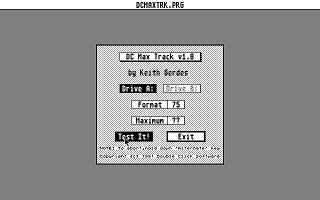
1) Execute DCMAXTRK.PRG from the desktop.  You will be presented with a
   dialog box containing the following buttons and displays:

   DRIVE A: - selects testing of drive A:
   DRIVE B: - selects testing of drive B:
   Test It! - begin testing the designated drive

   Maximum - displays the maximum number of tracks on the disk thus far
   [Operation] - displays FORMAT, WRITE, VERIFY of current track during test

2) Click on the appropriate drive select button.

3) Click on TEST IT! to begin testing.

   NOTE: Make sure you insert a floppy disk in the drive you want tested.
         This floppy will get formatted and written to from track 75 and
         up for the testing.

4) The current track being FORMATTED, WRITTEN and VERIFIED will be displayed.
   The maximum tracks on the floppy will be displayed directly below.

5) When testing is done, you will see the maximum number of tracks this
   floppy disk drive can format.

   NOTE: This number represents the maximum tracks, not the maximum track
         number (84 tracks = tracks 0-83).

DISCLAIMER: Double Click Software can not be responsible for any consequential
damages caused to your disk drive by using this program.  (We haven't run
into any troubles, but your disk drive might be sensitive.)

100% Assembly

==================
COMMENTS WELCOME
==================

As usual, we would be EXTREMELY glad to hear your comments and suggestions
for enhancements to this and any other of our programs.

- mike and keith

We can be reached at:

Voice:  (713)977-6520

Online:

The DC BBS: (713)944-0108   / 300-1200-2400 baud / 24 hrs
GEnie:      DOUBLE-CLICK (CATegory 30)
CompuServe: 75300,577 (go ATARIVendors, area 13)
Usenet:     uace0@menudo.uh.edu