

Atari ST - 1988
Animate
- Genre
- Graphics - Animation
- Year
- 1988
- Language
- [unknown]
- Publisher
- [no publisher]
- Controls
- Keyboard / Mouse
- Distributor
- —
- Resolution
- Low
- Developer
- [n/a]
- ST Type
- ST, STe / 0.5MB
- Licensed from
- —
- Programmer(s)
- Hudson, Tom
- Country

- MIDI
- —
- Software
- English
- Version
- 4
- Box/Instructions
- English
- Number of Disks
- 1 / Double Sided / HD Installable
- License
- PD / Freeware / Shareware
- Dump
- Download
- Serial
- —
- Dump format
- MSA
- Protection
- —
OTHER VERSIONS WITH THE SAME TITLE (1)
INSTRUCTIONS
ANIMATE4

(c) 1988 by Tom Hudson
Program & Documentation
by Tom Hudson

This is a Public Domain utility.

ANIMATE4.PRG is the fourth generation
animation display program for the
CYBER family of products:

CYBER STUDIO
CYBER CONTROL
CYBER PAINT
CYBER VCR and
CYBER SCUUULPT

This program will display delta-file
AND sequence animations,
created either by CYBER PAINT in
.DLT or .SEQ format, or CYBER
STUDIO/CONTROL in .DLT format.
Delta files (with initial.PI1 files
and data files with a .DLT extender)
take up morespace on disk than
sequence files (composed of only
file file, which takes up about
30-40% less disk space than a
comparable .PI1/.DLT combination).
Sequence files take up the same amount
of space in memory as delta files,
however.

This version of ANIMATE will also
display all color-palette
changes in .SEQ files created with
CYBER PAINT 2.0, and no longer
uses the double-buffering command of
the previous animation programs.
(The buffering is now automatic, and
very fast.)


To display .DLT files, click on the
.DLT button in the custom
file selector.  Likewise, to display
.SEQ files, click on the .SEQ button.

Disk drives may be altered with the
drive-letter buttons.  Paths
may be moved through with the "Back"
and Reread" buttons.

As with my previous animate programs,
there are 2 operating modes:
Batch and manual.  Animations can be
run in sequence from a hard disk
and/or floppy drives in batch modes,
with chained animation files
easily accomodated.  NOTE:  You can
only chain delta files --
sequence files are NOT chainable.


MANUAL MODE

The manual mode is invoked by simply
double-clicking on the
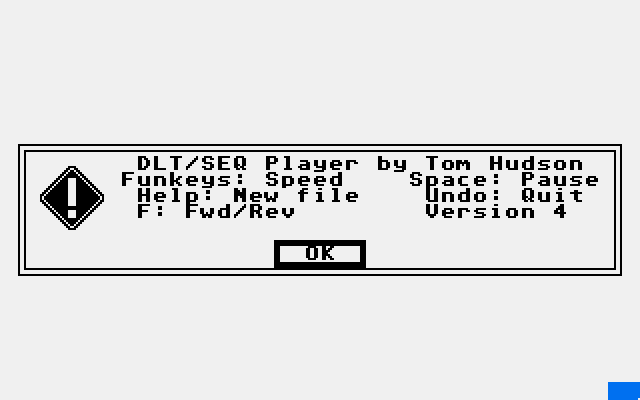
ANIMATE4.PRG icon.  The program will
display help information
-- take some time to read it for the
basic commands such as (F)orward, etc.
Click on OK, and you will be presented
with my new file selector.

Loading Delta Files:

Select the delta file you want to run
(it can be either stereo or
monoscopic).  The program will load
the delta file and its associated .PI1
file (L_ and R_ versions, if the
animation is in stereo).  It will ask
if you have more delta file sections
(this will only happen if you chained
the animation), click on the
appropriate button.  If there are more
delta files, the file selector will
reappear, and you must select the name
of the chained delta file.

After all delta files are loaded, the
program will start animation.

Loading Sequence Files:

Click on the .SEQ button, and the
sequence files on the disk will
be displayed.  Select the sequence file
you want to run (sequence
files can only be monoscopic).  The
program will load it and begin running
automatically.  Press the F key to turn
Ping-pong mode on or off.


BATCH MODE

The animator program will run in a
batch mode for continuous
demonstrations of animations.  This is
done through the use of a run
control file, which has the extension
.RUN.  To work properly, the
ANIMATE4.PRG program must be installed
via the "Install application"
selection on the desktop.  Install
ANIMATE4.PRG as a GEM application
with document type RUN.

To execute the animator in batch mode,
just double-click on the
appropriate .RUN file.

The .RUN file format is discussed after
the keyboard command section.


KEYBOARD COMMANDS

Once you have an animation sequence
running, the following keys are
operational:

F1-F10 -- Control the speed of the
animation from slow (F1) to fast
(F10).  Default speed is F6.

Help -- Aborts the animation and
displays the file selector for a new
animation in both batch and manual
modes.  Changes to manual mode if
running in batch mode.

Undo -- Quits the program, returning
to the desktop.

F -- Toggles the animation direction
from forward-only to a forward-reverse
ping-pong effect.  Default is
forward-only.

Space bar -- Pauses and single-steps
the animation.  Press any other
key to resume normal operation.

Alt-L -- Locks the keyboard to prevent
tampering during demonstrations,
no keys will have any effect.
Press Alt-L again to unlock the
keyboard.


.RUN FILE FORMAT

The .RUN file is a simple text file,
which can be created with any text
editor or 1st Word.  Each line has
the following format:

PATH,FILE,MORE[,FWDBAK,BUFFER,
SPEED,TIMES]

PATH -- Drive and path of animation
delta file or sequence file, may
be upper or lower case.  Example:
A:\ANIMATIONS\

FILE -- Filename of animation delta
file, in upper or lower case.
Example: CARGO.DLT.  If it is a
sequence file, the example would
be CARGO.SEQ.

MORE -- Indicates whether or not there
are more delta files to be
chained to this one.  Enter Y if there
are more, or N if there are not.
May be upper or lower case.  If the Y
is entered, the next line contains the
filename of the next delta file
in the chain, and the extra parameters
on this line are not used.  Any number
of files may be chained.  For sequence
files, use an N.

FWDBAK -- Indicates whether the
animation should be run forward only
(F) or forward/reverse (R).  May be
upper or lower case.  Not used if
the file has more delta files
chained to it.

BUFFER -- This parameter is no longer
used in ANIMATE4.PRG, but should be
included for compatibility with older
programs. Simply include a B in
this slot.

SPEED -- Indicates the speed at which
the animation should be run.
Values range from 0-9, corresponding
to function keys F1-F10.

TIMES -- The number of times the
animation is to be run before going to
the next animation.  In
forward/reverse mode, this is the
number of complete forward/reverse
cycles; in forward mode, it is the
number of normal animation cycles.
ŠA value of 9999 indicates to run the
animation forever, until HELP or UNDO
is pressed.  Use 9999 when you're
creating a .RUN file that will be
used to load one animation from a
floppy disk and display it forever.

Example batch files:

b:\,cargo.dlt,n,f,b,8,9999

Runs the CARGO animation forward at
speed 8, forever.


c:\animate\,hollow.dlt,y
c:\animate\,hollowb.dlt,n,f,b,9,9999

Runs the two-part HOLLOW animation
(HOLLOW.DLT and HOLLOWB.DLT, in the
ANIMATE folder on drive c:) forward
at speed 9, forever.


a:\,bounce.dlt,n,r,b,7,20
b:\,atari.dlt,y
b:\,atarib.dlt,n,f,b,9,25

Runs the BOUNCE animation from drive
A: 20 times in forward/reverse
mode at speed 7, then runs the
two-part ATARI animation
(ATARI.DLT and ATARIB.DLT) from drive
B: 25 times at speed 9 forward.  When
the ATARI animation is complete,
operation resumes with BOUNCE again
and continues until HELP or UNDO
is pressed.

a:\tutorial\,tesla.seq,n,f,b,9,9999

Runs the TESLA animation on the CYBER
PAINT disk forward, at speed 9,
forever (or as long as the hardware
holds out, whichever comes first).