

Atari ST - 1990
Address Book
- Genre
- Database / Spreadsheet
- Year
- 1990
- Language
- GFA BASIC
- Publisher
- [no publisher]
- Controls
- Mouse
- Distributor
- —
- Resolution
- Medium
- Developer
- —
- ST Type
- ST / 0.5MB
- Licensed from
- —
- Programmer(s)
- Noble, Cy
- Country

- MIDI
- —
- Software
- English
- Version
- —
- Box/Instructions
- English
- Number of Disks
- 1 / Single Sided
- License
- PD / Freeware / Shareware
- Dump
- Download
- Serial
- —
- Dump format
- ST
- Protection
- —
ADDITIONAL COMMENTS
Source code included
INSTRUCTIONS
      Address  Version 1.2

       This is meant to be a shareware program. That means if you
find the program useful and use it regularly then a contribution
of œ5 is expected from you. Contributors will recieve the latest
version of the program and a listing to play with in case you want
to tailor the program. Please report any bugs you find but don't
expect to find any. I haven't -


       Please feel free to distribute it among your friends but be
sure the three files are all together.

       Phone.adr is a sample file with my name and address

       Address.doc is what you are reading

       Address.prg is the compiled machine code version ( GFA
3.5 Version ) and is clickable from the desktop. It only works
in medium or hi res. and is menu driven throughout. Just click
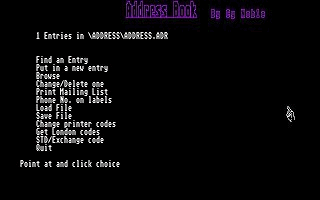
on the option you require.

     The first thing to do is run the address.prg (med.res) &
load in the phone.adr file. This has just one entry - mine. Click
on the 'Find an entry' option and type a space & RETURN. It will
come up with my name & address and ask you if you want to do a
label. Put a label in your switched on printer and hit 'Y'. Put
the resulting label on an envelope with a œ5 note in it and post
it. You will get a disc with the complete listing of the program
for you to play with...

       You can keep as many files of names & addresses as
required but the maximum number of entries is 500 per file.
You may want to keep friends in one file, business addresses in
another etc. Or you may want to keep records of other things
... it's up to you. Bear in mind that the whole file is loaded
into memory so finding entries is very fast but the bigger the
file the longer the loading time. Also GFA 3 is much faster
at file loading than earlier versions.

       To find entries the clue required is any sequence of
characters known to be in the file. Ba would find all the
entries 'barbara,barbados,malabar ...'. As all entries are
capitalised when you first put them in it doesn't matter what
case you type in.

       To make single labels remember the FIRST FOUR lines of the
entry are printed.*** Just hit 'Y' when asked if a label is to be
printed, but make sure the printer is connected and on line.

       You can also select entries to save in a plain ASCII
file via the "File Save/Load" menu. This is in order to be
able to use them in a Word Processor document. This option
only saves the first four lines as printed on a label.

       When making new entries you will be asked if the entry
is to be put on the mailing list. If 'Y' then that entry (and
all those others with a 'Y') will be printed, so make sure you
have enough labels ready. Very handy at Xmas time.

       I use the program regularly and have not
found any that I haven't fixed.

       Enjoy ...

       Cy Noble
       323 North Circular Rd.
       Palmers Green
       London N13 5JH
       England

       July 12 1990
     There is now a new option in the Menu for finding the London
dialling code for any London exchange. Where it used to be O1 for
London it is now either O71 or O81, depending on the exchange you
are calling. Enter the exchange code and the appropriate code is
returned.

       August 7 1990
     Another new option on the menu - this one will find the
exchange code from the name of the exchange name or the exchange
name from the exchange code. For any exchange in the U.K.

***    Sept 25 1990
     Another new option on the menu - this one will allow you to
print the phone number on the label as a fifth line. Do not adjust
the label spacing in the printer codes - it's taken care of.