

Atari ST - 1991
ABFormatter
- Genre
- Tape / Disk / Cartridge Utility
- Year
- 1991
- Language
- Modula-2
- Publisher
- [no publisher]
- Controls
- Mouse
- Distributor
- —
- Resolution
- Medium / High
- Developer
- [n/a]
- ST Type
- ST, STe / 0.5MB
- Licensed from
- —
- Programmer(s)
- Hungerford, G.
- Country

- MIDI
- —
- Software
- English
- Version
- —
- Box/Instructions
- English
- Number of Disks
- 1 / Double Sided / HD Installable
- License
- PD / Freeware / Shareware
- Dump
- Download
- Serial
- —
- Dump format
- MSA
- Protection
- —
INSTRUCTIONS
    ABFormatter:                             (c) 1991 Gregg Hungerford


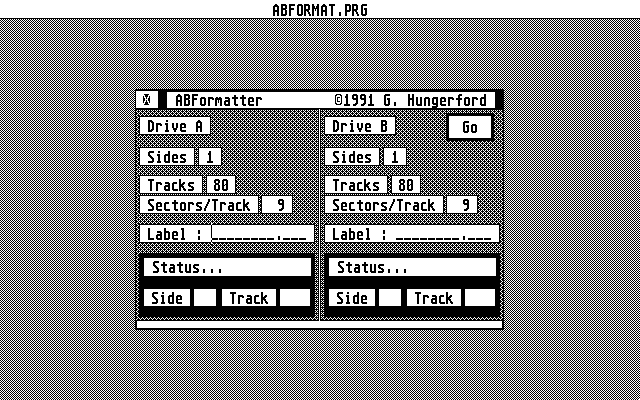
    ABFormatter is a floppy disk formatter for 1 or 2 floppy disk
   drives. As ABFormatter is in itself a multitasking program, both
   drives are formatted independently of each other and don't re-
   quire the same set up. Non-critical bad sectors are mapped out
   of the File Allocation Tables.

   ABFormatter is run from one central dialog box with identical
   controls for each disk drive.


                            OPTIONS:


    Selecting Drives:
      Toggle which drives are to be formatted by clicking directly
      on the buttons marked "Drive A" and "Drive B". IF you only have
      one floppy, you may only format Drive A (Drive B will be dis-
      abled).


    Sides:
      Click directly on the current number of sides to toggle.
      NOTE: As a one sided floppy drive can't announce it's
            one sided-ness, you will run into problems if you
            attempt to format a disk as double sided on a one
            sided drive.


    Tracks:
      Click directly on the current number of tracks to toggle
      the total number of tracks (80-83).


    Sectors/Track:
      Click directly on the current number of sectors per track
      to toggle between 9 or 10 sectors per track.


    Label:
      If a label is entered, it will be written to the disk
      directory.


    Go:
      Click on this button (or press ) to begin the
      format process.
      NOTE: If both drives are disabled, very little will happen...
            If a disk is write protected you will be given a couple
            chances to correct the problem without aborting that
            disk format operation.


    Let Me Out Of Here:
      That little button in the upper lefthand corner of the
      dialog box. Aborts the program. Say g'night, Gracie.


    Status Box:
     The status box will inform you of the progress of each
     format operation. You will be informed whether the format
     was good or if the disk was unusable.


                            SHAREWARE:

   This program may be freely distributed as long as this doc
   file (ABFORMAT.DOC) is included. If you use this program and
   wish to encourage more programs of this nature, please send
   a $5.00 donation to :

                        G. Hungerford
                          1718 Ocala Ave. #117
                            San Jose, Ca. 95122


Developed using TDI Modula-2/ST