

Atari ST - ST Format - 1995
Team
- Genre
- Sports - Soccer
- Year
- 1995
- Language
- Machine Language
- Publisher
- ST Format
- Controls
- Joystick / Jagpad / Keyboard
- Distributor
- Future Publishing
- Players
- 1 / 1 vs. 2 / Demo
- Developer
- [n/a]
- Resolution
- Low
- Licensed from
- —
- Programmer(s)
- Lovesy, Ralph
- Country

- Graphic Artist(s)
- Daue-Vienne, Jocelyne
- Software
- English
- Game design
- Lovesy, Ralph
- Box/Instructions
- English
- Musician(s)
- Lovesy, Greg
- License
- Game Demo or Preview - Commercial
- Sound FX
- Lovesy, Ralph / Lovesy, Greg
- Serial
- —
- Cover Artist(s)
- —
- ST Type
- STe Only, Falcon030 / 1MB
- MIDI
- —
- Version
- [preview]
- Dump
- Download
- Number of Disks
- 1 / Double Sided
- Dump format
- MSA
- Protection
- —
OTHER VERSIONS WITH THE SAME TITLE (1)
OTHER VERSIONS WITH A DIFFERENT TITLE (1)
INSTRUCTIONS
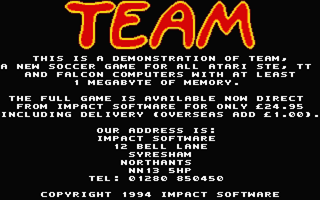
Team demonstration
(c) 1994 Impact Software
All Rights Reserved


DISTRIBUTION:

This demonstration may be freely copied
and   distributed  as  long  as   these
conditions are complied with:

The    files    TEAM.PRG,     TEAM.DAT,
IMPACT.DAT   and   READ.ME   are    all
included;

No alterations are made to the  program
or any of the files;

No  charge is made for the  demo  apart
from the disk copying fee.


DISCLAIMER:

The  program is supplied on an "as  is"
basis  with no warranty,  so we do  not
accept   any  responsibility  for   any
consequences resulting from the use  of
this program.


TECHNICAL REQUIREMENTS:

This  demonstration works on any  Atari
STE  or Falcon computer with  at  least
1 Megabyte of RAM and supports  RGB/VGA
monitors  and colour TV.  On  the  Mega
STE, run in 16 Mhz with no cache.

To install onto a hard disk,  copy  the
entire  TEAM folder and run  as  usual.
The demo will only run if all the files
are in the same directory.


SCREEN DISPLAY:

In order to obtain the largest possible
display,  adjust  your monitor so  that
the width is as large as possible,  and
change the height of the screen so that
you can see the entire play area.

Should  you  be unable to  adjust  your
monitor,  or your monitor is unable  to
display  the  entire  screen,  you  can
toggle OverScan mode on/off by pressing
the "O" key during the game.


CONTROLS:

This demonstration supports a  joystick
in  port 1,  the keyboard (cursor  keys
and  left shift) or an  Atari  Powerpad
(Jaguar controller) in port A.

Press  "P"  to pause and  "O"  to  turn
OverScan on/off.


COMMENTS:

Feel free to contact us if you have any
comments or suggestions regarding Team;
let us know what you think!

Our address is:

Impact Software
12 Bell Lane
Syresham
Northants  NN13 5HP
United Kingdom

Telephone: 01280 850450


(c) 1994 Impact Software
TRIVIA (3)
Sound
Features digitized title soundtrack at 50KHz (stereo)
Features digitized menu soundtrack at 50KHz (stereo)
Features digitized sound fx at 12.5KHz
Features digitized menu soundtrack at 50KHz (stereo)
Features digitized sound fx at 12.5KHz
Graphics
Features up to 26 colours on-screen simultaneously (in-game)
Features overscan (in-game)
Features overscan (in-game)
Hardware
Supports Blitter
Supports STe DMA sound
Supports STe palette
Supports STe hardware scrolling
Supports STe DMA sound
Supports STe palette
Supports STe hardware scrolling
BOOK / MAGAZINE REVIEWS (5)
STart Micro · Septembre, 1994Rating: 8.5/10
ST Format · December, 1994Rating: Preview
ST Magazine · Juillet, 1995
ST Format · January, 1995Rating: Preview
ST Format · July, 1995Rating: 94%