

Atari ST - 1994
Patience
- Genre
- Cards - Solitaire
- Year
- 1994
- Language
- [unknown]
- Publisher
- [no publisher]
- Controls
- Mouse
- Distributor
- —
- Players
- 1
- Developer
- ?
- Resolution
- Low / Medium / High / VGA / RGB
- Licensed from
- —
- Programmer(s)
- Müller, Markus
- Country

- Graphic Artist(s)
- Müller, Markus
- Software
- German
- Game design
- Müller, Markus
- Box/Instructions
- English / German
- Musician(s)
- [n/a]
- License
- PD / Freeware / Shareware
- Sound FX
- [n/a]
- Serial
- —
- Cover Artist(s)
- —
- ST Type
- ST, STe, STe Enhanced, TT, Falcon030 / 1MB
- MIDI
- —
- Version
- 1.0
- Dump
- Download
- Number of Disks
- 1 / Double Sided
- Dump format
- MSA
- Protection
- —
INSTRUCTIONS
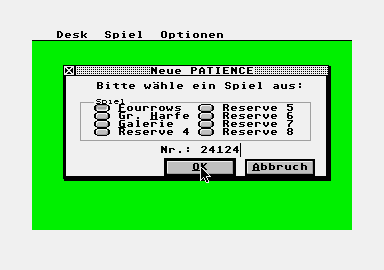
1) Copyright ============ First of all a important note about the copyright. The program PATIENCE and all files belonging to it can be freely distributed and used without limitations as long as no changes within the files are made (exceptions see below). Distributing the m in PD collections (disk, CD ROM etc.) is only permitted when the demanded pay keeps within the usual limits. If the files (or parts of them) are to be used within commercially distributed programs the explicit permission of the author is required. This program consumed much of my spare time with in the last months and I find is only just that these conditions are obeyed, especially as I do not request any money, post cards or something similar for this program. 2) Changes within the files =========================== As sid in chapter 1 no changes within the enclosed files are allowed. But following exceptions are allowed: a) Key shortcuts: If the user is not contended with the key shortcuts I choose, he/she may alter the m using a fitting resource construction set (which must be able to handle color icons, e.g. Interface 2). The shortcuts can be build using the usual rules: '^' for CONTROL, 'ALT-1' for SHIFT, 'ALT-7' for ALTERNATE (combinations are possible), followed by a single upper case letter or a keyword (ESC, TAB, BACK, DEL, HELP, UNDO, INS, HOME, CLR, F1 to F20). It is recommended to avoid CTRL-ALT combinations ( the DELETE key is waiting...). Attention with ALT combinations: the menus are preferred to the dialog boxes if they are in a window! For shortcuts within a dialog box always 'ALT-7' must be used, which can also be within a word (e.g. 'Re#new' means ALT-N). These changes must only be done within PATIENCE.RSC, all other resource files are no t to be changed. b) Adapting to languages: As there are not only countries with German or English as mother language, the program can be adapted to any language by changing the resource file. The base resource (PATENG.RSC or PATDEU.RSC) should be loaded into a resource construction set and be save with "SAVE AS..." using a new name (e.g. PATFRA.RSC for French, PATESP.RSC for Spanisch and so on). The texts can be changed at will, but the order of the objects must not be altered. The new resource files can be distributed with the other files under the conditions stated above. If someone sends me a new resource I will try to include it in the next release. 3) Liability and errors ======================= The program war created on an ATARI Falcon030 using Pure C and Interface. It runs with all color resolutions from 2 to 256 and was tested with the operating system version 4.01, 4.04 (RAM+ROM) in different screen resolutions (using Screenblaster), further on ATARI ST with operating system versions 1.02, 1.04 and 2.06 (Thanks to Richard + Mario!). I believe it is save to say it should run on any computer from ATARI and on any grafic-card, but I cannot guarentee that this is really so or be held responsible for any demage caused by this program. Should any errors occur while running this program, I ask to be informed. Stating the configuration (computer, TOS version, installed hard- and software) will help. I will try to locate and fix the error if possible and release a corrected version of the program. 4) Release notes ================ The program PATIENCE was only created because I needed to test the GEM libraries I wrote. These relieve the programmer from much work, master dialogs in windows, key shortcuts and all the stuff that is "in". As these libraries have been much work I will not release the sources officially. Version 1.00: ------------- First release of the program; it uses the features of operating system as good as possible and displays 3D objects and color icons even on computers with TOS smaller than 4.01; it is freely configurable ( shortcuts, dialogs in windows and so on) and is obeys all known rules, I learned from books and magazines. 5) Usage ======== Using this program should not be hard for anyone, who already has some expirience with GEM based programs. Nevertheless some program specific hints: Shortcuts are distributed primarily to the menu, only if no matching menu is found it will be passed to the upper window. This is important for dialogs in windows, as double defined ALT combinations can be ambigious. My suggestion: do not used ALT combinations within the menus. Dialogs within a window are always linked to the starting window. If this window should be brought to the foreground, the dialog comes up instead. All in puts to this window are inhibited. The same applies to dialogs referring to the whole program, which lock all windows and menus. Accessories of course can always be used. It is possible to play as many games as windows or memory are available. But because dialogs may need windows too and TOS 4.01 hangs up when using more then 15 windows, it is recommended to have not more than two or three games simultaneously. Besides the screen will get too complex, too. If a game is over the window is not closed by the program, it should be done by the player before a new one is opened (see also previous paragraph). The mouse pointer shows a hint if a card is moveable (cross) or not (arrow). But this is not working on all TOS versions correctly, I know n o solution for this problem. (Reason: TOS 4.0X always sends a WM_TOPPED if the window becomes the to p one, old TOS versions only when the window is topped with a mouse click. Cue: closing of ACC windows). With the help function it is possible to show the next possible move. This function is also available using the right mouse button. The mouse buttons have the following functions: Left once: selects a card. If there was already a card selected, it is checked if the cards match, where by the program automatically recognizes which card fits onto which. If they match, one is moved. If not the last selected card stays selected. Left holding: move a selectable flush of cards to another column. If the mouse button is released (the mouse pointer is important, not the cards) the flush of cards is move if possible. Left twice: the clicked-on card is moved to a matching one if possible. Right once: shows the next possible move. Right twice: performs the next possible move. The autoplay function can be abended by menu or keyboard input. It can run in the background during playing another patience in the foreground. Each dialog can be abended by closing the window or by pressing UNDO. By double clicking on a radio button or the text near it a game can be started immediately (without OK). Fourrows (difficult) -------------------- Four rows has a card stack with 104 cards, twelve columns and eight stores. At the beginning four rows of cards (hence the name) are laid on the columns. Cards can be moved red on black ( or vice versa) with descending value (e.g. Ace of Hearts on Two of Spades). On free columns a king may be laid. If a flush beginning with an Ace and ending with a King is completed, it is move to the store automatically. If the stack is empty and no more move is possible, the game ends. Solitaire (easy) ---------------- Solitaire has a closed card stack (104 cards), an open stack, eight stores and ten columns. At the beginning cards are laid to the columns in the shape of a triangle. Cards can be moved red on black (or vice versa) with descending value (e.g. Ace of Hearts on Two of Spades). On free columns a king may be laid. The upper cards of the open stack and of the stores may also be used. On the stores the card families are build with the same colour and ascending (e.g. Queen of Hearts on Jake of Hearts), on to an empty store an Ace may be laid. If no more move is possible, the upper three cards of the closed stack are moved to the open stack. If the closed stack is empty, the open stack can be made a closed one as often as necessary. Attention: the help function does not show possible moves to the stores! When moving a card without selecting a target card, the store is used before the columns. Gallery (medium) ---------------- Gallery has a closed stack (104 cards), 24 stores and eight columns. At the beginning 24 cards are laid on to the stores, aces are not used and are removed automatically. On a free store either a Four (upper row), a Three (middle row) or a Two (lower row) can be laid. On these cards cards with the same colour can be laid as follows: 4-7-10-King, 3-6-9-Queen, 2-5-8-Jake. From the stack always eight cards are laid to the columns, which can be used too. If the stack is empty and no more move possible, the game ends. Hints ----- The following games are easy and can be solved using the autoplay function: Fourrows 15552, Solitaire 20584, Gallery 12789. For beginners it is adviced to try this games to get accostumed to the rules.