

Atari ST - 1999
Orb
- Genre
- Brain - Logical / Puzzle
- Year
- 1999
- Language
- [unknown]
- Publisher
- [no publisher]
- Controls
- Mouse
- Distributor
- —
- Players
- 1
- Developer
- [n/a]
- Resolution
- High / VGA
- Licensed from
- —
- Programmer(s)
- Becroft, Mario
- Country

- Graphic Artist(s)
- Becroft, Mario
- Software
- English
- Game design
- Becroft, Mario
- Box/Instructions
- English
- Musician(s)
- [n/a]
- License
- PD / Freeware / Shareware
- Sound FX
- [n/a]
- Serial
- —
- Cover Artist(s)
- —
- ST Type
- ST, STe, TT, Falcon030 / 1MB
- MIDI
- —
- Version
- 0.1.5
- Dump
- Download
- Number of Disks
- 1 / Double Sided / HD Installable
- Dump format
- MSA
- Protection
- —
INSTRUCTIONS
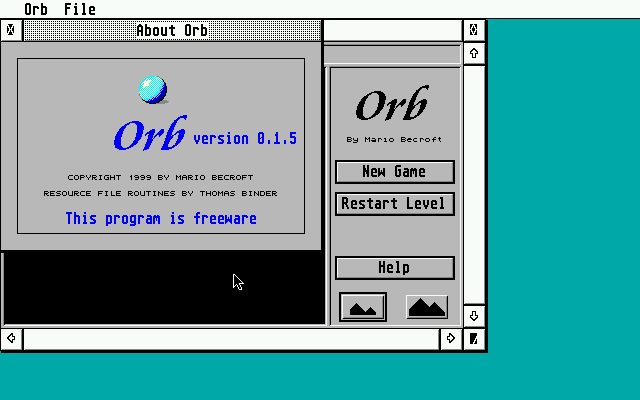
This is Orb, a clone of Sokoban with some extra features.
Copyright 1999 by Mario Becroft.

License: this program is freeware and, as such, may be distributed freely
provided that the original archive is distributed complete and in
unmodified form. This program may not, however, be distributed as part of
or together with any product that is being sold on a commercial basis
without the permission of the author.


ABOUT THE GAME

If you have played Sokoban then you will know how to play this game. The
map file supplied with Orb is, in fact, a duplicate of the original Sokoban
maps.

For those unfortunate enough never to have heard of the game, here is an
explanation of the rules.

The player controls a character which moves about a grid-shaped map by one
square at a time. The arrow keys are used to navigate the player's
character around the map. The map includes walls which cannot be moved past.

Also scattered around the grid are boxes/jewels which must be moved onto
specified destination squares. Does this sound easy? It's not!

The catch is that the boxes may only be pushed, and thus the player's
character must be able to get behind a box in order to move it along. The
maps are so deviously devised that, while they are all solvable, it is
extemely difficult to find the solution especially at the later levels.

Fortunately each level has a code which is shown to the player when the
level is reached. By entering this code, the player may start at any level
which he has reached in the past. This feature is indispensable since it
is practically impossible to solve all the levels in one session.

There are also a few other features to help the poor game player. The Undo
key will revert the state of the game to what it was prior to the player's
last action. There are also four memory slots which may be used to store
the current state of the game. It is easy to revert to one of the stored
positions if the situation deteriorates. To store a position hold down the
shift key and press F1, F2, F3 or F4 each of which corresponds to one slot.
To restore a position, press one of the above keys without shift.

There is also a time-saving automatic path finder. A click of the mouse on
any part of the map will move the player's character there, if the point is
reachable without moving any boxes. If no possible path exists then the
move will fail. A double click has the same effect except that the boxes
may be pushed along on the way - but that is no guarantee that a path will
be found, as the computer can only find simple paths that do not involve
pushing the boxes except directly in the path of the player's character!
Otherwise the game would be no fun since the computer could solve it all.

The two zoom icons allow a close or distant view of the map. The close view
is good for large screens, but the distant view will fit onto small screens
without any scrolling. Double clicking on the zoom icons additionally
resizes the window to fit the whole map (if possible).


OTHER FEATURES AND BUGS

Orb includes many features not found in the original Sokoban game. These
include arrow squares which can only be moved over in the direction of the
arrow, teleportation squares which transport the player to another part of
the board, and variously colour boxes which must be matched up with the
same colour destination squares, and more.

Unfortunately, the map files supplied, being the original Sokoban maps do
not make use of any of these features. And with me being busy on so many
more important projects, I have not had time to design maps that utilise
the new features.

If you are interested in designing new maps please contact me and I will
send you the map design tools and documentation. Designing maps is quite
easy.

There is also a lack of good monochrome graphics. (In fact all the graphics
could be better, but I am not an artist...) If you want to draw improved
graphics, the icons are all stored in the file icons.rsc which can be
edited with a standard resource editor such as Interface. If it exists, a
colour icon palette stored in the Interface format will be loaded from the
resource file and used for the colour icons.

Of course I would also be pleased to hear from anyone who plays the game,
whether or not you want to design maps. My address is below.


CONTACTING THE AUTHOR

Mario Becroft, the author of Asteroids may be contacted at the following
addresses:

Email: mb@gem.win.co.nz
WWW: http://gem.win.co.nz/
Telephone: +64 9 412 9700
Post:
P.O. Box 332
Kumeu
Auckland 1250
NEW ZEALAND