
Atari ST - 1990
KV_Fonic
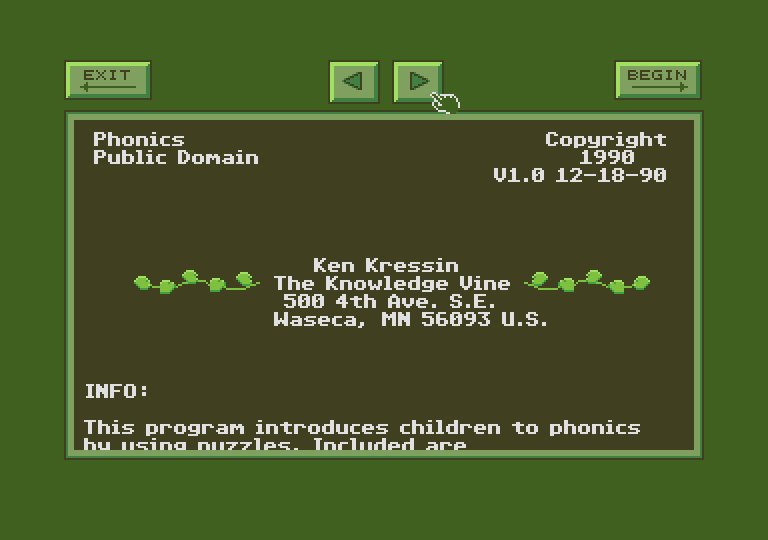 1 / 4
1 / 4- Genre
- Education - Spelling
- Year
- 1990
- Language
- GFA BASIC
- Publisher
- [no publisher]
- Controls
- Mouse
- Distributor
- —
- Players
- 1
- Developer
- Knowledge Vine (The)
- Resolution
- Low
- Licensed from
- —
- Programmer(s)
- Kressin, Ken
- Country

- Graphic Artist(s)
- Kressin, Ken
- Software
- English
- Game design
- Kressin, Ken
- Box/Instructions
- English
- Musician(s)
- Kressin, Ken
- License
- PD / Freeware / Shareware
- Sound FX
- Kressin, Ken
- Serial
- —
- Cover Artist(s)
- —
- ST Type
- ST, STe / 0.5MB
- MIDI
- —
- Version
- —
- Dump
- Download
- Number of Disks
- 1 / Double Sided
- Dump format
- MSA
- Protection
- —
INSTRUCTIONS
' * Hi, this is file used by KV_FONIC.
' * KV_FONIC is the 7th KV program.
' * Others include: ME1ST, PARK_, HOUSE,
' * MATCH, GEO_1, and GEO_2.
' *
' * This file has 5 messages for you
' * related to KV_FONIC.
' *
' * First, KV_FONIC runs on a color
' * ST system in low resolution. Put
' * all KV_FON** files in the same
' * folder and go!
' *
' * Second, KV_FONIC is public domain.
' *
' * Third, use this program at your
' * own risk. It works fine
' * on my computer, but who knows
' * what will happen on yours!
' *
' * Fourth, the program uses up
' * to 52 files - 26 are compressed
' * (.DAT) and 26 are DEGAS format (PI1)
' * that can be made by you, your
' * children, or anyone else.
' *
' * Fifth, This file contains the
' * the text used by KV_FONIC.
' * This text could be modified for
' * another language.
' * Unfortunately, this program, by
' * it's nature, does not lend itself
' * well to language conversion.
' * To give you the most flexibility,
' * you may modify the existing
' * pictures or create new ones.
' * If you are interested, read on.
' *
' * The small .DAT files used by
' * KV_FONIC are simply compressed
' * DEGAS format pictures. There
' * are some rules you need to
' * follow if you are going to make
' * your own. I won't try to explain
' * all the rules. Instead, I'll give
' * you examples. Hold the Control key
' * and press P (^P) when the Stop Light
' * appears (STOP, AGAIN, or NEXT). The
' * program will write the previous
' * DEGAS picture to disk (in normal,
' * uncompressed PI1 format). Make sure
' * the disk has room and is writable.
' * You may repeat this for all the
' * .DAT files.
' *
' * Again, just press ^P, and it will
' * write the PI1 file.
' *
' * Some things to note:
' * 1. Bright green (color 15)
' *     defines the boxes.
' * 2. Purple (color 14) defines the
' *     letters and where they are to
' *     appear.
' *
' * Some rules you need to follow:
' * 1. Don't change colors 1,14,15
' *     (black,purple, and green)
' * 2. Don't use colors 14 or 15 in
' *     your pictures.
' * 3. Color 0 (the edge color) should
' *     be medium bright (one intensity
' *     is recommended to be 5).
' * 4. Insure all boxes are the same
' *     size.
' *
' * Don't be afraid to give it a try.
' * Once you see a DEGAS picture, you'll
' * see it's quite simple.
' *
' * You don't need to compress the file
' * again, since the program also looks
' * for PI1 files too. If you have
' * registered any KV programs and want
' * the compressor, just let me know...
' * I'll send it (It compresses 32000
' * byte DEGAS files to 3000 or so bytes).
' *
' * If I can be of any assistance, don't
' * hesitate to call. Really...!
' *
' *
' *
' * Now if you want to change the text
' * below to another language...
' *
' * KV_FONIC looks in this file
' * to get messages displayed
' * in the program. It usually
' * adapts to different message
' * lengths, except where noted.
' * (By lengths, I mean lengths of
' * the lines, NOT number of lines!)
' *
' * If you try to modify this file,
' * I recommend the following:
' *
' *  1. Save a backup of this file
' *     in case you make an error
' *     you don't know how to fix.
' *
' *  2. Don't add or remove any
' *     lines, just modify them.
' *     (Again, important!)
' *
' *  3. Read the instructions
' *     carefully. Do a part at a
' *     time.
' *
' *  4. If you make an error, the
' *     program will most likely
' *     crash.
' *
' * I could not test this well,
' * since I can not anticipate what
' * you may try. Please let me know
' * what kind of results you get.
' *
' * Thanks!
' *
' *  Ken @ The Knowledge Vine
' *
' * Acknowledge message, 4 char. max.
' OK
' * This message tells the user not enough memory.
' Warning, memory:
' * These messages ALERT the user if a file cannot be found
' * Keep the messages in the same format. Do not remove the | markers.
' Can't find| the file:|
' Retry|End
' * The lines below contain simple