

Atari ST - ST User - 1991
Flipped
- Genre
- Brain - Logical / Puzzle
- Year
- 1991
- Language
- STOS BASIC
- Publisher
- ST User
- Controls
- Mouse
- Distributor
- —
- Players
- 1
- Developer
- Gothic Domain
- Resolution
- Low
- Licensed from
- —
- Programmer(s)
- Oakley, Andrew R.
- Country

- Graphic Artist(s)
- [unknown]
- Software
- English
- Game design
- [unknown]
- Box/Instructions
- English
- Musician(s)
- [unknown]
- License
- PD / Freeware / Shareware
- Sound FX
- [unknown]
- Serial
- —
- Cover Artist(s)
- —
- ST Type
- ST, STe / 0.5MB
- MIDI
- —
- Version
- —
- Dump
- Download
- Number of Disks
- 1 / Double Sided
- Dump format
- MSA
- Protection
- —
OTHER VERSIONS WITH THE SAME TITLE (1)
INSTRUCTIONS
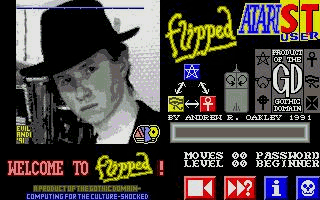
             How to play Flipped:

      In the top left of the screen is a
    board of 9x9 tiles. The object of the
     game is to change this board so that
      all the tiles are the same colour.

    You can 'flip' tiles over by selecting
     one of the three 3x3 grids from the
     bottom left of the screen using the
      mouse, then clicking on the tiles.

     Clicking the left mouse button will
    flip in the order blue-yellow-red-blue
      and the right mouse button in the
    order blue-red-yellow-blue. There is a
    diagram in the centre of the screen to
        remind you these rotations.

     However, each of the three 2x3 grids
     will flip over a different selection
          of tiles! Try it and see!

          Click mouse for next page.
      There is a display showing wich of
     the 100 levels, numbered 00 to 99, you
       are currently on, together with a
     password for that level. There is also
     a moves counter, although this is for
     your information only; you may make as
       many moves as you wish (or need!).

       Below this display are four icons,
        which are (from left to right) :-

       RESET: Left button resets current
     level. Right button randomises level-
       enter difficulty 1-9999 7 RETURN.

     GOTO: Click with left button and type
      in a password to go to a particular
     level, or with the right for level 00.

      INFORMATION: Click with left button
     for screen output, right for printer.

      QUIT: Click twice to leave Flipped.