

Atari ST - The One - 1992
Penguin
 1 / 5
1 / 5- Genre
- Brain - Logical / Puzzle
- Year
- 1992
- Language
- STOS BASIC
- Publisher
- The One
- Controls
- Mouse
- Distributor
- EMAP Images
- Players
- 1
- Developer
- DBR Software Development
- Resolution
- Low
- Licensed from
- -
- Programmer(s)
- Butler, Mark (UK)
- Country

- Graphic Artist(s)
- [unknown]
- Software
- English
- Game design
- [unknown]
- Box/Instructions
- English
- Musician(s)
- [unknown]
- License
- PD / Freeware / Shareware
- Sound FX
- [unknown]
- Serial
- —
- Cover Artist(s)
- —
- ST Type
- ST, STe / 0.5MB
- MIDI
- —
- Version
- —
- Dump
- Download
- Number of Disks
- 1 / Double Sided
- Dump format
- ST
- Protection
- —
OTHER VERSIONS WITH THE SAME TITLE (2)
ADDITIONAL COMMENTS
Released on The One for ST Games coverdisk issue 42 (March 1992)
INSTRUCTIONS
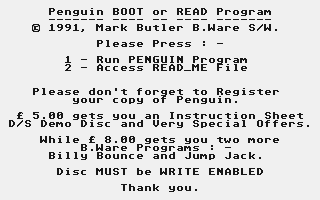
Penguin Shareware Information
------- --------- -----------

***************************************
* If you are using a 520 ST/STE then  *
* make sure that you run Penguin from *
* within an AUTO Folder - otherwise   *
* you will have insufficient memory.  *
***************************************

"Graphics  and  sound  are  of  a  high
quality,  and  the games  addictiveness
and  Cartoon type Characters make  this
a  game to look out for"  "Deserves  to
become a classic" - ST USER March  1990

A  couple of quotes from a review  when
Penguin sold for Twenty  Pounds,  shows
just what you are getting for a fiver !

Following the success of the  Shareware
Super  Card,  we are going  ahead  with
two  more  Shareware titles  -  Penguin
and Master Doodle.

Penguin  is  a  highly  addictive   and
original  game,  whilst  Master  Doodle
takes  the  Doodle part of  the  highly
acclaimed  Master Time and  expands  it
into a program with a unique method  of
control, ideally suited to children.

To All Super Card Registers
-- --- ----- ---- ---------

Thank  you to everyone who  sent  their
fivers in for Super Card,  the  quality
of  the people that did  register  made
up for those that didn't.

We greatly enjoyed reading all of  your
letters,   and  only  regret  that  any
reply  had to be hastily  scribbled  on
the back of the documents that we  sent
back  to you.  A lot of overseas  users
and  many  Doctors and Vicars  made  up
the numbers,  with some generous  souls
insisting  that we accepted  more  than
the five pounds that we asked for.

Well  you  can pat  yourselves  on  the
back,  knowing that you are responsible
for  Two more B.Ware titles being  made
Shareware.

"I  can afford a lot of fivers but  not
many  fifties"  said  one  user,  which
sums up nicely what it's all about.

It  doesn't matter to us if we  sell  a
little  for  a  lot,  or a  lot  for  a
little,  but  it allows you to be  able
to  amass a lot of top  quality  titles
with a clear conscience,  knowing  that
you  can  be a genuine  user  for  only
five pounds.

What is Shareware ?
---- -- --------- -

For  those  unaware of the  concept  of
Shareware  here  is  what  it  is   all
about.

We  put  out a program of  the  quality
that  you would normally pay twenty  to
thirty  pounds for,  via magazines  and
Public Domain libraries.

Then  we  ask everyone that  likes  the
program  for  a donation for  which  we
will   send  you  some   goodies,   and
special  offer  forms that  will  allow
you  to  recoup your five  pounds  many
times over.

And  then as you have made us happy  by
sending  your  money,  we do  the  same
thing again.

You  are  free to copy the  program  as
many  times as you wish,  and  pass  on
copies  to  anyone,   anywhere  in  the
world.


Shareware  relies on trust and  honesty
-    if   no   one   sends    in    any
contributions,   then  we  decide  that
we're wasting our time and pack it  in,
and  you  will have to find  "lot's  of
fifties" or delve into the seedy  world
of  piracy  for your programs  (and  we
hope you get nicked and all your  discs
eaten by a Virus!)

So  please don't leave it  to  everyone
else - send a fiver in - Thanks.

How to register your copy
--- -- -------- ---- ----

Send  in  five pounds  sterling,  as  a
postal order or cheque made payable  to
: -

B.Bytes Computer Systems

and send it to : -

B.Ware Software
B.Bytes Computer Systems
19 Southfield Road
Hinckley
Leics
LE10 1UA

Or  Telephone UK (0455)  613377  9-5:30
Mon-Sat  UK Time with a credit  card  -
Access / Visa or American Express.

We  will  return a data  sheet  on  the
program,  double-sided B.Ware demo disc
and  special  offer  order  forms  that
will  let  you  purchase  other  B.Ware
programs at prices so low that we  dare
not  print them for fear  of  upsetting
other dealers !

If  you  can only boot from  a  Single-
Sided  drive,  then  please  enclose  a
blank  disc,  and  we  will  split  the
demo's over two single-sided discs  for
you.

The  offer to upgrade to Super  Card  2
was  so good that very few people  have
yet  to  take it up,  -  and  they  may
simply be waiting a bit longer !  -  so
you know that we mean a GOOD offer !

There are a couple of extra's that  you
can take up as you register : -

2. Billy Bounce and Jump Jack
-- ----- ------ --- ---- ----

Two  more top quality  B.Ware  programs
for just one pound fifty each !  - just
add on Three Pounds to make a total  of
eight pounds.

"Both  games are  superbly  illustrated
with   large   sprites   of    friendly
characters,  Jump Jack is a small devil
while  Billy  Bounce  is  a  Ball.  The
biggest  difference between the two  is
that   Jump  Jack  takes  place  on   a
limited  screen that needs items to  be
collected  in order to leave  a  locked
door  while  Billy Bounce has  a  large
scrolling  screen to bounce  around  in
order to find his objects.  Both  games
are  amusing  and frustrating  and  the
difference  in  screen  format   allows
enough individuality to make them  both
worthwhile  purchases."  -  New   Atari
User Review Conclusion - Issue 44

Note  that Billy Bounce and  Jump  Jack
are returned on One Double-Sided  Auto-
Booting  disc  which  will  also   work
manually  from  a  Double-Sided  second
drive.

If   you  only  have   a   Single-Sided
internal   drive   and   no    external
Double_Sided drive,  then please add on
an  extra  pound to cover the  cost  of
seperate discs - Thank you.

So in conclusion : -

a:  Send  Five pounds to  register  and
get  an info sheet,  double_sided  demo
disc and special offers.

b:  Include  a blank disc if  you  want
two single-sided demo discs instead.

c:  Add  three pounds (or  four  pounds
for  Single-Sided versions)  for  Billy
Bounce  and  Jump Jack  -  Total  eight
pounds (nine pounds for Single-Sided).

Please register your copy - Thank you.

Penguin Instructions
------- ------------

The  program  file PENGUIN.PRG  can  be
placed  within an AUTO folder  to  make
it Auto run and to save 32k of  memory,
or it can be started from the Desktop.

***************************************
* 520 ST/STE owners MUST Run Penguin  *
*   using   an   AUTO   Folder    !   *
***************************************

This is a mouse controlled game.

On the start screen click on the +  and
-  buttons  to  select  the  number  of
penguins  (1  to  4)  and  the   level,
before clicking on START.

You  can  only  select levels  1  to  5
unless you play beyond them,  in  which
case  you  can press F5  to  save  your
position  to disc (make sure that  it's
write enabled),  so that you can return
to this level another day.

Function key commands are : -

F1 - Pause - Stop game while you  catch
your breath !

F2 - Help - Displays Help Screen

F3 - Music Toggle - Off speeds up  game
-  also  Blitter ON from  Desktop  will
also  increase  the  speed  (  if   you
really want to ! )

F4   -   50Hz/60Hz  -   Switch   screen
frequency  -  gives bigger  display  on
some monitors

F5 - Save Max - Got past screen 5  ?  -
Press  F5 so that you can  return  next
time.

F10 - Game Over - Give up !

The  game  consists of  moving  various
arrows,  bridges and objects around  to
shepherd  your penguins safely  to  the
finish.

There are twenty screens in all with  1
to 4 penguins,  giving you 80 levels in
all.  And if you switch the blitter  On
and Off as well as the music,  then you
can   create   even  more   levels   of
difficulty.

Have fun - and please don't forget  the
fiver - Bye Bye for now.
BOOK / MAGAZINE REVIEWS (1)
International TOS Software Catalog · Winter, 1992