

Atari ST - Beery's Bit - 1987
Orion's Run
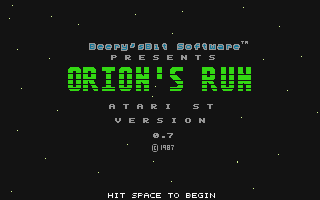 1 / 4
1 / 4- Genre
- Shoot'em Up! - Vertical Scrolling
- Year
- 1987
- Language
- Compiled C
- Publisher
- Beery's Bit
- Controls
- Mouse
- Distributor
- -
- Players
- 1
- Developer
- [n/a]
- Resolution
- Low
- Licensed from
- -
- Programmer(s)
- Beery, Andrew
- Country

- Graphic Artist(s)
- [unknown]
- Software
- English
- Game design
- Beery, Peter D. / Gray, Steven T.Beery, Andrew
- Box/Instructions
- English
- Musician(s)
- [unknown]
- License
- Game Demo or Preview - Commercial
- Sound FX
- [unknown]
- Serial
- —
- Cover Artist(s)
- —
- ST Type
- ST, STe / 0.5MB
- MIDI
- Yes
- Version
- 0.7 [preview]
- Dump
- Download
- Number of Disks
- 1 / Single Sided
- Dump format
- —
- Protection
- —
OTHER VERSIONS WITH THE SAME TITLE (2)
TRIVIA (2)
Development
Messages found from the disk:
* Title page with instructions
w-3 * Let picture rest on screen 3 secs after song finished
*- * Fade the picture to border color
s-ORIONS1.RUN * Play song once
* Title page with instructions
w-3 * Let picture rest on screen 3 secs after song finished
*- * Fade the picture to border color
s-ORIONS1.RUN * Play song once
p-jukebox.sc0 * Picture will rest, by default, 5 secs here
f-
s-sidestep.sng
f-
s-sidestep.sng
p-pwtitle.1 * when extension is less than three chars make sure
* you put a comment on the same line.
f-
s-prelude.sng
* you put a comment on the same line.
f-
s-prelude.sng
p-patterns.sc0
f-
s-rainbows.sng
f-
s-rainbows.sng
p-clipart1.cl0
f-
s-beachwlk.sng
f-
s-beachwlk.sng
p-pwtitle.0 * when extension is less than three chars make sure
* you put a comment on the same line.
w-7
f-
s-studiom.sng
* you put a comment on the same line.
w-7
f-
s-studiom.sng
r-2 * Repeat the whole sequence 5 times
----
This is a nearly completely debugged version of Orion's Run
presented to you for review purposes. Slight corrections
may be added to the final distribution copies.
presented to you for review purposes. Slight corrections
may be added to the final distribution copies.
Instructions:
Boot system from the Orion's Run disk or rename ORIONS.RUN
to ORIONS.PRG and run from low resolution.
to ORIONS.PRG and run from low resolution.
Use the mouse to control all action and follow the screen
prompts.
prompts.
Use help key to pause the game. Use the <- and -> keys to
adjust volume of the background music.
adjust volume of the background music.
Enjoy,
Andrew Beery
5/30/87
5/30/87
Sound
Music written with Music Studio