

Atari ST - 1994
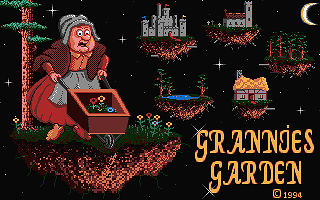
Grannies Garden
- Genre
- Adventure - Point and Click
- Year
- 1994
- Language
- STOS BASIC
- Publisher
- [no publisher]
- Controls
- Mouse
- Distributor
- —
- Players
- 1
- Developer
- Silly Software
- Resolution
- Low
- Licensed from
- —
- Programmer(s)
- Sharples, Dean
- Country

- Graphic Artist(s)
- Gooding, Tony
- Software
- English
- Game design
- [unknown]
- Box/Instructions
- English
- Musician(s)
- [n/a]
- License
- PD / Freeware / Shareware
- Sound FX
- [unknown]
- Serial
- —
- Cover Artist(s)
- —
- ST Type
- ST, STe / 0.5MB
- MIDI
- —
- Version
- —
- Dump
- Download
- Number of Disks
- 1 / Single Sided
- Dump format
- MSA
- Protection
- —
INSTRUCTIONS
   Grannies Garden
                      ~~~~~~~~~~~~~~~~~~~~

                      THIS GAME IS FREEWARE

 IMPORTANT INFO:-

 When you save and load a game postion, always save it in the
 GARDATA folder on this disk.

 Before you can play this game you will need to know a bit about
 the control system. Grannies Garden is a graphic adventure and
 its completely controlled by the mouse, no typing is needed.

 Once the game has loaded press the left mouse button to start.
 You will be presented with a picture, this is a picture of your
 current location. You are also presented with a description.
 Click on the mouse twice and an option bar will come up.

 Lets look at what each option means.......

   Look

 If you click on this option with the mouse then you will be
 imformed of your current location along with any objects.

   Examine

 This one has a double meaning. If you click on it with the left
 mouse button then the option bar will list any objects you are
 carrying. Click on one for a description of it.

 If you click on Examine with the right mouse button then you will
 be able to examine part of your location. Just click on a part of
 the picture with the mouse to get a description.

   Inventory

 Clicking on this will tell you what you have on you.

   Speak

 This is used if you want to speak to a character, just click on
 the one you wish to speak to.

   Use

 This one has a double meaning. A left click allows you to use an
 object and a right click allows you to use an object on part of
 your location. Choose the object and click on the picture.

   Give

 Click on this to give an object to a character.

   Take-Drop

 Another double meaning. Click with the left mouse button to take
 an object and right click to drop one.

   Open-Close

 A left click to open and right click to close. Choose an option
 then click on a part of the picture.

   Wear-Remove

 Same as Take-Drop, but used to wear and remove objects.

   Load-Save

 Left click to load a saved game postion or right click to save
 your present postion in the game. Files must be saved with the
 extension (.DAT).

   Leave

 Click on this followed by part of your location to go there.

   Consume

 Allows you to eat or drink an object.

   Quit

 This quits the game and gives you the option to play again.

                                 The Story

 One sunny afternoon in the land of Morlic, the children were
 playing in Grannies Garden when the Wicked Witch came and took
 them to her castle. Granny dropped her teapot and ran outside
 just in time to see the children sat on the back of the Witches
 broomstick screaming for help.

 In this game, you have been lumbered with the task of destroying
 the Wicked Witch and rescuing the children. You will have to
 overcome various puzzles before you gain entrance to the castle.

 So lets begin our quest. Granny wants the children home in time for tea.
BOOK / MAGAZINE REVIEWS (1)
ST Format · June, 1996Rating: 79%