

Atari ST - 1990
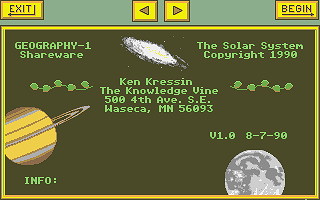
Geography-1 - The Solar System
- Genre
- Education - Space / Astronomy
- Year
- 1990
- Language
- GFA BASIC
- Publisher
- [no publisher]
- Controls
- Mouse
- Distributor
- —
- Players
- 1
- Developer
- Knowledge Vine (The)
- Resolution
- Low
- Licensed from
- —
- Programmer(s)
- Kressin, Ken
- Country

- Graphic Artist(s)
- Kressin, Ken
- Software
- English
- Game design
- Kressin, Ken
- Box/Instructions
- English
- Musician(s)
- [n/a]
- License
- PD / Freeware / Shareware
- Sound FX
- [n/a]
- Serial
- —
- Cover Artist(s)
- —
- ST Type
- ST, STe, TT, Falcon030 / 0.5MB
- MIDI
- —
- Version
- —
- Dump
- Download
- Number of Disks
- 1 / Single Sided
- Dump format
- MSA
- Protection
- —
INSTRUCTIONS
Do you know the phases of the moon?
...the size of the planets?
...the difference between a meteor and
   a meteroid?

Well, this program should help. Browse
around by clicking on objects. Then
take a quiz to see what you've learned.

This is a hypertext geography program
on the solar system.

Color - LOW RES only.

You need to know the following to
navigate the program. First, remember:

 LEFT mouse selects
 RIGHT mouse backs up

When you select an object, a text box
appears. If a box appears around a
word, you may select the word, leading
you to another screen. Or, you may
"back up" by pressing the RIGHT mouse
button. There are about 10 screens and
40 boxes, so look around!

There are 4 boxes in the UPPER-LEFT
corner. The top one has a number in
it. This shows you how many "hot-spots"
there are in the current picture. If
you click on this, it will even show
you where they are.

The other 3 are marked F (FIND), M
(MARK), and Q (QUIZ). These can be
selected by clicking on them or by
pressing the corresponding key on the
keyboard.

FIND: use this to search for text
strings. The find box works like GEM,
press ESC to clear the line, TAB to go
to the next line. Here is a sample of
things to try:

    jupiter
    comet
    meteor
    gibbous
    planet   AND   large
    solar    NOT   system
    largest   OR   smallest

When you do a find, several matches may
occur. A little box appears, showing
you how many, and letting you view each
match.

MARK: This function can be used to
quickly return to certain screens.
To set a mark, click on an empty box,
type in a name, and press EXIT. To
return to the marked screen, select the
mark, and press GOTO. Note, this
function is of limited use with only 10
screens...I left it in there for use
with larger systems.

QUIZ: Don't leave the program until
you have tried a quiz. Questions are
multiple choice, but usually the
choices are areas you click on the
screen. Sometimes, boxes appear around
the text, such as in a TRUE/FALSE
question. Some questions require you
to click on several areas!

All questions must be answered
correctly before proceding. If you
answer incorrectly, you will lose
points, and a little message will give
you encouragement, a clue, or tell
you why that selection was wrong.

There are 45 questions in all, 15 in
each difficulty level. When multiple
players are selected, the 15 questions
are divided up.

If you have any questions, find any
bugs, etc., my address is in the
program, or I can be reached on GEnie
at K.KRESSIN.

This program is shareware, but I don't
ask for a fixed price. Contributions
will give me the encouragement and
financial resources to write more
quality ST programs.

Disclaimer: I do not make any
guarantees...this program could even
have a bug...even a big one! You are
using it at your own risk.

Credits: written in GFA BASIC 3.0
  original artwork done in CYBER PAINT

Try these other programs:

 KV_ME1ST    ME FIRST
      learn by putting stories in order
 KV_ME2ND    ME FIRST
              24 more stories
 KV_PARK_    Butterfly in the Park,
              Animated Puzzle
 KV_HOUSE    About the House,
              a Childrens Adventure
 KV_GEO_1    Hypertext Geography,
              the Solar System