

Atari ST - 1990
F-16
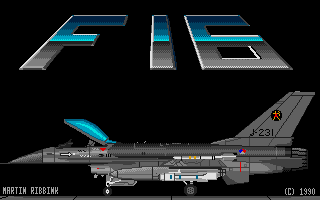
- Genre
- Shoot'em Up! - Horizontal Scrolling
- Year
- 1990
- Language
- STOS BASIC
- Publisher
- [no publisher]
- Controls
- Joystick
- Distributor
- —
- Players
- 1
- Developer
- [n/a]
- Resolution
- Low
- Licensed from
- —
- Programmer(s)
- Ribbink, Martin
- Country

- Graphic Artist(s)
- Ribbink, Martin
- Software
- English
- Game design
- Ribbink, Martin
- Box/Instructions
- English
- Musician(s)
- —
- License
- PD / Freeware / Shareware
- Sound FX
- —
- Serial
- —
- Cover Artist(s)
- —
- ST Type
- ST / 0.5MB
- MIDI
- —
- Version
- —
- Dump
- Download
- Number of Disks
- 1 / Single Sided
- Dump format
- MSA
- Protection
- —
INSTRUCTIONS
 F16 by Martin Ribbink
                          Stokebrand 162
                             7206 EK
                             Zutphen
                             Holland

Controls (joystick):

down: move plane up
up: move plane down
right:afterburner (plane moves faster)
right+fire:  launch  missile  (AGM  64  Maverick)  against  ground
targets
left+fire: drop bomb (Mk 84) against ground targets
fire: fire gun against air targets and credits

Object: High score + complete all 8 missions.

To start the plane first push joystick to the right, then push the
joystick  down  to  take off.  To land the plane  wait  until  the
airfield appears then land,the plane will stop automatically.
As soon as the plane has landed, a message will appear to indicate
wether  the  mission  has been completed or not (  to  complete  a
mission  all  the specified targets have to be destroyed  and  the
plane has to land again).  When the mission has not been completed
one plane is lost and you have to refly the mission.
When  the mission is completed a menu will appear from  which  you
can choose to refuel,  reload, repair damage etc. For every option
you need 1 credit. As soon as you have finished click on ready and
the next mission will start.
When you are attacked by mig 25's,  watch the radar screen to  see
from  which  side  the migs are attacking (mig  indicated  by  the
yellow plane).

F16 was     programmed   (in   STOS basic   version    2.6)    and
tested on a 520 STm with 0.5 Mb memory.  The program only works in
colour.

IMPORTANT:The  file  F16.prg has to be placed in an auto  folder in
order to run the program on a 0.5 MB ST.


FILES:         F16.PRG
               F16 FOLDER
               MANUAL.F16