

Atari ST - 1993
Drop Out
- Genre
- Brain - Tetris
- Year
- 1993
- Language
- Machine Language
- Publisher
- [no publisher]
- Controls
- Keyboard
- Distributor
- —
- Players
- 1
- Developer
- [n/a]
- Resolution
- Low
- Licensed from
- —
- Programmer(s)
- Bullough, Jason
- Country

- Graphic Artist(s)
- Bullough, Jason
- Software
- English
- Game design
- Bullough, Jason
- Box/Instructions
- English
- Musician(s)
- Hippel, Jochen
- License
- PD / Freeware / Shareware
- Sound FX
- Bullough, Jason
- Serial
- —
- Cover Artist(s)
- —
- ST Type
- ST, STe / 0.5MB
- MIDI
- —
- Version
- —
- Dump
- Download
- Number of Disks
- 1 / Double Sided
- Dump format
- MSA
- Protection
- —
ADDITIONAL COMMENTS
Please have a look at author's website how to support the game.
INSTRUCTIONS
 **************************************
 **                                  **
 ** DROP-OUT By J. Bullough (C) 1993 **
 **                                  **
 **************************************

 Credits:
 Me for the code and graphics
 Mad-Max for the music.
 Sean Keeney for the initial
 version of the copper list
 generator.

 This game is shareware and should
 be distributed only through
 Goodmans PD Library.
 This is not to be put on any cover
 disks without first seeking
 permission from me at the address
 below.  Should you use this and
 find it enjoyable, then please
 send a cheque for £4.00 to my
 address below, to register your
 copy.

 To obtain the sourcecode and
 register the game at the same
 time then send a cheque for
 £7.00 and all relevant files
 for the game will be sent to
 you.  If you have already
 registered your version of
 DROP-OUT and want the source
 code, then send a cheque for
 £5.00 to me.  Best to buy the
 sourcecode when you first
 register as you save £2.00.
 Sourcecode requires Devpac
 Version 2 or higher to compile.
 To obtain the sourcecode, you
 must register or have
 registered your version of
 DROP-OUT.  Registered users
 will receive a disc with my
 Beta test version of
 'Disk-maSTer', the ultimate
 file utility software that
 enables selective file copying,
 viewing, and playing of music,
 and general file management,
 and a STOS game with sourcecode
 called LOOPED, a puzzle game.

 My Address:
 ----------

 Mr. J. Bullough
 Trafalger Apartments,
 Apartment 1,
 65 Bucks Road,
 Douglas,
 Isle Of Man,
 IM1 3EF.

   -----=====<<<<<    >>>>>=====-----


Instructions For DROP-OUT
-------------------------

The Idea of this game is to get either
3, 4 or 5 pieces in a vertical row to
score points.  The items are random
and drop down the screen constantly.
There are 10 levels to the game, and
each level increases in speed, whereby
the items drop more quickly down the
screen.  Once the items reach the top
of the screen, the game is over.

Once you get either 3, 4 or 5 items in
a row, they then dissapear, and
anything above them drops down until
the hit another object or the base of
the playing area.

You can obtain winning lines either
vertically, horizontally, or diagnolly.

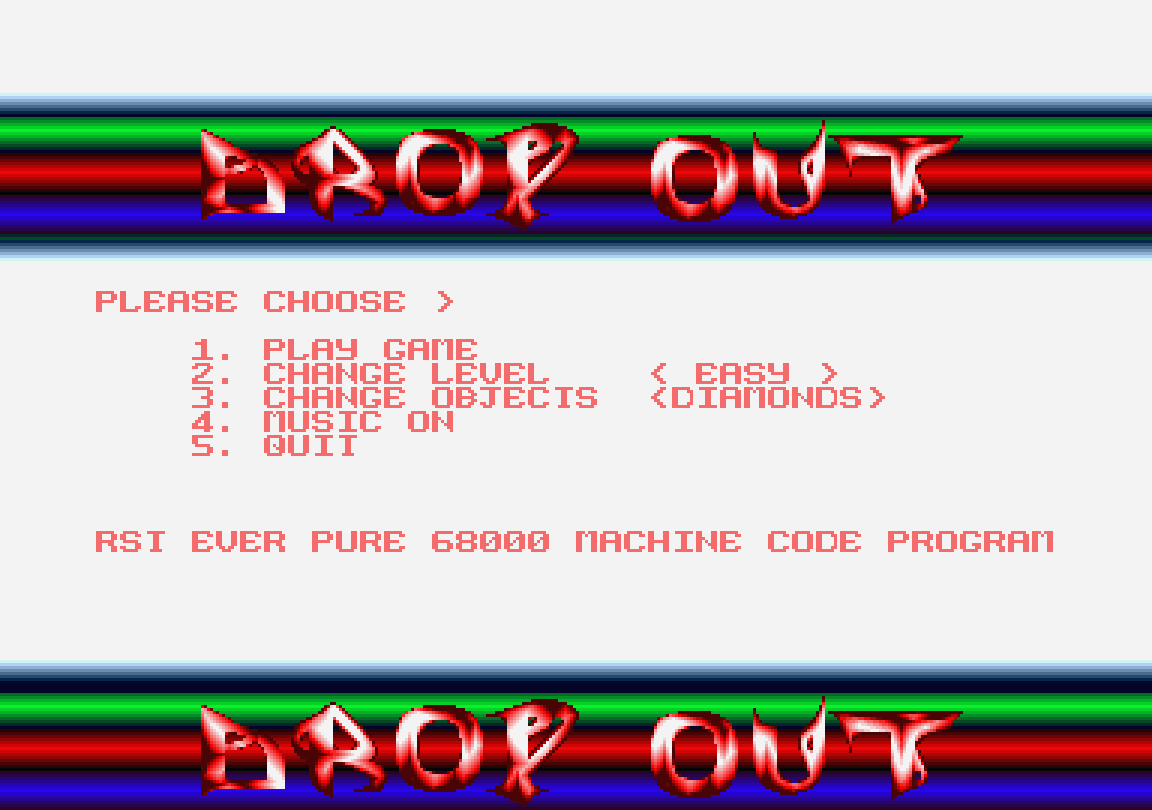
On the main screen the are 4 options.

1. Play the game

2. Change level difficulty

 This allows a random number of
items. Easy level only has 5 items,
menium has 6, and hard has 7 items.
 Your score is multiplied
depending on the difficulty level, and
the scores for each type are shown on
the game screen.

3. Change Objects.

 Allows you to change the items.
There are Diamonds, Squares, Fruits,
or Flags to choose from.

4. Music On/Off

 If the Music is off then you
will get sound effects instead, but if
music is on then you will only get music
and no sound effects.

The Keys
--------

The Method of control is as follows:

The Up Arrow to rotate your current
shapes around, bottom to top.
Down Arrow to speed up the dropping
process.  The Left/Right Arrows to move
pieces either left or right.
The HELP button to pause the game, and
then any movement button to Unpause.
The UNDO button to quit the game, which
will still enable you to enter a hiscore
should you have achieved one.

The Hi-Scores
-------------

If you obtain a highscore, you will
notice a blank line in the table. Simply
press the keys to enter what ever you
want to a max. of 14 characters. On the
14th keypress it automatically returns
and proceeds to save the hiscore table.
If your entry is less than 14 characters
then press the Return button.
If you have made a mistake then press
either the Backspace or Delete key to
remove last entry.

Should you want to wipe the hiscore
table clean then simply remove the file
'drop_out.hsc' and run the game.
This will then produce the original
hiscore table on the disc.
Ensure disc is write enabled when
creating the new hi-score table.
TRIVIA (1)
Graphics
Features up to 37 colours on-screen simultaneously (options or static screen)
Features up to 54 colours on-screen simultaneously (in-game)
Features overscan (options or static screen)
Features overscan (in-game)
Features up to 54 colours on-screen simultaneously (in-game)
Features overscan (options or static screen)
Features overscan (in-game)