

Atari ST - Antic Software - 1988
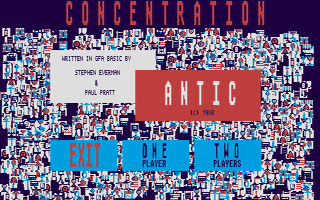
Concentration
- Genre
- Board Game - Miscellaneous
- Year
- 1988
- Language
- GFA BASIC
- Publisher
- Antic Software
- Controls
- Mouse
- Distributor
- Antic Publishing
- Players
- 1 / 2 (alt.)
- Developer
- [n/a]
- Resolution
- Medium
- Licensed from
- —
- Programmer(s)
- Pratt, Paul / Everman, Stephen
- Country

- Graphic Artist(s)
- —
- Software
- English
- Game design
- —
- Box/Instructions
- English
- Musician(s)
- —
- License
- PD / Freeware / Shareware
- Sound FX
- —
- Serial
- —
- Cover Artist(s)
- —
- ST Type
- ST, STe / 0.5MB
- MIDI
- —
- Version
- —
- Dump
- Download
- Number of Disks
- 1 / Single Sided
- Dump format
- MSA
- Protection
- —
INSTRUCTIONS
     CONCENTRATION
     BY PAUL PRATT AND STEPHEN EVERMAN

     You don't need Hugh Downs to help you play
Concentration, a speedy GFA BASIC version of the well-known
television game.  BASIC Concentration is written by the
authors of Deduction (ANTIC, December 1986), Super Trek
     (January 1987), Antic Towers
     (May 1987) and Maze
     (March 1988).
     Concentration runs only in medium resolution, so a color
monitor is required.  When you start the game, you'll be
asked to choose either the one-player or two-player version.
Then eight rows of eight dots apiece will be drawn on the
screen.
     Click on two of the dots.  This turns up two icons --
for example, a butterfly and a disk.  Well, your icons don't
match, so the next player gets a chance and turns up two
briefcases.  Whoa!  A match!  The briefcase icon appears in
your opponent's column, while a letter or space appears where
those dots were.
     If your opponent can guess the famous saying hidden by
the dots, the game is over and you lose.  If not, it's your
turn again.  This continues until one of you guesses the
saying.
     To make a guess, just click where the screen says you
should click, and then type your guess (which the program
will automatically in all capital letters).  If nobody
guesses correctly, nobody wins -- but this only happens when
all icons are removed from the board without a correct guess.
If you're playing the one-person version, you'll just keep
clicking and guessing until you either win or lose, as above.
     It's easy to add your own sayings to the puzzle.  The
sayings are stored in Data statements at the bottom of the
program.  Use these lines as a guide for creating and adding
your own Data statements.  Remember, though, that you cannot
use any commas in your Data statements.
     In this example, we'll add the famous saying, "BUY ANTIC
MAGAZINE".  When written into a Data statement in GFA BASIC,
the saying looks like this:
     Data BUY ANTIC MAGAZINE
     All you need to do is add this sample statement to the
other Data statements at the bottom of the program.  Of
course, you must remember to Save your new version of the
program before you Run it.