

Atari ST - 1996
Battle
- Genre
- Board Game - Miscellaneous
- Year
- 1996
- Language
- Machine Language
- Publisher
- [no publisher]
- Controls
- Mouse
- Distributor
- —
- Players
- 1 vs. 2
- Developer
- Nature
- Resolution
- VGA / RGB
- Licensed from
- —
- Programmer(s)
- Gildå, Tornbjörn / Gildå, Henrik
- Country

- Graphic Artist(s)
- [unknown]
- Software
- English
- Game design
- [unknown]
- Box/Instructions
- English
- Musician(s)
- [n/a]
- License
- PD / Freeware / Shareware
- Sound FX
- [unknown]
- Serial
- —
- Cover Artist(s)
- —
- ST Type
- ST, STe, TT, Falcon030 / 0.5MB
- MIDI
- —
- Version
- —
- Dump
- Download
- Number of Disks
- 1 / Double Sided
- Dump format
- MSA
- Protection
- —
INSTRUCTIONS
			Battle v1.0


--------------------------------------------------------------------------
	Battle is freeware and should be spread and copied as much as
possible as long as no profit is made from it. It should only be spread in
its entirety with no files missing or modified.
--------------------------------------------------------------------------


			Introduction

	Battle is a mini-strategy wargame placed in a GEM-window. The
purpose of this game is to be playable while the computer is doing other
things, i.e. under MultiTOS, or other multitasking systems, though it
works fine under normal TOS. To be as non-timeconsuming as possible, this
game is programmed in 100% 68k assembly language. It uses standard VDI and
AES-calls and is therefore compatible with almost all Atari's ranging from
ST's to Medusa's (though the Info-box doesn't display good in a
Y-resolution of 200), and should also work with graphic-cards since these
usually have their own version of VDI or NVDI. We cannot guarantee the
function of this game on anything but Falcon030, since we haven't had the
opportunity to test it on anything else, but we are pretty sure it'll
work.

-------------------------------------------------------------------------
**** DISCLAIMER ****
We also don't take any responsibility for loss of data, money, sanity or
body peripherals resulting from the use, misuse, abuse or overuse of this
program. The responsibility is entirely yours.
-------------------------------------------------------------------------

			Playing Battle

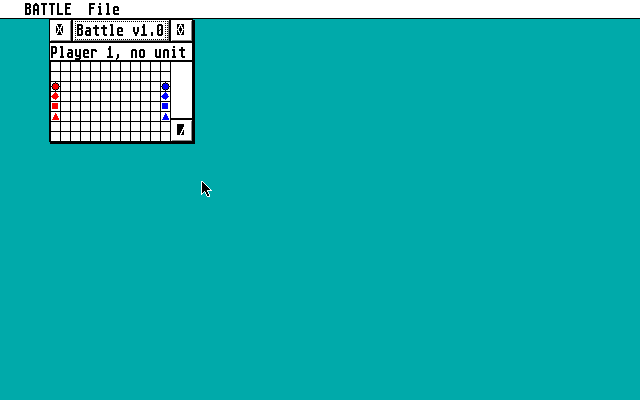
	When you start Battle you are first presented with a window,
divided by lines into 12*8 squares. On the left and right hand side of the
'battle field' there are four figures representing the troops of player
one and player two respectively, with the red being the troops of player
one and the blue being the troops of player two. The game window is
scalable to fit all resolutions, and the unit-symbols are scaled according
to the window-size. Each unit has characteristics regarding its number of
soldiers, skill level, morale, arms, and protection. This is a medieval
battle field and the troops have medieval arms and armour, and are to
fight each other in close range battle, or by firing their bows. Each
player may choose between three different actions: Move a unit, Fire the
(cross)-bows of a unit, or get Info on a particular unit. The last action
mentioned may be done as many times as the player likes, while performing
one of the other two ends the move for the selected unit. A player's turn
is ended when all his units has either moved or fired their bows, or when
the player presses 'q' on the keyboard. The battle is over when one player
has lost all his units.


			Unit characteristics

	The characteristics are randomized at the startup of the game. The
number of soldiers in a unit ranges from 185 to 250, and the skill level
from 92% to 107%. Morale is calculated on the number of soldiers and their
skill level, and does not change during game play.
	Arms are divided into two categories: Close range weapons, and
Long distance weapons. The Close range weapons can be either Spear, Sword,
or Battle Axe, in ascending strength, however the weapons also provide
some protection with the Spear being the most protective. The Long range
weapons can be either Light bow, Heavy bow, or Crossbow, in ascending
strength. Their firing ranges are 2, 3, and 3 squares respectively.
	Protection is divided into two categories: Armour, and Shields. The
armour of a unit may be Leather, Ring mail, or Plate armour, with the
Plate armour being the strongest. Shields can be either Wooden shield,
Knight shield, or Roman shield (scutata), in ascending strength.


			Moving a unit (and Attacking)

	Moving a unit is done by clicking on the desired unit with the
left mouse button, pressing 'm' on the keyboard and then clicking at the
destination square. A unit may not move further than two steps in any
direction, and clicking outside the allowed moving range will result in
the game moving the unit as far as it can. Clicking outside the game
window cancels the action. If there are more than one unit on one square,
the player can toggle the selection by clicking the left mouse button
again. A player may not move an enemy unit. A unit engaged in combat with
an enemy unit can't be moved either. Attacking one or several enemy unit/s
is done by moving one of your own units to the same square as the enemy.
Attack damage is calculated for all remaining units after both players
have performed their moves. An alert box appears telling a player that one
of his units has lost soldiers.


			Firing

	Firing a unit's (cross)-bows is done by selecting the desired unit
using the mouse, and pressing 's', as for 'Shoot', on the keyboard. A red
square then appears with the selected unit in the centre, informing the
player of the range of the bows. Clicking inside the red square forces the
unit to fire its weapons at the desired location, while clicking outside
the weapon range or outside the window cancels the action. The units at
the chosen square then receive damage in proportion to their numbers,
skill level and protection. A player may damage his own troops by firing
at them, so be careful. A unit engaged in combat with an enemy unit may
not fire its long range weapons.


			Information

	Getting information on a particular unit is done by selecting the
unit with the mouse and pressing 'i' on the keyboard. An alert box informs
you of the different characteristics of the unit. When a player tries to
get Info on an enemy unit, the skill level and the morale is not
displayed, '???' is shown instead.


---------------------------------------------------------------------------
			Known bugs

	<1> If you have run Battle and then try to change resolution
		sometimes the computer freezes.
	<2> Under TOS 4.92 the cancelling of Move and Shoot by clicking
		outside the window doesn't work.

	If you find more bugs then please report them to Torbj”rn Gild†
(adress at the end of this document).

---------------------------------------------------------------------------

Greetings go to Anthony Jacques, Impulse, Dead Hackers Society, and
		New Beat Development.


Docs by Henrik Gild† of NaTuRe, Atari Division
Original CASIO 7700 GE-version by Henrik Gild†
Programming by Torbj”rn & Henrik Gild† of NaTuRe, Atari Division
E-mail:		henrikg.nv94@loke.vh.skovde.se
		torbjorn.nv94@loke.vh.skovde.se

	E-mail addresses are valid until June -97

Snail mail:
	Henrik Gild† (or Torbj”rn Gild†)
	Prinsgatan 3c
	541 31 Sk”vde
	Sweden

Tel:	(046)0500-410205


Battle is ½1996 Henrik and Torbj”rn Gild†
TRIVIA (1)
Graphics
Supports ST Low, Med and High Resolutions, but has graphics errors