
Atari ST - 2015
Anarcho Ride
 1 / 19
- Genre
- Racing - Cars
- Year
- 2015
- Language
- GFA BASIC
- Publisher
- [no publisher]
- Controls
- Joystick / Mouse
- Distributor
- -
- Players
- 1
- Developer
- [n/a]
- Resolution
- Low
- Licensed from
- -
- Programmer(s)
- Ilg, Thomas
- Country

- Graphic Artist(s)
- Tomkins, Alan / Ilg, Thomas
- Software
- English / German / Spanish / Polish
- Game design
- Ilg, Thomas
- Box/Instructions
- English
- Musician(s)
- xFalcon
- License
- PD / Freeware / Shareware
- Sound FX
- Ilg, Thomas
- Serial
- —
- Cover Artist(s)
- —
- ST Type
- STe Only, Falcon030 / 1MB
- MIDI
- —
- Version
- 1.0
- Dump
- Download
- Number of Disks
- 2 / Double Sided / HD Installable
- Dump format
- ST
- Protection
- —
OTHER VERSIONS WITH THE SAME TITLE (6)
- [no publisher] (version 1.01)Austria · 2015
- [no publisher] (version Expansion Pack 1)Austria · 2015
- Anarcho Ride LaboratoriesAustria · 2018
- Anarcho Ride Laboratories (version Limited Edition)Austria · 2018
- [no publisher] (version 1.04)Austria · 2016
- [no publisher] (version Expansion Pack 2)Austria · 2016
ADDITIONAL COMMENTS
Game language also available in Vorarlbergerisch.
See more info and updates from authors website
INSTRUCTIONS
INSTRUCTIONS
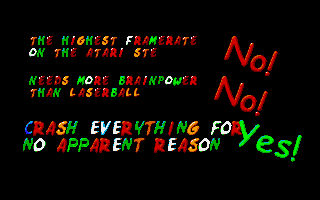
You expect instructions for this game?
Ok: Crash everything that gets in your way. Collect points for that. Exchange the points and bonuses for cute hearts. And go and buy more cars and tracks in the flower shop.
Sounds logical?
No???
PERFECT!

Ahh, yes: Press "X" to end a level at any time.
RIDE IN MULTIPLE LANGUAGES
English (G/Q)
German (G/Q)
Spanish (BETA, G)
Polish (G)
Vorarlbergerisch (G)
G – Game Text, Q – Quest Explanations
More languages and language updates to be expected soon.

SYSTEM REQUIREMENTS
ATARI STe/Falcon or compatible ATARI ST emulator.
Colour monitor. Or switch emulator to Low resolution mode.
RAM STe: 2MB recommended/1MB minimum
(enter setup on start-up to switch to 1MB mode)
RAM Falcon: 4MB minimum
Harddrive recommended for convenience and shorter loading times
(Floppy version comes with setup utility)
If available use 16Mhz or higher (Falcon & MEGA STe).

Setup Options
This has become a complicated beast! Therefore a system setup tool is built into the game. It enables you to run the game in full beauty on a +2MB STe or in a reduced setup in a 1MB Machine. Technically it should even run on a standard ST(f) but with a massively lower framerate. So the ST(f) is no official option to playing the game.
At any time the game needs full writing access to the Floppy/Harddrive it is played from! If you play it from a Floppy, do not write protect the Disc!

You can enter the setup screen by pressing any key at game start or by entering it from the main menu. Some options force a restart. Some options become active only after restart.

GAME SOUND… MUSIC/ENGINE
Listening to the beautiful tunes form xFalcon results in a little lower framerate… Its up to you!

JOYSTICK/MOUSE CONTROL
Joystick is by far the best way to handle the game, but if you do not have one, ride with the mouse!

Any object is stored in the Memory in every single scale state. This takes lots of RAM.
You can reduce the amount of scale states -> less memory consumption -> jumpier game experience.
Prerendered values

There is some math going on while playing. Math is not funny. Math takes time. Therefore some math can be done before hand and the results are stored in RAM for a higher framerate. BUT this takes RAM!
You can reduce the Prerendered Values -> Less memory usage -> quicker game start -> slighty lower framerate.

Streetdesigns per Track
Streets come in different forms: Normal, Beach, Highway… But using more street designs in one Track, means massive amount of memory being used.
You can reduce track designs here -> Less memory consumption -> some levels have lesser variations in Track designs.

Load music
Music needs RAM as well. Not loading it, saves lots of space… but: No Music. The ride becomes a bit quicker without music.

Load DMA Sound FX
Lots of cool sounds are stored as Sound samples. They are BIG BIG BIG! (more than 40kb!) Not loading them results in saving lots of RAM.
But therefore you will hear some Chip Sounds… not as good…
Process Debug console (on startup only)

Starts a screen with lots of weird boring things going on. Not as boring for the developers of the game.

Load all riders to memory
This option load all the beautiful graphics of the Drivers-Cars to the memory for fast access. But it also takes RAM.
Switching it OFF also has an impact on the Gameplay: when playing from FLOPPY DISC new riders/cars coming from expansion packs, can only be used if the option “Load all rides to memory” is set to “YES”!

Easy mode
Choose from a 1MB standard setup or do the opposite.

Cleanup Ram
This searches for unused objects in the Ram. But don’t expect to much.

Street details
This option changes the details in which the street is painted to the screen. Going to „MEDIUM“ or „MIN“ results in higher frame rate but more edgy street looks.

Host System
If there is “AUTO” switched on, and your system is not shown correctly for example as “AUTO (STE)”, you may overwrite the auto detection by selecting your system manually to “STF/STE/FALCON”. Side information: this will result in a different handling of Sound. For FALCON users: if your Falcon plays DMA sound in the STE Mode, there is no reason why you MUST go to FALCON mode. The FALCON mode has a slower startup.
HARDWARE (1)
Minimum:
Atari 1040ST
Atari 1040ST
Recommended:
Atari Mega STe
Atari Mega STe
TRIVIA (3)
Additional credits:
SNDH Playback: GWEM / YM Rockerz / Paradize
Videomode Kernel: Cooper
DMA Playback: Simon Sunnyboy / Paradize
GFA Depacking Logic: SWE / YESCrew
Translation: JoanAM, Piotr
Poster Artwork: Melanie Schober
Videomode Kernel: Cooper
DMA Playback: Simon Sunnyboy / Paradize
GFA Depacking Logic: SWE / YESCrew
Translation: JoanAM, Piotr
Poster Artwork: Melanie Schober
Hardware
Supports Blitter
Supports STe DMA sound
Supports STe palette
Supports STe DMA sound
Supports STe palette
Sound
Features digitized sound fx at 6.2KHz